Cómo ver los comentarios en un informe
Traducción automática del inglés. Se muestra el original en inglés.
Monitor comments directly in your report with the Comments widget. Select the metrics, org. units and periods you want to display comments for, easily and quickly.
-
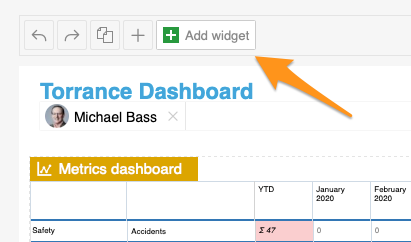
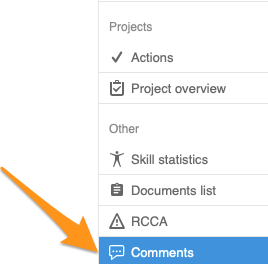
Add the Comments widget. Add the Comments widget to your slide.
-
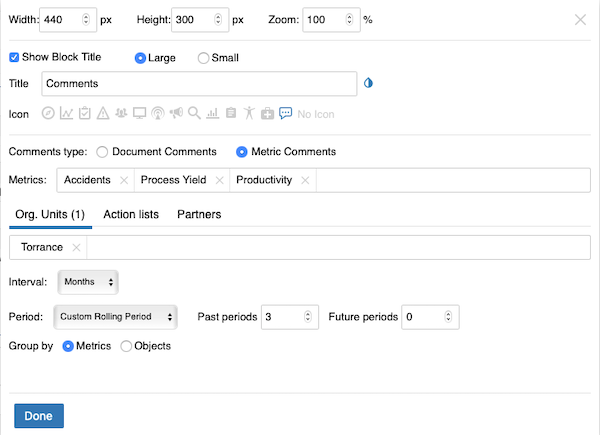
Set up the widget. Select the comment type (document or metric comments – you can view comments from different modules). Continue with all the other settings: metrics, org. units, time interval and others. When you finish your selection, click Done and save the changes.
-
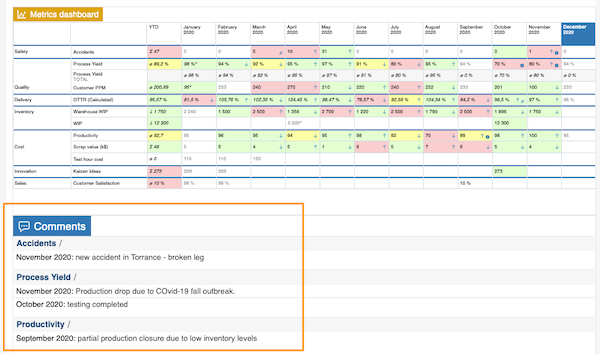
View the comments. The comments are displayed in your report.
Siga los comentarios directamente en su informe con el widget Comentarios. Seleccione de forma rápida y sencilla las métricas, unidades organizativas y periodos cuyos comentarios quiere mostrar.
-
Agregue el widget Comentarios. Agregue el widget Comentarios a su diapositiva.
-
Configure el widget. Seleccione el tipo de comentario (comentarios de documentos o de métricas: puede ver comentarios de distintos módulos). Continúe con el resto de la configuración: métricas, unidades organizativas, intervalo de tiempo y demás. Cuando termine, haga clic en Listo y guarde los cambios.
-
Consulte los comentarios. Los comentarios aparecen en su informe.
¿Necesita más ayuda?
Escríbanos. En días laborables solemos responder en menos de una hora.