Ako zobraziť komentáre v reporte
Strojový preklad z angličtiny. Zobrazený je anglický originál.
Monitor comments directly in your report with the Comments widget. Select the metrics, org. units and periods you want to display comments for, easily and quickly.
-
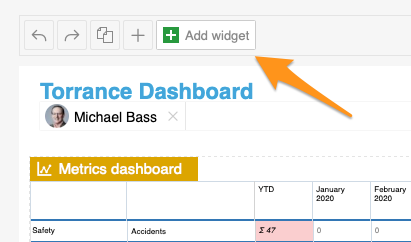
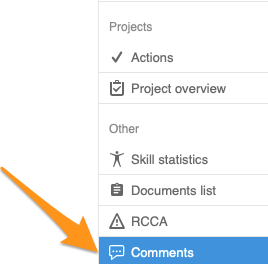
Add the Comments widget. Add the Comments widget to your slide.
-
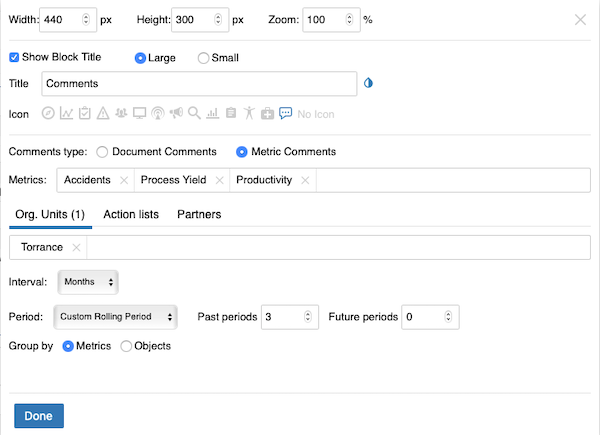
Set up the widget. Select the comment type (document or metric comments – you can view comments from different modules). Continue with all the other settings: metrics, org. units, time interval and others. When you finish your selection, click Done and save the changes.
-
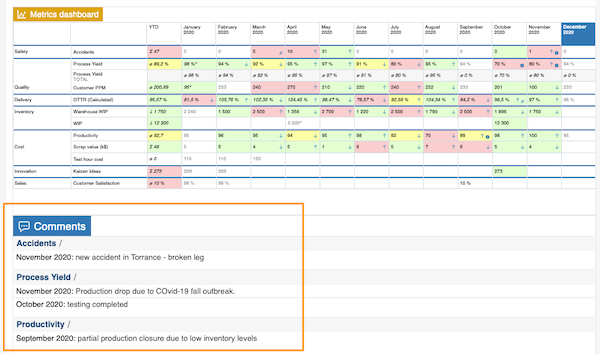
View the comments. The comments are displayed in your report.
Komentáre môžete sledovať priamo v reporte cez widget Komentáre. Rýchlo a jednoducho vyberte metriky, org. jednotky a obdobia, za ktoré chcete komentáre zobraziť.
-
Pridajte widget Komentáre. Pridajte na snímku widget Komentáre.
-
Nastavte widget. Vyberte typ komentárov (komentáre k dokumentom alebo k metrikám – môžete zobraziť komentáre z rôznych modulov). Potom nastavte všetko ostatné: metriky, org. jednotky, časový interval a ďalšie. Po dokončení výberu kliknite na Hotovo a zmeny uložte.
-
Pozrite si komentáre. Komentáre sa zobrazia v reporte.
Potrebujete ďalšiu pomoc?
Napíšte nám. V pracovné dni zvyčajne odpovedáme do hodiny.