Compartilhar tópicos em outros relatórios
Tradução automática do inglês. Exibindo o original em inglês.
You can share topics in several reports. That way, you can easily create any summary report based on topics from other reports.
Please note that a sufficient role is required to use this functionality.
Share a topic
Open the Reports module
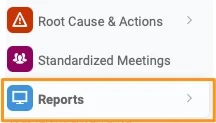
Go to the Reports module.
Add a topic
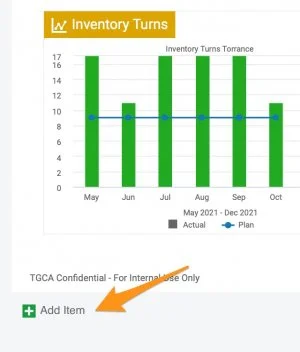
Click the green plus button Add item to create a topic.
Choose a topic from another report
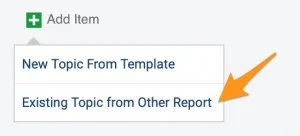
Choose Existing Topic from Other Report.
Select the topics
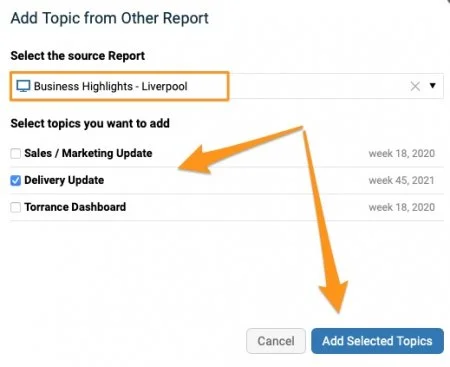
Select the source report and the topic(s) you want to add. Click the Add Selected Topics button.
Recognize a shared topic
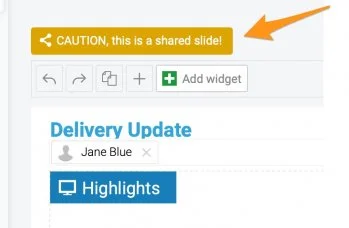
An extra icon above the topic shows that it is included in multiple reports.

Mind the change alert
When a topic is modified, an alert notification is activated. Please note that any change is applied to all the reports where this topic is shared.
Unshare topics
Choose how to unshare
If you decide not to share topics any longer, you have several options:
-
Remove the slides (topics) from the report(s).
-
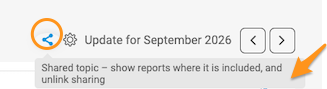
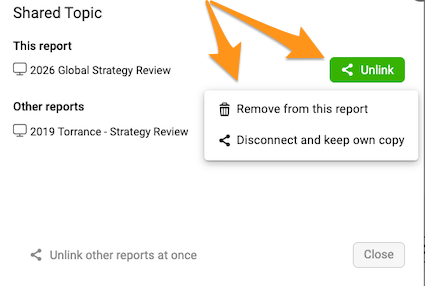
Disconnect and keep your own copy. Click the Share icon above your slide (topic). When you click the Unlink button, you can select the Disconnect and keep own copy option.

-
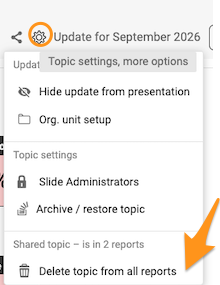
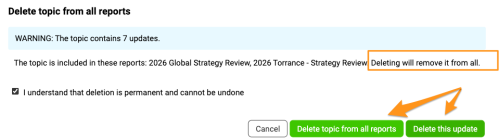
Remove the topic. Click the Settings icon above your topic (slide) and select Delete topic from all reports. You can then choose to remove only the update or all historical updates.
Please note that the selected update(s) are removed from ALL reports where the topic is shared.
Você pode compartilhar tópicos em vários relatórios. Assim, fica fácil montar qualquer relatório-resumo com tópicos de outros relatórios.
Para usar este recurso, é preciso ter uma função com permissão suficiente.
Compartilhar um tópico
Abrir o módulo Relatórios
Acesse o módulo Relatórios.
Adicionar um tópico
Clique no botão de mais verde Adicionar item para criar um tópico.
Escolher um tópico de outro relatório
Escolha Tópico existente de outro relatório.
Selecionar os tópicos
Selecione o relatório de origem e os tópicos que quer adicionar. Clique no botão Adicionar tópicos selecionados.
Identificar um tópico compartilhado
Um ícone extra acima do tópico indica que ele está em vários relatórios.
Atenção ao alerta de alteração
Quando um tópico é alterado, uma notificação de alerta é ativada. Atenção: qualquer alteração é aplicada a todos os relatórios em que o tópico está compartilhado.
Deixar de compartilhar tópicos
Escolher como deixar de compartilhar
Se decidir não compartilhar mais os tópicos, você tem várias opções:
-
Remova os slides (tópicos) dos relatórios.
-
Desconecte e mantenha uma cópia própria. Clique no ícone Compartilhar acima do slide (tópico). Ao clicar no botão Desvincular, você pode selecionar a opção Desconectar e manter cópia própria.
-
Exclua o tópico. Clique no ícone Configurações acima do tópico (slide) e selecione Excluir tópico de todos os relatórios. Depois, escolha se quer remover apenas a atualização ou todas as atualizações históricas.
As atualizações selecionadas são removidas de TODOS os relatórios em que o tópico está compartilhado.
Precisa de mais ajuda?
Escreva para nós. Em dias úteis, costumamos responder em até uma hora.