Compartir temas en otros informes
Traducción automática del inglés. Se muestra el original en inglés.
You can share topics in several reports. That way, you can easily create any summary report based on topics from other reports.
Please note that a sufficient role is required to use this functionality.
Share a topic
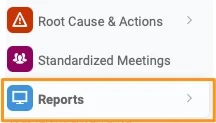
Open the Reports module
Go to the Reports module.
Add a topic
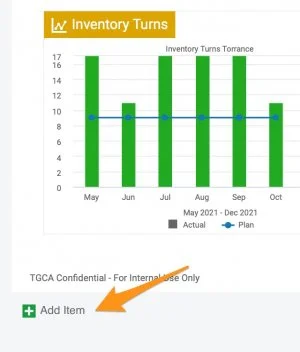
Click the green plus button Add item to create a topic.
Choose a topic from another report
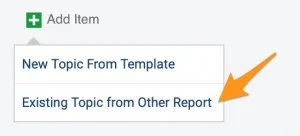
Choose Existing Topic from Other Report.
Select the topics
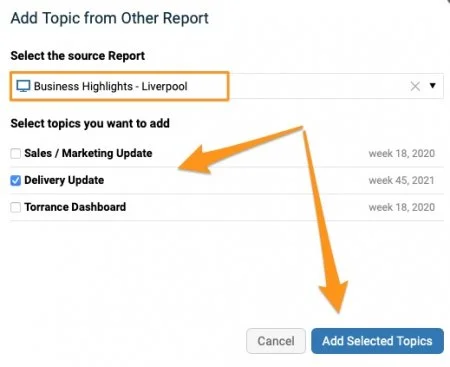
Select the source report and the topic(s) you want to add. Click the Add Selected Topics button.
Recognize a shared topic
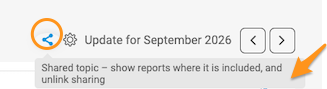
An extra icon above the topic shows that it is included in multiple reports.

Mind the change alert
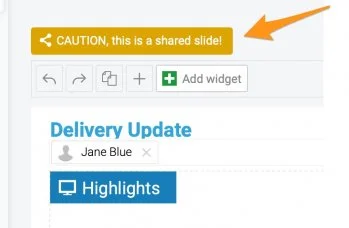
When a topic is modified, an alert notification is activated. Please note that any change is applied to all the reports where this topic is shared.
Unshare topics
Choose how to unshare
If you decide not to share topics any longer, you have several options:
-
Remove the slides (topics) from the report(s).
-
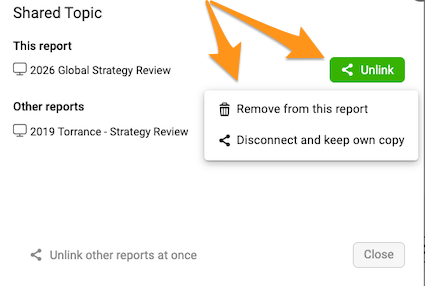
Disconnect and keep your own copy. Click the Share icon above your slide (topic). When you click the Unlink button, you can select the Disconnect and keep own copy option.

-
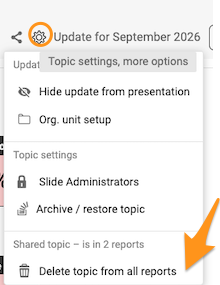
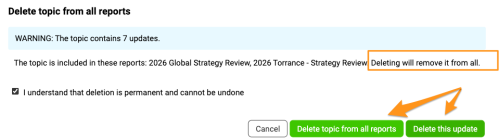
Remove the topic. Click the Settings icon above your topic (slide) and select Delete topic from all reports. You can then choose to remove only the update or all historical updates.
Please note that the selected update(s) are removed from ALL reports where the topic is shared.
Puede compartir temas en varios informes. Así puede crear fácilmente cualquier informe resumen a partir de temas de otros informes.
Tenga en cuenta que se necesita un rol con permisos suficientes para usar esta función.
Compartir un tema
Abrir el módulo Informes
Vaya al módulo Informes.
Agregar un tema
Haga clic en el botón verde de suma Agregar elemento para crear un tema.
Elegir un tema de otro informe
Elija Tema existente de otro informe.
Seleccionar los temas
Seleccione el informe de origen y los temas que quiere agregar. Haga clic en el botón Agregar temas seleccionados.
Reconocer un tema compartido
Un icono adicional encima del tema indica que está incluido en varios informes.
Atención al aviso de cambios
Cuando se modifica un tema, se activa un aviso. Tenga en cuenta que cualquier cambio se aplica a todos los informes en los que se comparte este tema.
Dejar de compartir temas
Elegir cómo dejar de compartir
Si decide dejar de compartir temas, tiene varias opciones:
-
Quite las diapositivas (temas) de los informes.
-
Desconecte el tema y conserve su propia copia. Haga clic en el icono Compartir encima de la diapositiva (tema). Al hacer clic en el botón Desvincular, puede seleccionar la opción Desconectar y conservar copia propia.
-
Elimine el tema. Haga clic en el icono Configuración encima del tema (diapositiva) y seleccione Eliminar el tema de todos los informes. Después puede elegir si elimina solo la actualización o todas las actualizaciones históricas.
Tenga en cuenta que las actualizaciones seleccionadas se eliminan de TODOS los informes en los que se comparte el tema.
¿Necesita más ayuda?
Escríbanos. En días laborables solemos responder en menos de una hora.