如何关闭/重新打开8D报告
本文由英文机器翻译。 当前显示英文原文。
An 8D report is usually closed when all its sections are completed. If needed, you can also close it without completing all the sections: you only get a message that not all the sections have been completed, asking whether you want to close it anyway.
-
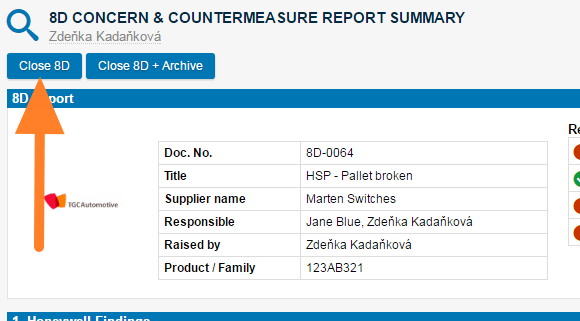
Close the 8D. Click the Close 8D button in the first section of the report.
-
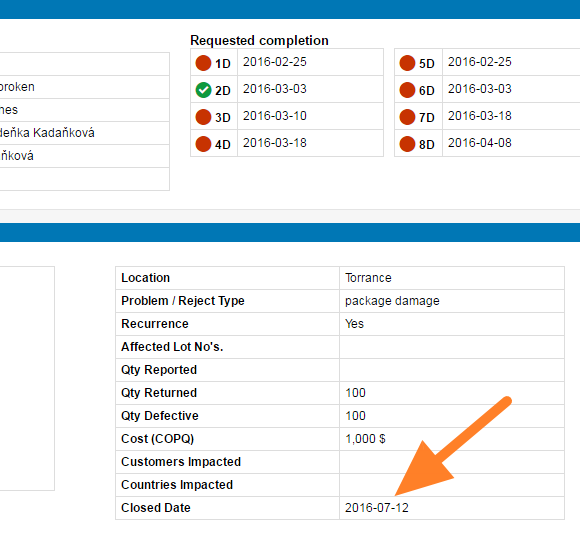
Check the closed date. Once you close the report, the closed date is visible in the description part (usually the first step of the 8D document).
-
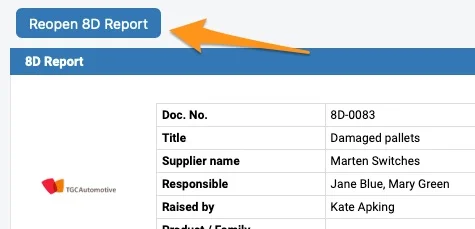
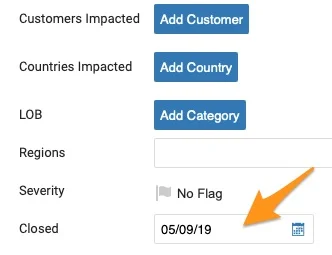
Reopen the 8D if needed. To reopen the document, either click the Reopen 8D Report button or remove the Closed date in the settings of your document. To be able to reopen the 8D document, you have to be either the Raised by person or a document administrator.
通常在所有部分都完成后关闭8D报告。如有需要,也可以在未完成所有部分的情况下关闭:系统只会提示并非所有部分都已完成,并询问您是否仍要关闭。
-
关闭8D。 点击报告第一部分中的 关闭8D 按钮。
-
查看关闭日期。 关闭报告后,关闭日期会显示在描述部分(通常是8D文档的第一步)。
-
按需重新打开8D。 要重新打开文档,请点击 重新打开8D报告 按钮,或在文档设置中删除 已关闭 日期。只有 发起人 或文档管理员才能重新打开8D文档。
还需要帮助吗?
请给我们留言。工作日我们通常会在一小时内回复。