Cómo cerrar o reabrir un informe 8D
Traducción automática del inglés. Se muestra el original en inglés.
An 8D report is usually closed when all its sections are completed. If needed, you can also close it without completing all the sections: you only get a message that not all the sections have been completed, asking whether you want to close it anyway.
-
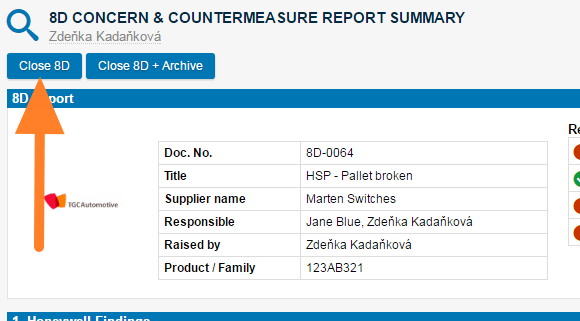
Close the 8D. Click the Close 8D button in the first section of the report.
-
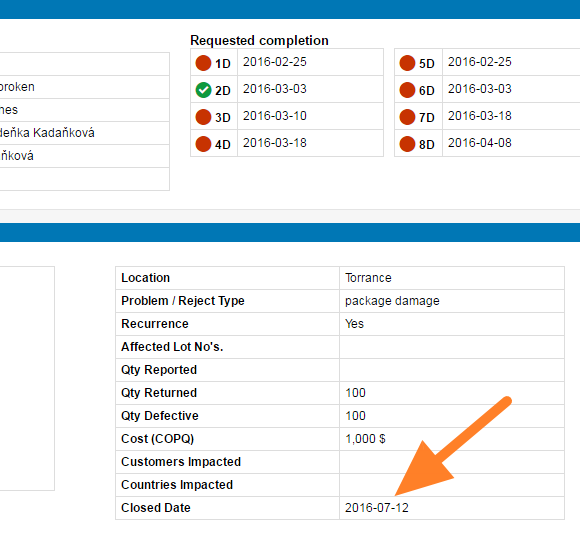
Check the closed date. Once you close the report, the closed date is visible in the description part (usually the first step of the 8D document).
-
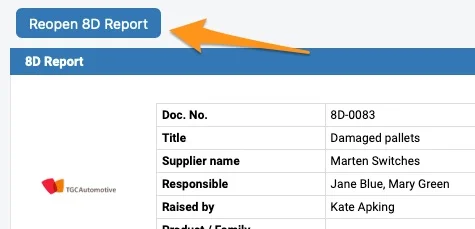
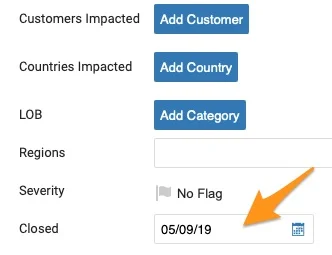
Reopen the 8D if needed. To reopen the document, either click the Reopen 8D Report button or remove the Closed date in the settings of your document. To be able to reopen the 8D document, you have to be either the Raised by person or a document administrator.
Normalmente, un informe 8D se cierra cuando todas sus secciones están completadas. Si lo necesita, también puede cerrarlo sin completar todas las secciones: solo verá un mensaje que le avisa de que no todas las secciones están completadas y le pregunta si quiere cerrarlo de todos modos.
-
Cierre el 8D. Haga clic en el botón Cerrar 8D en la primera sección del informe.
-
Revise la fecha de cierre. Al cerrar el informe, la fecha de cierre aparece en la parte de descripción (normalmente el primer paso del documento 8D).
-
Reabra el 8D si es necesario. Para reabrir el documento, haga clic en el botón Reabrir informe 8D o borre la fecha de Cierre en la configuración del documento. Para poder reabrir el documento 8D, debe ser la persona indicada en Creado por o un administrador del documento.
¿Necesita más ayuda?
Escríbanos. En días laborables solemos responder en menos de una hora.