Ako uzavrieť a znova otvoriť 8D report
Strojový preklad z angličtiny. Zobrazený je anglický originál.
An 8D report is usually closed when all its sections are completed. If needed, you can also close it without completing all the sections: you only get a message that not all the sections have been completed, asking whether you want to close it anyway.
-
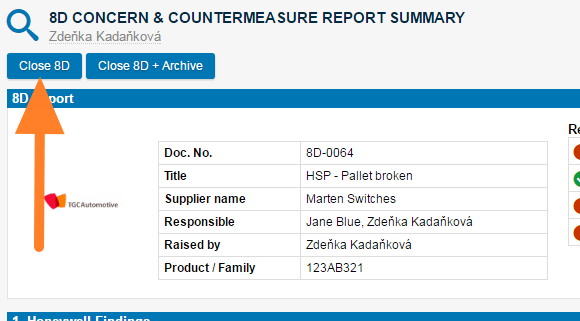
Close the 8D. Click the Close 8D button in the first section of the report.
-
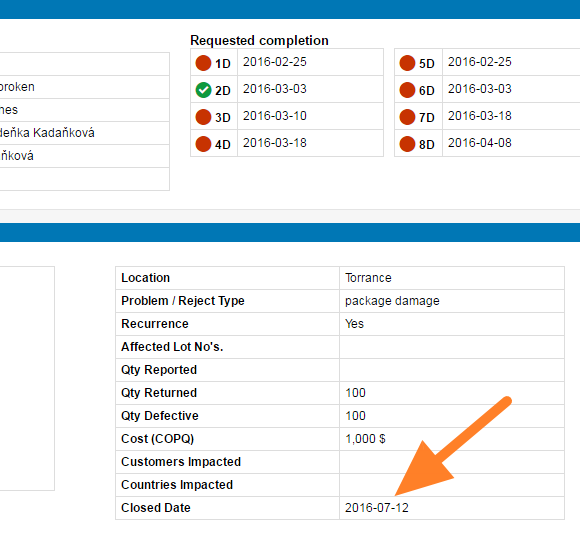
Check the closed date. Once you close the report, the closed date is visible in the description part (usually the first step of the 8D document).
-
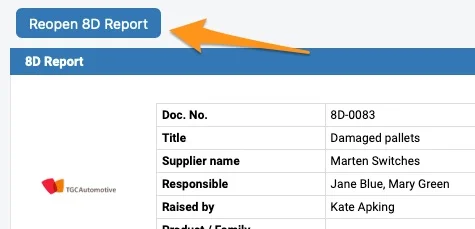
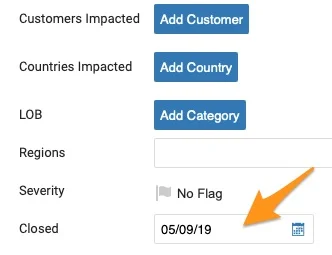
Reopen the 8D if needed. To reopen the document, either click the Reopen 8D Report button or remove the Closed date in the settings of your document. To be able to reopen the 8D document, you have to be either the Raised by person or a document administrator.
8D report sa zvyčajne uzatvára, keď sú dokončené všetky jeho časti. V prípade potreby ho môžete uzavrieť aj bez dokončenia všetkých častí: zobrazí sa iba správa, že nie všetky časti sú dokončené, s otázkou, či ho chcete napriek tomu uzavrieť.
-
Uzavrite 8D. V prvej časti reportu kliknite na tlačidlo Uzavrieť 8D.
-
Skontrolujte dátum uzavretia. Po uzavretí reportu je dátum uzavretia viditeľný v časti popisu (zvyčajne v prvom kroku dokumentu 8D).
-
V prípade potreby otvorte 8D znova. Dokument znova otvoríte kliknutím na tlačidlo Znova otvoriť 8D report alebo odstránením dátumu Uzavreté v nastaveniach dokumentu. Aby ste mohli dokument 8D znova otvoriť, musíte byť osoba v poli Zadal alebo administrátor dokumentu.
Potrebujete ďalšiu pomoc?
Napíšte nám. V pracovné dni zvyčajne odpovedáme do hodiny.