什么情况下会发送有关8D的电子邮件?
本文由英文机器翻译。 当前显示英文原文。
The system sends email notifications about a new 8D report and about updates to its sections.
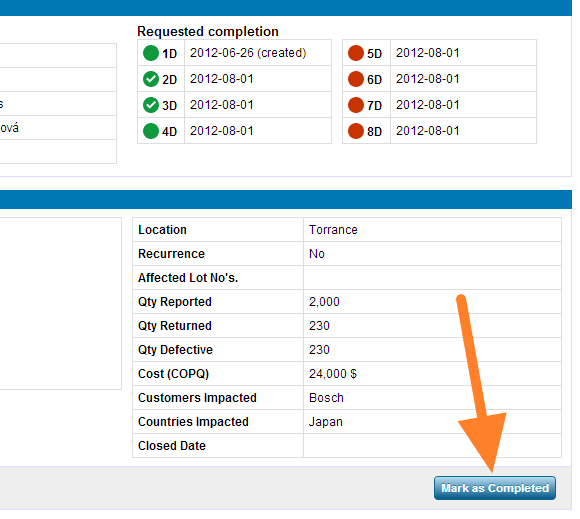
Mark the first section as completed
When you create a new 8D report, you have to click the Mark as Completed button in the first section so that your partner receives an email notification about the new 8D. If you do not click it, the partner does not receive an email.
Emails about 8D updates
-
Section marked as completed. When you update an 8D report, an email is sent when the 8D section is marked as completed.
-
Section approved. An email is sent when the section is approved.
-
Section rejected. An email is sent when the section is rejected.
-
Section closed. An email is sent when the section is closed.
-
Supplier’s section edited. When a section marked as completed by a supplier is then edited by the person who issued the 8D (e.g. a text or comment is added), an email is sent and the status changes to In progress. When you edit the section, the email is sent after you click Save.
系统会在创建新的8D报告以及其中各部分更新时发送电子邮件通知。
将第一部分标记为完成
创建新的8D报告时,必须在第一部分点击 标记为完成 按钮,合作伙伴才会收到有关新8D的电子邮件通知。如果不点击,合作伙伴不会收到邮件。
有关8D更新的电子邮件
-
部分标记为完成。 更新8D报告时,8D中的某一部分被标记为完成后,系统会发送邮件。
-
部分获得批准。 某一部分获得批准时,系统会发送邮件。
-
部分被驳回。 某一部分被驳回时,系统会发送邮件。
-
部分已关闭。 某一部分关闭时,系统会发送邮件。
-
供应商的部分被编辑。 供应商标记为完成的部分随后被8D发起人编辑(例如添加了文字或评论)时,系统会发送邮件,状态变为 进行中。您编辑该部分时,邮件会在您点击 保存 后发送。
还需要帮助吗?
请给我们留言。工作日我们通常会在一小时内回复。