如何查看我的/全部或其他用户的行动
本文由英文机器翻译。 当前显示英文原文。
You can easily view your own or other users’ actions across all TeamGuru documents (Action Lists, RPS, Checklists, etc.) with an advanced filter.
Video Guide (text instructions below)
-
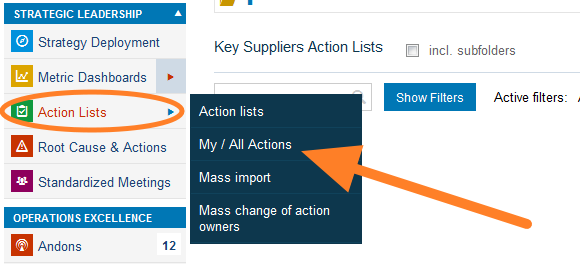
Open My / All Actions. Go to the Action Lists module and select My / All Actions from the submenu.
-
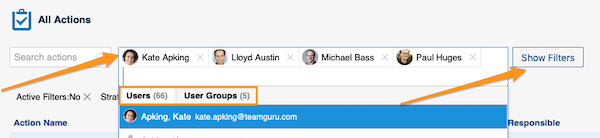
Select the people and filter the actions. Select the person(s) or user groups whose actions you want to view. You can narrow down the list further with the filters below the user name field: click the Show Filters button.
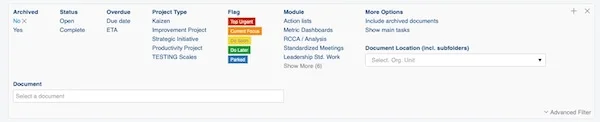
You will find more options when you click Advanced Filter.

-
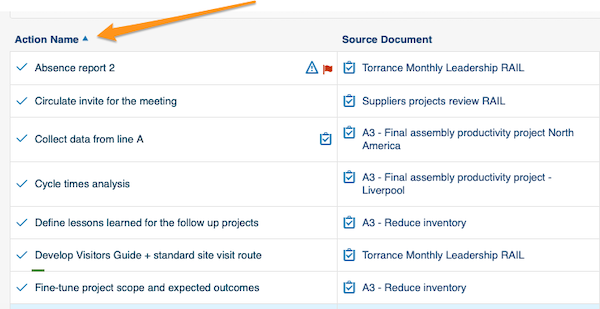
Sort the actions. You can sort the actions by columns: simply click a column title.
-
Open linked documents. Actions, source documents and the actions’ related documents are live links. Click a link to go directly to that document.

-
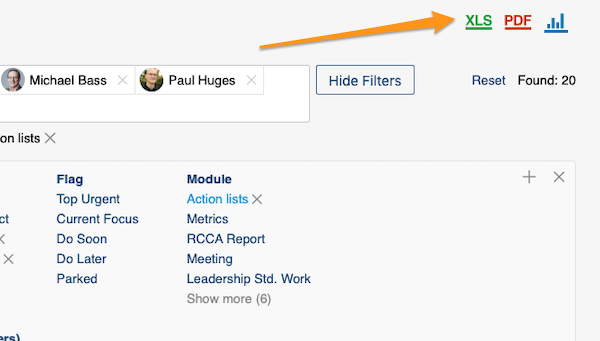
Export and view statistics. You can export your actions to an XLS or PDF file, and also view statistics.
通过高级筛选,您可以轻松查看自己或其他用户在所有TeamGuru文档(行动清单、RPS、清单等)中的行动。
视频教程(文字说明见下文)
-
打开我的/全部行动。 进入 行动清单 模块,在子菜单中选择 我的/全部行动。
-
选择人员并筛选行动。 选择要查看其行动的人员或用户组。点击 显示筛选 按钮,可使用用户名字段下方的筛选条件进一步缩小列表范围。
点击 高级筛选 可查看更多选项。
-
对行动排序。 点击列标题,即可按该列对行动排序。
-
打开关联文档。 行动、源文档以及行动的相关文档都是实时链接。点击链接即可直接打开对应文档。
-
导出并查看统计。 您可以将行动导出为XLS或PDF文件,也可以查看统计数据。
还需要帮助吗?
请给我们留言。工作日我们通常会在一小时内回复。