Ako zobraziť moje, všetky alebo akcie iných používateľov
Strojový preklad z angličtiny. Zobrazený je anglický originál.
You can easily view your own or other users’ actions across all TeamGuru documents (Action Lists, RPS, Checklists, etc.) with an advanced filter.
Video Guide (text instructions below)
-
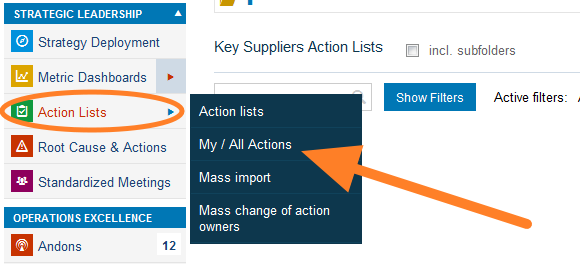
Open My / All Actions. Go to the Action Lists module and select My / All Actions from the submenu.
-
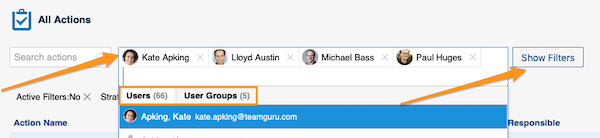
Select the people and filter the actions. Select the person(s) or user groups whose actions you want to view. You can narrow down the list further with the filters below the user name field: click the Show Filters button.
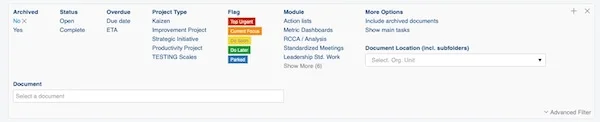
You will find more options when you click Advanced Filter.

-
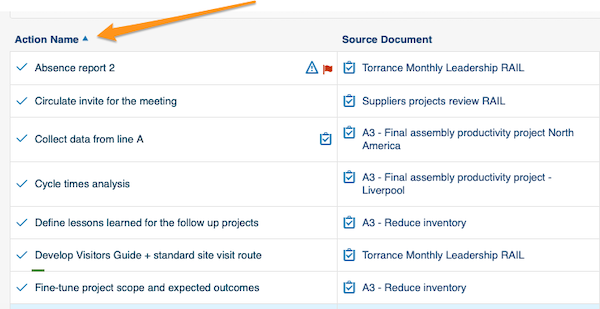
Sort the actions. You can sort the actions by columns: simply click a column title.
-
Open linked documents. Actions, source documents and the actions’ related documents are live links. Click a link to go directly to that document.

-
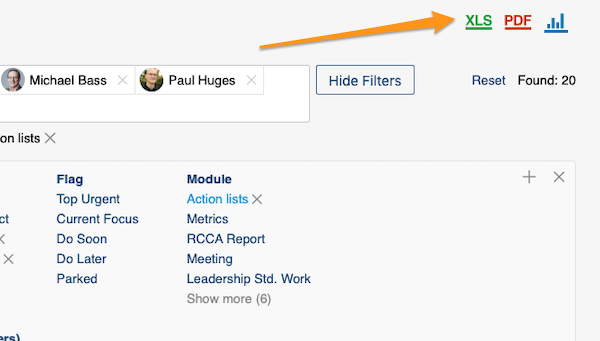
Export and view statistics. You can export your actions to an XLS or PDF file, and also view statistics.
Pomocou rozšíreného filtra jednoducho zobrazíte svoje akcie alebo akcie iných používateľov naprieč všetkými dokumentmi TeamGuru (Akčné zoznamy, RPS, Checklisty a pod.).
Video návod (textový postup nižšie)
-
Otvorte Moje / všetky akcie. Otvorte modul Akčné zoznamy a v podmenu vyberte Moje / všetky akcie.
-
Vyberte ľudí a vyfiltrujte akcie. Vyberte osoby alebo skupiny používateľov, ktorých akcie chcete zobraziť. Zoznam môžete ďalej zúžiť filtrami pod poľom s menom používateľa: kliknite na tlačidlo Zobraziť filtre.
Ďalšie možnosti nájdete po kliknutí na Rozšírený filter.
-
Zoraďte akcie. Akcie môžete zoradiť podľa stĺpcov: stačí kliknúť na názov stĺpca.
-
Otvorte prepojené dokumenty. Akcie, zdrojové dokumenty aj súvisiace dokumenty akcií sú aktívne odkazy. Kliknutím na odkaz prejdete priamo do daného dokumentu.
-
Exportujte a pozrite si štatistiky. Akcie môžete exportovať do súboru XLS alebo PDF a zobraziť si aj štatistiky.
Potrebujete ďalšiu pomoc?
Napíšte nám. V pracovné dni zvyčajne odpovedáme do hodiny.