如何启用统计控制限
本文由英文机器翻译。 当前显示英文原文。
TeamGuru can determine the control limits automatically using the principles of SPC (Statistical Process Control). This helps you react quickly to abnormal variations in your process.
Open the Statistical Limits tab
To enable the control limits, click into the relevant metric value cell to open the metric data entry window, and switch to the Statistical Limits tab.

Choose how the limits are set
-
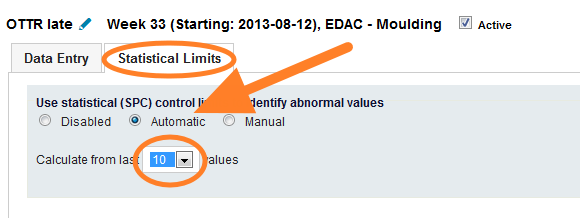
Automatic. The system calculates the limits automatically from a selected number of historical values.
-
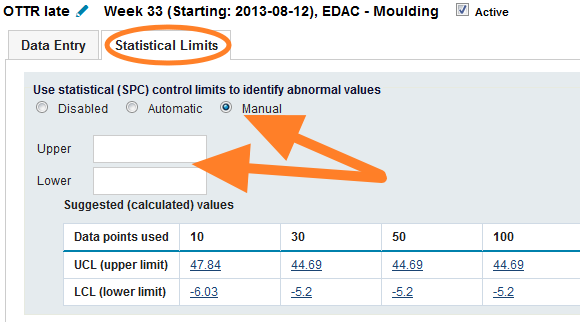
Manual. You set the control limits manually. To set them correctly, TeamGuru recommends following the limits calculated from historical data, which are displayed in the chart below the fields.
Set natural limits for a metric
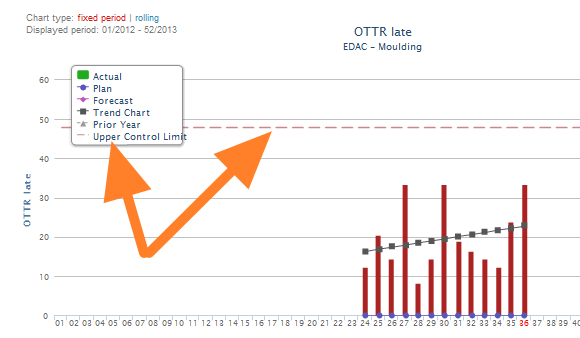
If your metric has natural limits (e.g. it cannot be lower than 0), you can set them in the metric definition screen. This setting is global and affects the control limits of all org. units. See the pictures below.
-
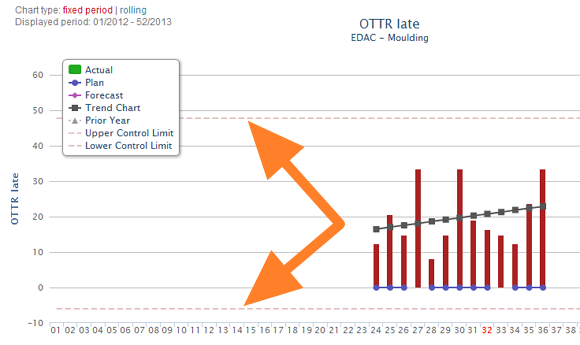
Without natural limits. The control limits before natural limits are set for the metric.
-
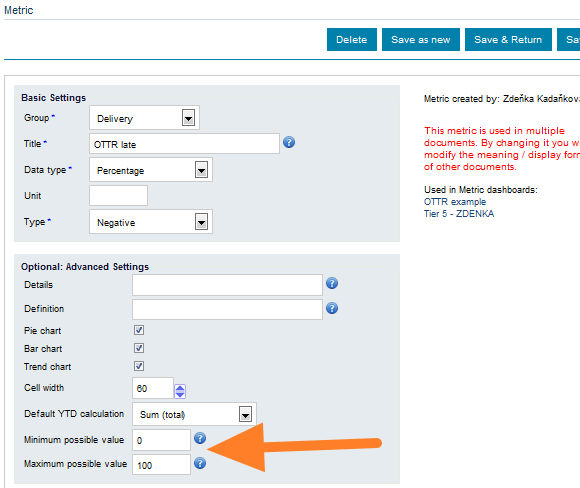
Natural limits in the metric setup. The control limits setup of the metric.
-
With natural limits. The control limits after natural limits are set for the metric.
TeamGuru可以按照SPC(统计过程控制)原理自动确定控制限,帮助您对过程中的异常波动迅速做出反应。
打开统计控制限选项卡
要启用控制限,请点击相应的指标值单元格,打开指标数据录入窗口,然后切换到 统计控制限 选项卡。
选择控制限的设置方式
-
自动。 系统根据选定数量的历史值自动计算控制限。
-
手动。 由您手动设置控制限。为确保设置正确,TeamGuru建议参照根据历史数据计算出的控制限,这些控制限显示在字段下方的图表中。
为指标设置自然界限
如果指标存在自然界限(例如不能小于0),可以在指标定义界面中进行设置。此设置为全局设置,会影响所有组织单元的控制限。请参见下图。
-
未设置自然界限。 为指标设置自然界限之前的控制限。
-
在指标设置中设置自然界限。 指标的控制限设置。
-
已设置自然界限。 为指标设置自然界限之后的控制限。
还需要帮助吗?
请给我们留言。工作日我们通常会在一小时内回复。