Jak zapnout statistické regulační meze
Strojový překlad z angličtiny. Zobrazen anglický originál.
TeamGuru can determine the control limits automatically using the principles of SPC (Statistical Process Control). This helps you react quickly to abnormal variations in your process.
Open the Statistical Limits tab
To enable the control limits, click into the relevant metric value cell to open the metric data entry window, and switch to the Statistical Limits tab.

Choose how the limits are set
-
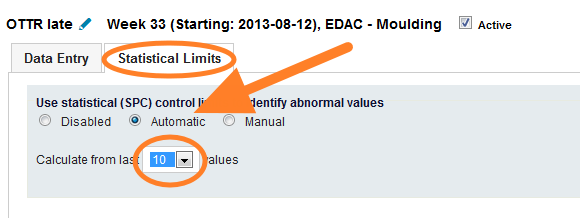
Automatic. The system calculates the limits automatically from a selected number of historical values.
-
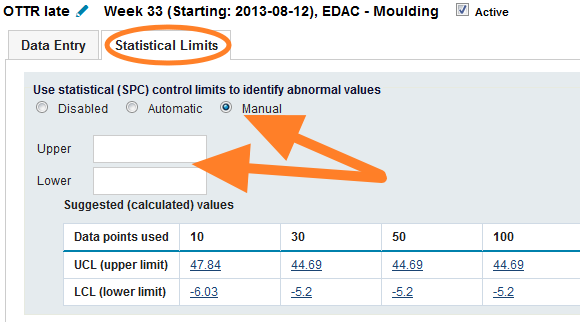
Manual. You set the control limits manually. To set them correctly, TeamGuru recommends following the limits calculated from historical data, which are displayed in the chart below the fields.
Set natural limits for a metric
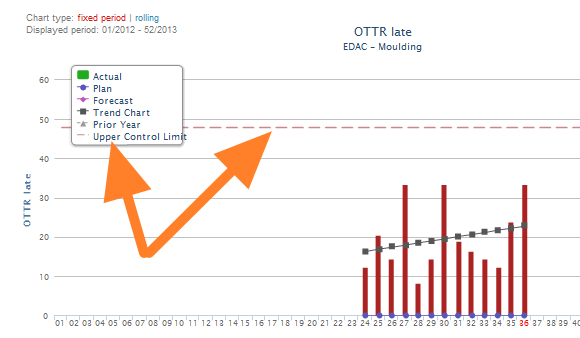
If your metric has natural limits (e.g. it cannot be lower than 0), you can set them in the metric definition screen. This setting is global and affects the control limits of all org. units. See the pictures below.
-
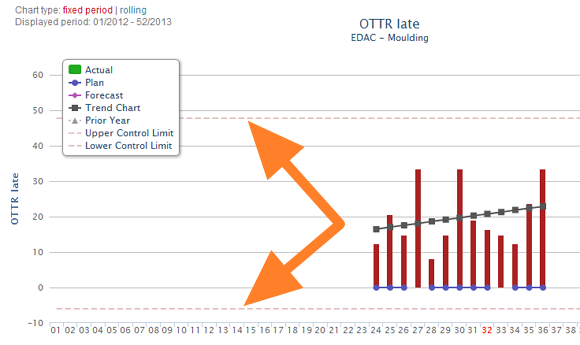
Without natural limits. The control limits before natural limits are set for the metric.
-
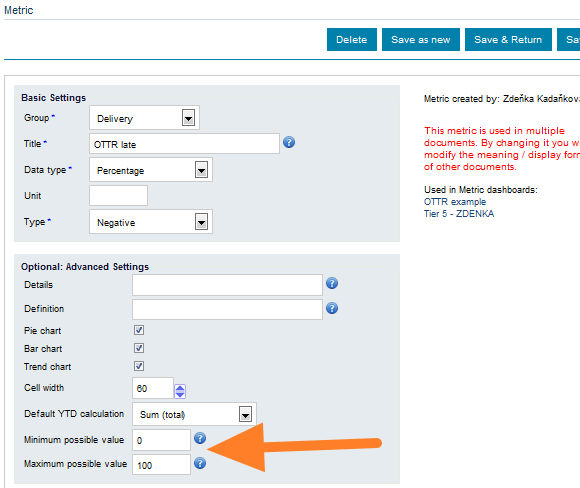
Natural limits in the metric setup. The control limits setup of the metric.
-
With natural limits. The control limits after natural limits are set for the metric.
TeamGuru umí regulační meze určit automaticky podle principů SPC (statistické regulace procesu). Díky tomu můžete rychle reagovat na neobvyklou variabilitu procesu.
Otevřete záložku Statistické meze
Regulační meze zapnete tak, že kliknete do příslušné buňky s hodnotou metriky, otevře se okno pro zadání dat, a přepnete na záložku Statistické meze.
Zvolte způsob nastavení mezí
-
Automaticky. Systém vypočítá meze automaticky ze zvoleného počtu historických hodnot.
-
Ručně. Regulační meze nastavíte ručně. Aby byly nastavené správně, doporučujeme řídit se mezemi vypočtenými z historických dat, které vidíte v grafu pod poli.
Nastavte přirozené meze metriky
Pokud má metrika přirozené meze (např. nemůže být menší než 0), nastavíte je v definici metriky. Toto nastavení je globální a ovlivní regulační meze všech org. jednotek. Viz obrázky níže.
-
Bez přirozených mezí. Regulační meze před nastavením přirozených mezí metriky.
-
Přirozené meze v nastavení metriky. Nastavení regulačních mezí metriky.
-
S přirozenými mezemi. Regulační meze po nastavení přirozených mezí metriky.
Potřebujete další pomoc?
Napište nám. V pracovní dny obvykle odpovídáme do hodiny.