Ako zapnúť štatistické regulačné medze
Strojový preklad z angličtiny. Zobrazený je anglický originál.
TeamGuru can determine the control limits automatically using the principles of SPC (Statistical Process Control). This helps you react quickly to abnormal variations in your process.
Open the Statistical Limits tab
To enable the control limits, click into the relevant metric value cell to open the metric data entry window, and switch to the Statistical Limits tab.

Choose how the limits are set
-
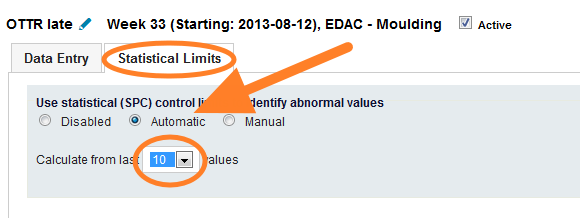
Automatic. The system calculates the limits automatically from a selected number of historical values.
-
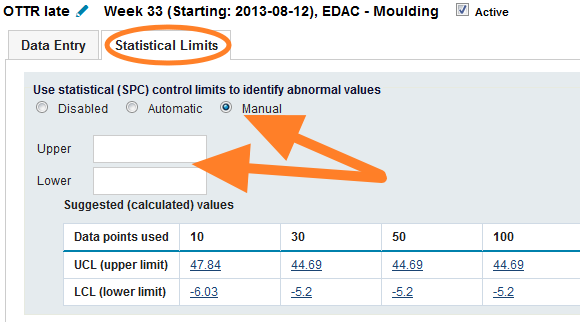
Manual. You set the control limits manually. To set them correctly, TeamGuru recommends following the limits calculated from historical data, which are displayed in the chart below the fields.
Set natural limits for a metric
If your metric has natural limits (e.g. it cannot be lower than 0), you can set them in the metric definition screen. This setting is global and affects the control limits of all org. units. See the pictures below.
-
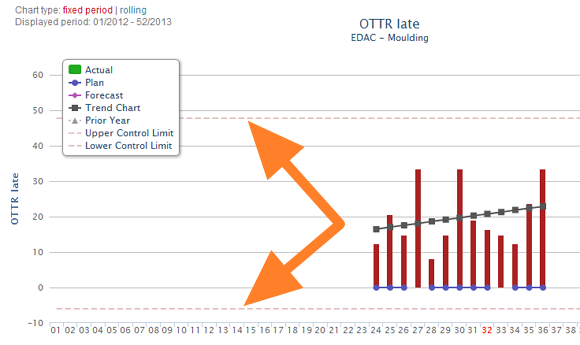
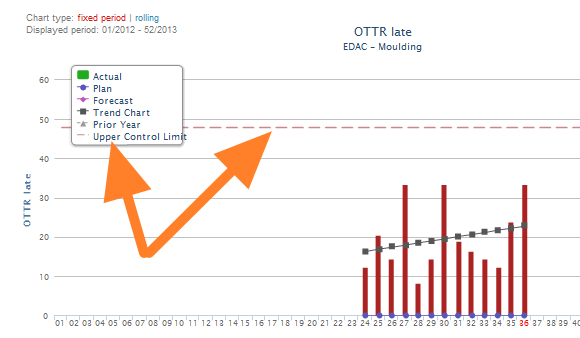
Without natural limits. The control limits before natural limits are set for the metric.
-
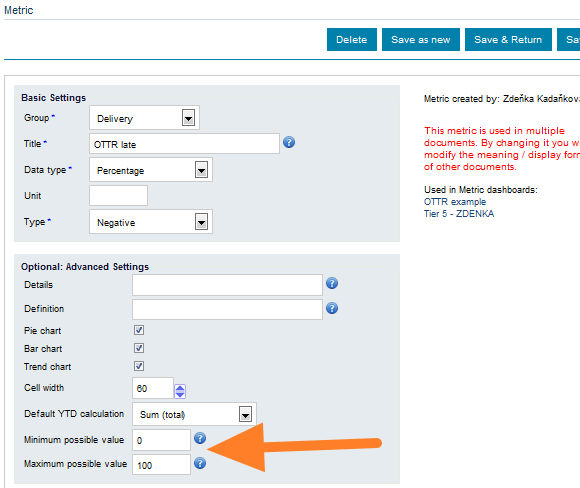
Natural limits in the metric setup. The control limits setup of the metric.
-
With natural limits. The control limits after natural limits are set for the metric.
TeamGuru dokáže regulačné medze určiť automaticky podľa princípov SPC (štatistickej regulácie procesov). Pomáha vám to rýchlo reagovať na neobvyklé odchýlky v procese.
Otvorenie karty Štatistické limity
Regulačné medze zapnete tak, že kliknete do príslušnej bunky s hodnotou metriky, otvorí sa okno na zadávanie dát metriky, a prepnete na kartu Štatistické limity.
Spôsob nastavenia medzí
-
Automaticky. Systém vypočíta medze automaticky zo zvoleného počtu historických hodnôt.
-
Ručne. Regulačné medze nastavíte ručne. Aby boli nastavené správne, TeamGuru odporúča riadiť sa medzami vypočítanými z historických dát, ktoré sa zobrazujú v grafe pod poľami.
Prirodzené medze metriky
Ak má metrika prirodzené medze (napr. nemôže byť nižšia ako 0), môžete ich nastaviť na obrazovke definície metriky. Toto nastavenie je globálne a ovplyvňuje regulačné medze všetkých organizačných jednotiek. Pozrite si obrázky nižšie.
-
Bez prirodzených medzí. Regulačné medze pred nastavením prirodzených medzí metriky.
-
Prirodzené medze v nastavení metriky. Nastavenie regulačných medzí metriky.
-
S prirodzenými medzami. Regulačné medze po nastavení prirodzených medzí metriky.
Potrebujete ďalšiu pomoc?
Napíšte nám. V pracovné dni zvyčajne odpovedáme do hodiny.