Cómo activar los límites de control estadístico
Traducción automática del inglés. Se muestra el original en inglés.
TeamGuru can determine the control limits automatically using the principles of SPC (Statistical Process Control). This helps you react quickly to abnormal variations in your process.
Open the Statistical Limits tab
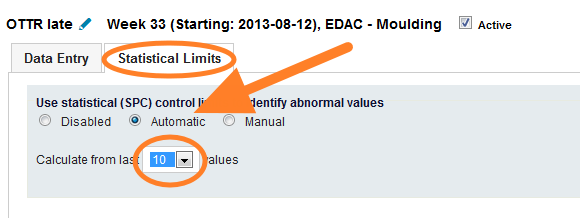
To enable the control limits, click into the relevant metric value cell to open the metric data entry window, and switch to the Statistical Limits tab.

Choose how the limits are set
-
Automatic. The system calculates the limits automatically from a selected number of historical values.
-
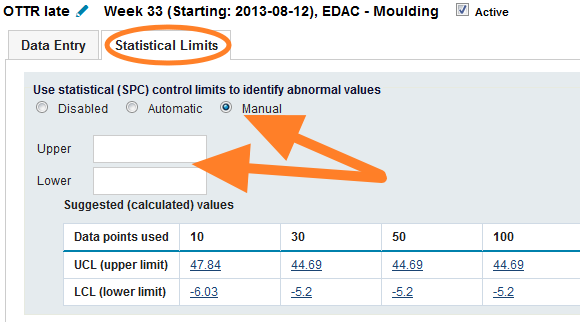
Manual. You set the control limits manually. To set them correctly, TeamGuru recommends following the limits calculated from historical data, which are displayed in the chart below the fields.
Set natural limits for a metric
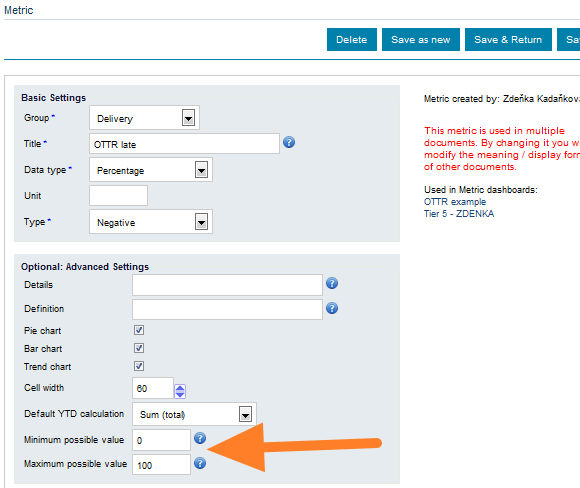
If your metric has natural limits (e.g. it cannot be lower than 0), you can set them in the metric definition screen. This setting is global and affects the control limits of all org. units. See the pictures below.
-
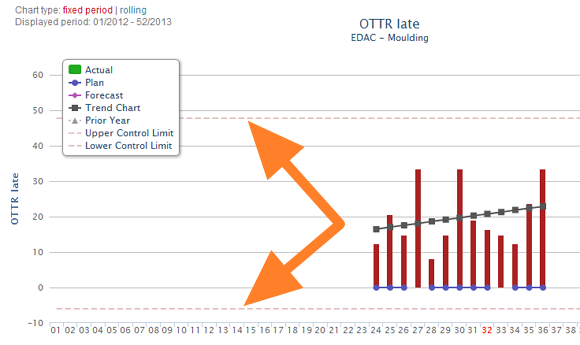
Without natural limits. The control limits before natural limits are set for the metric.
-
Natural limits in the metric setup. The control limits setup of the metric.
-
With natural limits. The control limits after natural limits are set for the metric.
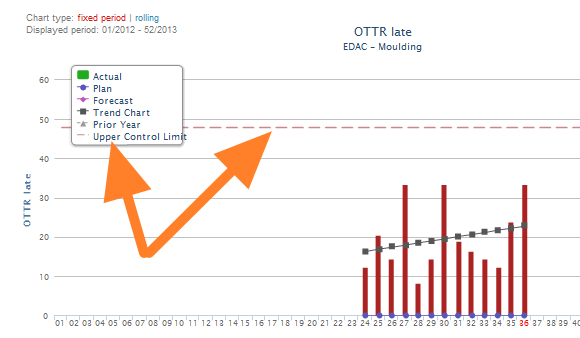
TeamGuru puede determinar automáticamente los límites de control según los principios del SPC (control estadístico de procesos). Así puede reaccionar rápido ante variaciones anormales en su proceso.
Abrir la pestaña Límites estadísticos
Para activar los límites de control, haga clic en la celda del valor del indicador para abrir la ventana de captura de datos y cambie a la pestaña Límites estadísticos.
Elegir cómo se fijan los límites
-
Automático. El sistema calcula los límites automáticamente a partir de un número elegido de valores históricos.
-
Manual. Usted fija los límites de control manualmente. Para fijarlos bien, TeamGuru recomienda guiarse por los límites calculados con los datos históricos, que se muestran en la gráfica debajo de los campos.
Definir límites naturales para un indicador
Si su indicador tiene límites naturales (por ejemplo, no puede ser menor que 0), puede definirlos en la pantalla de definición del indicador. Esta configuración es global y afecta a los límites de control de todas las unidades organizativas. Vea las imágenes siguientes.
-
Sin límites naturales. Los límites de control antes de definir los límites naturales del indicador.
-
Límites naturales en la configuración del indicador. La configuración de los límites de control del indicador.
-
Con límites naturales. Los límites de control después de definir los límites naturales del indicador.
¿Necesita más ayuda?
Escríbanos. En días laborables solemos responder en menos de una hora.