如何设置指标汇总
本文由英文机器翻译。 当前显示英文原文。
The metric roll-up function calculates monthly values from weekly or daily values. You can collect a metric on a weekly or daily basis, and once the roll-up is set up, the values are automatically recalculated for your monthly view.
-
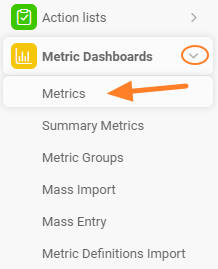
Open the metrics list. Go to the metrics list via the Metrics submenu of the Metric Dashboards module.
-
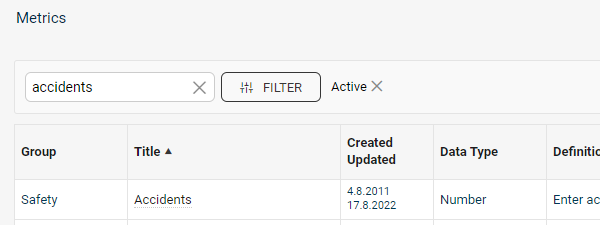
Edit the metric. Choose the metric you want to set up and click the edit icon next to it.

If the metric is locked, you need user rights for editing metric settings.
-
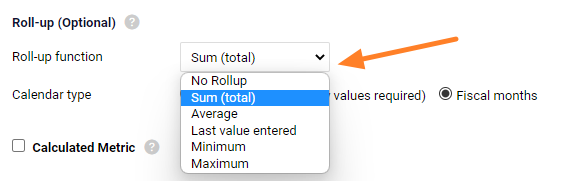
Choose the roll-up method. Define how the metric rolls up: Sum, Average, Last entered value, Minimum or Maximum. You can also choose No Rollup.
Choose the source of monthly values
The monthly values can be rolled up either from daily or from weekly data.
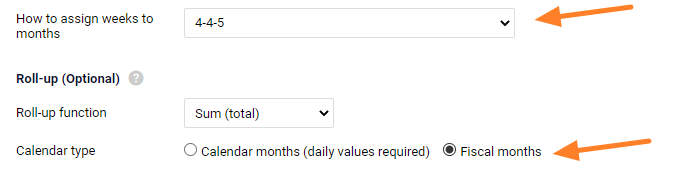
With the Calendar month (daily values required) option, the monthly values are calculated from the first day to the last day of the month (calendar month).
With the Fiscal months option, the monthly values are calculated according to the settings in the How to assign weeks to months (e.g. 4-4-5) section.
Rolled-up values are displayed in italics in the dashboard. You can overwrite them by entering values manually, unless a lock against manual overwriting is set up.
Related video guide: Set up a metric roll-up
指标汇总功能可根据每周或每日数据计算月度值。您可以按周或按日收集指标数据,设置汇总后,系统会自动重新计算月视图中的值。
-
打开指标列表。 通过 指标仪表板 模块的 指标 子菜单进入指标列表。
-
编辑指标。 选择要设置的指标,点击旁边的 编辑图标。
如果指标已锁定,您需要具备编辑指标设置的用户权限。
-
选择汇总方式。 定义指标的汇总方式:求和、平均值、最后录入值、最小值 或 最大值。也可以选择 不汇总。
选择月度值的来源
月度值可以由每日数据或每周数据汇总得出。
选择 自然月(需要每日值) 时,月度值按当月第一天到最后一天(自然月)计算。
选择 财务月 时,月度值按 如何将周分配到月(例如4-4-5) 部分的设置计算。
汇总值在仪表板中以斜体显示。您可以手动输入值覆盖汇总值,除非已设置禁止手动覆盖的锁定。
相关视频教程:设置指标汇总
还需要帮助吗?
请给我们留言。工作日我们通常会在一小时内回复。