Ako nastaviť agregáciu metriky
Strojový preklad z angličtiny. Zobrazený je anglický originál.
The metric roll-up function calculates monthly values from weekly or daily values. You can collect a metric on a weekly or daily basis, and once the roll-up is set up, the values are automatically recalculated for your monthly view.
-
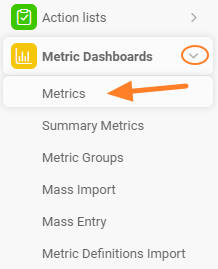
Open the metrics list. Go to the metrics list via the Metrics submenu of the Metric Dashboards module.
-
Edit the metric. Choose the metric you want to set up and click the edit icon next to it.
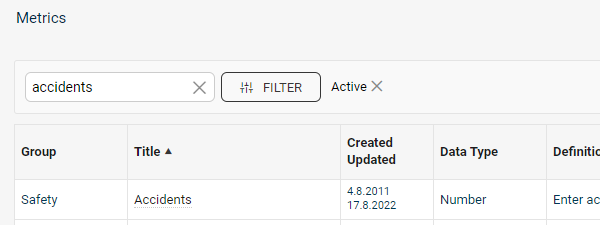

If the metric is locked, you need user rights for editing metric settings.
-
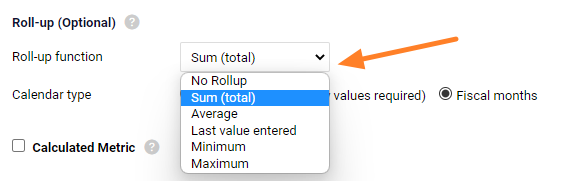
Choose the roll-up method. Define how the metric rolls up: Sum, Average, Last entered value, Minimum or Maximum. You can also choose No Rollup.
Choose the source of monthly values
The monthly values can be rolled up either from daily or from weekly data.
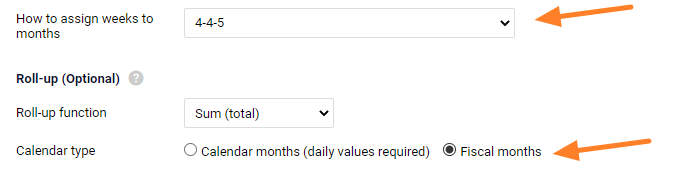
With the Calendar month (daily values required) option, the monthly values are calculated from the first day to the last day of the month (calendar month).
With the Fiscal months option, the monthly values are calculated according to the settings in the How to assign weeks to months (e.g. 4-4-5) section.
Rolled-up values are displayed in italics in the dashboard. You can overwrite them by entering values manually, unless a lock against manual overwriting is set up.
Related video guide: Set up a metric roll-up
Funkcia agregácie metriky vypočíta mesačné hodnoty z týždenných alebo denných hodnôt. Metriku môžete zbierať týždenne alebo denne a po nastavení agregácie sa hodnoty pre mesačné zobrazenie prepočítajú automaticky.
-
Otvorte zoznam metrík. Zoznam metrík otvoríte cez podmenu Metriky v module KPI dashboardy.
-
Upravte metriku. Vyberte metriku, ktorú chcete nastaviť, a kliknite na ikonu úprav vedľa nej.
Ak je metrika uzamknutá, potrebujete oprávnenie na úpravu nastavení metrík.
-
Zvoľte spôsob agregácie. Určte, ako sa metrika agreguje: Súčet, Priemer, Posledná zadaná hodnota, Minimum alebo Maximum. Môžete zvoliť aj Bez agregácie.
Zdroj mesačných hodnôt
Mesačné hodnoty sa môžu agregovať z denných alebo z týždenných dát.
Pri možnosti Kalendárny mesiac (vyžaduje denné hodnoty) sa mesačné hodnoty počítajú od prvého do posledného dňa mesiaca (kalendárny mesiac).
Pri možnosti Fiškálne mesiace sa mesačné hodnoty počítajú podľa nastavení v sekcii Priradenie týždňov k mesiacom (napr. 4-4-5).
Agregované hodnoty sa v dashboarde zobrazujú kurzívou. Môžete ich prepísať ručne zadanými hodnotami, ak nie je nastavený zámok proti ručnému prepisovaniu.
Súvisiaci video návod: Nastavenie agregácie metriky
Potrebujete ďalšiu pomoc?
Napíšte nám. V pracovné dni zvyčajne odpovedáme do hodiny.