How to re-assign all open actions from one person to another
Sometimes you need to change the action owner of all open actions of a particular person, for example when a user leaves the company or changes position. Instead of going to each action list and changing the responsible person manually, use the Mass Change of Action Owner function to easily replace one person with another.
The responsible person is changed for open tasks only. All complete tasks remain under the original responsible person’s name.
Get the right to change action owners
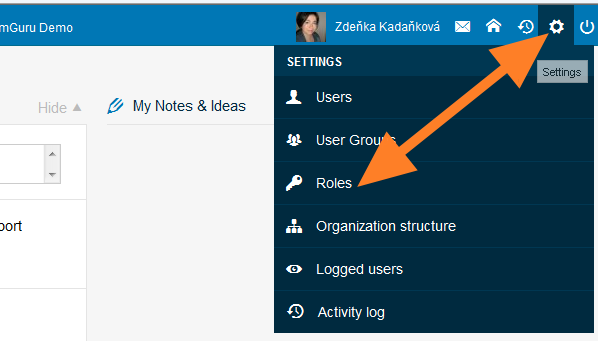
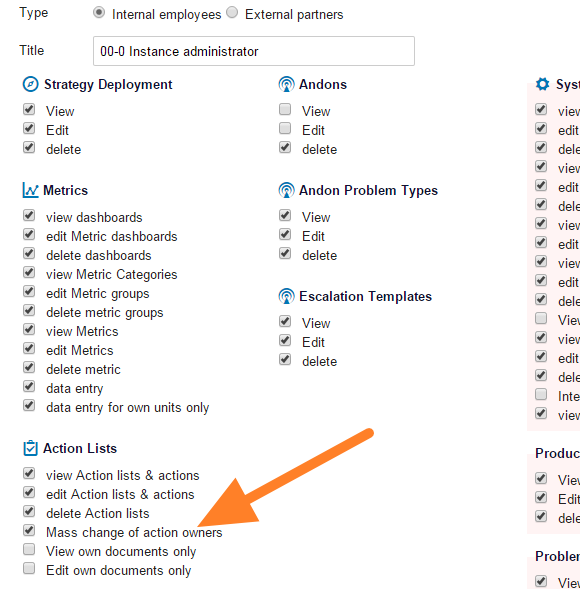
Only people with the appropriate user right can use this function. Click the Settings icon and go to the Roles submenu (accessible to instance administrators only). Edit the user role by changing it to instance administrator, or create a new user role that has this right.
Open the submenu
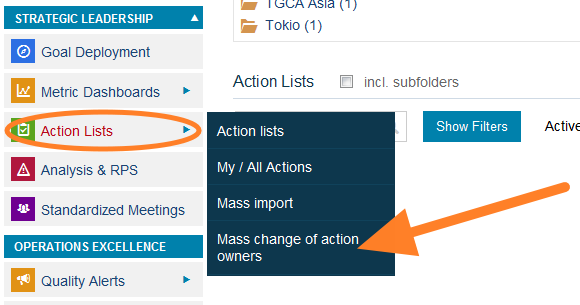
Once you have the right, the submenu for this function (Change of Owners) is included in the Action Lists module menu. Without the right, this submenu is not visible.
Change the action owners
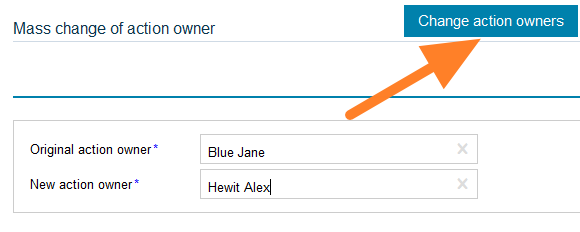
Fill in the original action owner and the new action owner and click Change action owners. The tasks are modified.
Still need help?
Write to us. We usually reply within an hour on business days.