如何将某人的所有未完成行动重新分配给他人
本文由英文机器翻译。 当前显示英文原文。
Sometimes you need to change the action owner of all open actions of a particular person, for example when a user leaves the company or changes position. Instead of going to each action list and changing the responsible person manually, use the Mass Change of Action Owner function to easily replace one person with another.
The responsible person is changed for open tasks only. All complete tasks remain under the original responsible person’s name.
Get the right to change action owners
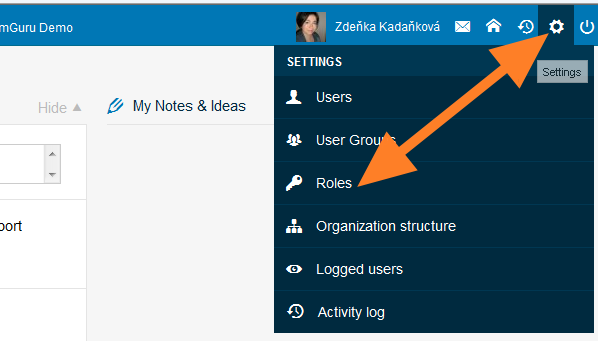
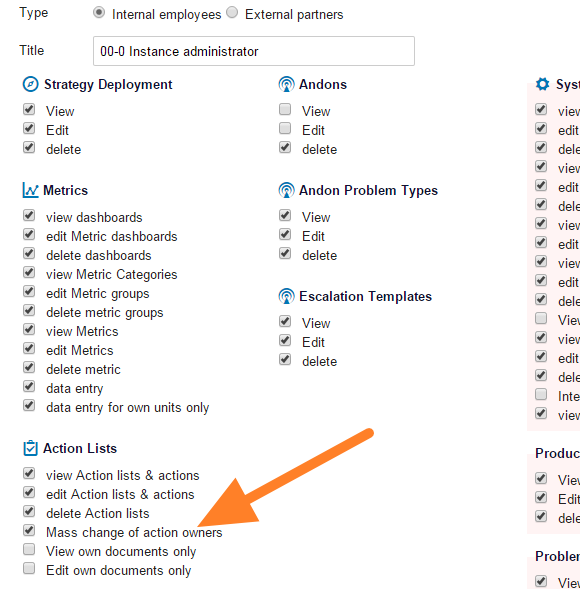
Only people with the appropriate user right can use this function. Click the Settings icon and go to the Roles submenu (accessible to instance administrators only). Edit the user role by changing it to instance administrator, or create a new user role that has this right.
Open the submenu
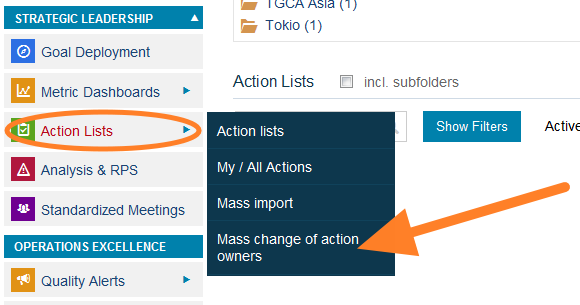
Once you have the right, the submenu for this function (Change of Owners) is included in the Action Lists module menu. Without the right, this submenu is not visible.
Change the action owners
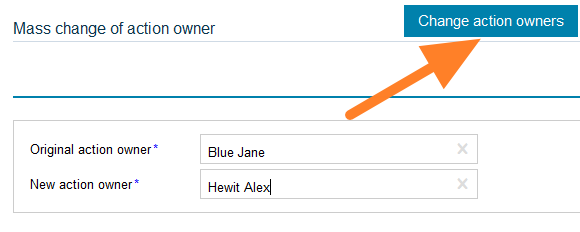
Fill in the original action owner and the new action owner and click Change action owners. The tasks are modified.
有时需要更改某个人所有未完成行动的负责人,例如用户离职或调岗时。无需逐个打开行动清单手动更改负责人,使用 批量更改行动负责人 功能即可轻松将一个人替换为另一个人。
只有未完成任务的负责人会被更改。所有已完成的任务仍保留在原负责人名下。
获取更改行动负责人的权限
只有拥有相应用户权限的人员才能使用此功能。点击 设置 图标,进入 角色 子菜单(仅实例管理员可访问)。编辑用户角色,将其改为实例管理员,或创建一个拥有此权限的新用户角色。
打开子菜单
获得权限后,行动清单 模块菜单中会出现此功能的子菜单(更改负责人)。没有权限时,该子菜单不可见。
更改行动负责人
填写原行动负责人和新行动负责人,然后点击 更改行动负责人。任务随即更新。
还需要帮助吗?
请给我们留言。工作日我们通常会在一小时内回复。