Cómo reasignar todas las acciones abiertas de una persona a otra
Traducción automática del inglés. Se muestra el original en inglés.
Sometimes you need to change the action owner of all open actions of a particular person, for example when a user leaves the company or changes position. Instead of going to each action list and changing the responsible person manually, use the Mass Change of Action Owner function to easily replace one person with another.
The responsible person is changed for open tasks only. All complete tasks remain under the original responsible person’s name.
Get the right to change action owners
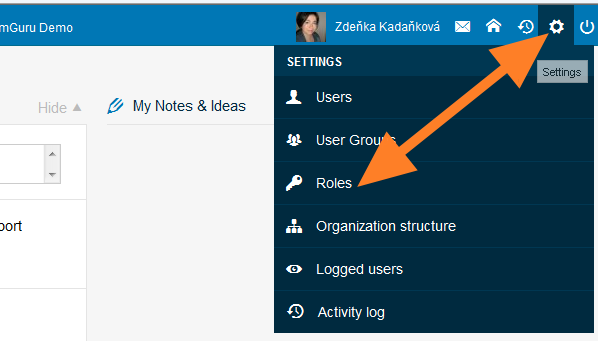
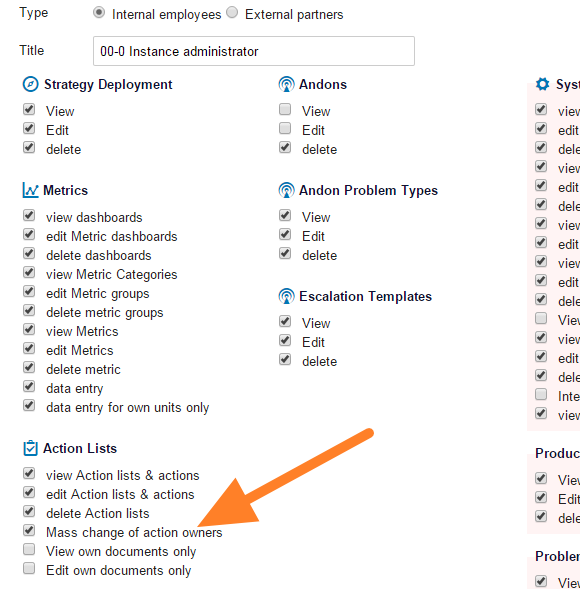
Only people with the appropriate user right can use this function. Click the Settings icon and go to the Roles submenu (accessible to instance administrators only). Edit the user role by changing it to instance administrator, or create a new user role that has this right.
Open the submenu
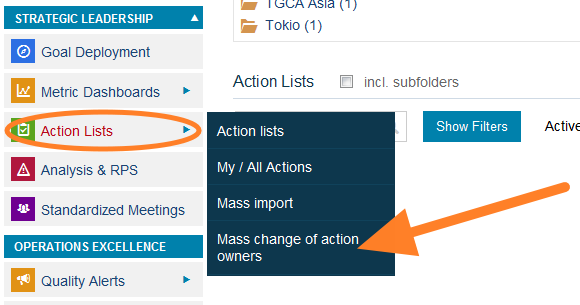
Once you have the right, the submenu for this function (Change of Owners) is included in the Action Lists module menu. Without the right, this submenu is not visible.
Change the action owners
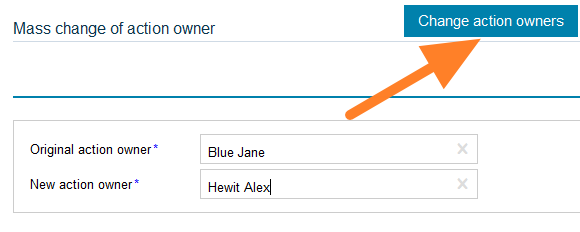
Fill in the original action owner and the new action owner and click Change action owners. The tasks are modified.
A veces necesita cambiar el responsable de todas las acciones abiertas de una persona, por ejemplo, cuando un usuario deja la empresa o cambia de puesto. En lugar de entrar en cada plan de acción y cambiar el responsable a mano, use la función Cambio masivo de responsable de acciones para sustituir fácilmente a una persona por otra.
El responsable solo cambia en las tareas abiertas. Todas las tareas completadas quedan a nombre del responsable original.
Obtener el permiso para cambiar responsables
Solo las personas con el permiso correspondiente pueden usar esta función. Haga clic en el ícono Configuración y vaya al submenú Roles (solo disponible para los administradores de la instancia). Edite el rol del usuario cambiándolo a administrador de la instancia, o cree un nuevo rol que tenga este permiso.
Abrir el submenú
Cuando tiene el permiso, el submenú de esta función (Cambio de responsables) aparece en el menú del módulo Planes de acción. Sin el permiso, este submenú no se ve.
Cambiar los responsables de las acciones
Indique el responsable original y el nuevo, y haga clic en Cambiar responsables. Las tareas se actualizan.
¿Necesita más ayuda?
Escríbanos. En días laborables solemos responder en menos de una hora.