Como transferir todas as ações abertas de uma pessoa para outra
Tradução automática do inglês. Exibindo o original em inglês.
Sometimes you need to change the action owner of all open actions of a particular person, for example when a user leaves the company or changes position. Instead of going to each action list and changing the responsible person manually, use the Mass Change of Action Owner function to easily replace one person with another.
The responsible person is changed for open tasks only. All complete tasks remain under the original responsible person’s name.
Get the right to change action owners
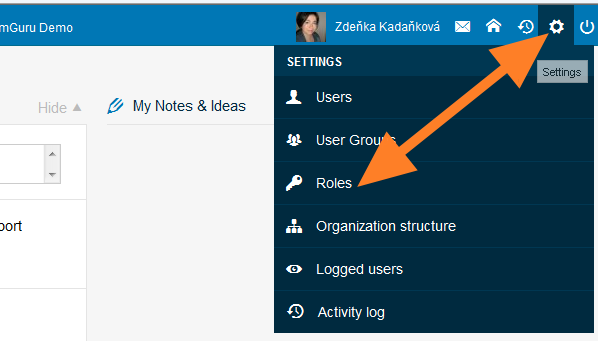
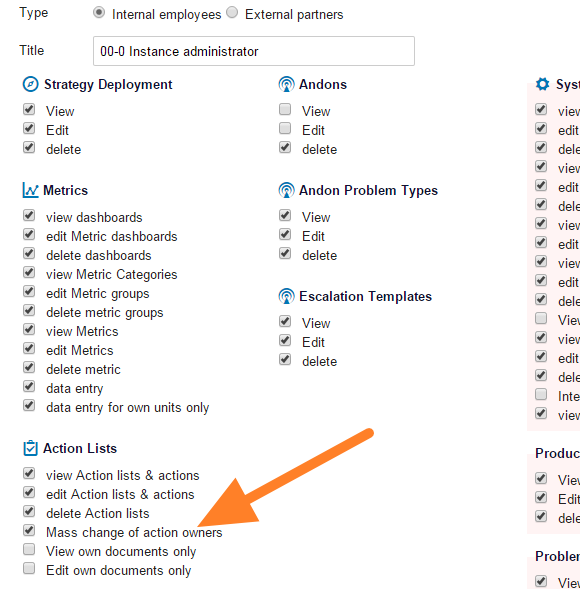
Only people with the appropriate user right can use this function. Click the Settings icon and go to the Roles submenu (accessible to instance administrators only). Edit the user role by changing it to instance administrator, or create a new user role that has this right.
Open the submenu
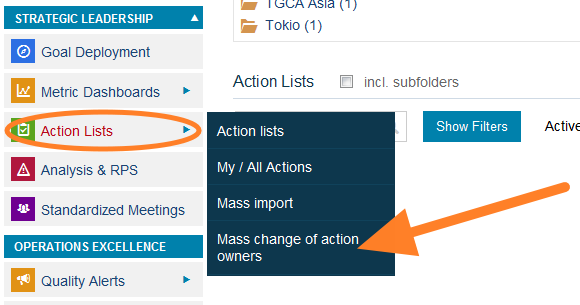
Once you have the right, the submenu for this function (Change of Owners) is included in the Action Lists module menu. Without the right, this submenu is not visible.
Change the action owners
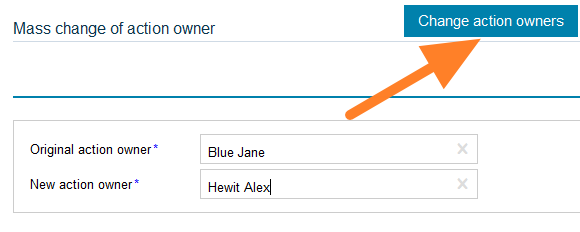
Fill in the original action owner and the new action owner and click Change action owners. The tasks are modified.
Às vezes é preciso trocar o responsável de todas as ações abertas de uma pessoa, por exemplo, quando um usuário sai da empresa ou muda de cargo. Em vez de abrir cada plano de ação e trocar o responsável manualmente, use a função Alteração em massa do responsável pela ação para substituir uma pessoa por outra com facilidade.
O responsável é alterado apenas nas tarefas abertas. Todas as tarefas concluídas continuam no nome do responsável original.
Obter a permissão para trocar responsáveis
Só pessoas com a permissão adequada podem usar essa função. Clique no ícone Configurações e abra o submenu Funções (acessível apenas a administradores da instância). Edite a função do usuário, mudando-a para administrador da instância, ou crie uma nova função de usuário que tenha essa permissão.
Abrir o submenu
Depois que você tiver a permissão, o submenu dessa função (Troca de responsáveis) aparece no menu do módulo Planos de ação. Sem a permissão, esse submenu não fica visível.
Trocar os responsáveis pelas ações
Preencha o responsável original e o novo responsável e clique em Trocar responsáveis. As tarefas são alteradas.
Precisa de mais ajuda?
Escreva para nós. Em dias úteis, costumamos responder em até uma hora.