Locating Documents Linked to Organization Units
When you make changes to your organization units, it is crucial to know which documents are associated with them. This guide shows you how to access the list of documents linked to a particular organization unit, so you can make informed decisions when moving or deleting units.
-
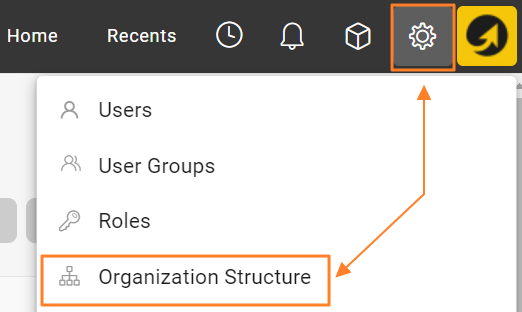
Open the organization structure. Go to your organization structure in TeamGuru.
-
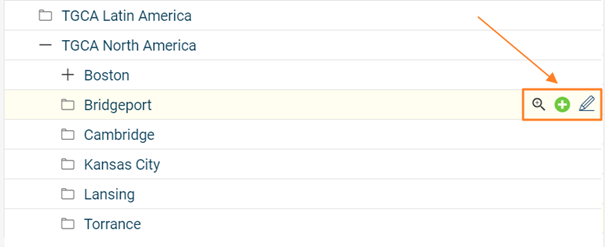
Edit the organization unit. Select the organization unit you want to investigate and open its edit screen.
-
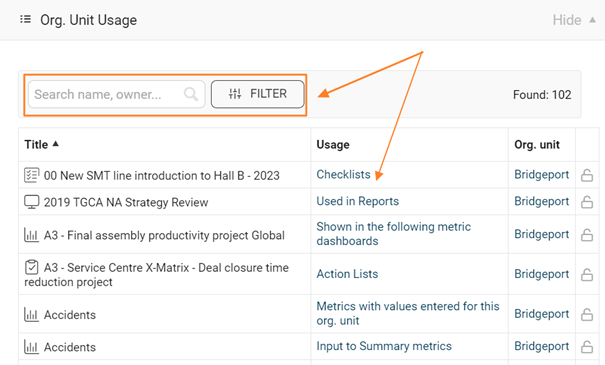
View the linked metrics and documents. On the edit screen, go to the Org. Unit Usage section. It lists all metrics and documents associated with the selected organization unit, so you can assess the impact of the changes you plan to make.
-
Be careful when deleting a unit. If you delete an organization unit, all metrics collected for that unit are permanently deleted as well. Remove units with caution and make sure all relevant data has been backed up or transferred as needed.
-
Delete or move the unit’s documents. If the organization unit contains documents, you can either delete them or move them to another folder. Consider the importance and relevance of these documents before deciding what to do.
Still need help?
Write to us. We usually reply within an hour on business days.