查找与组织单元关联的文档
本文由英文机器翻译。 当前显示英文原文。
When you make changes to your organization units, it is crucial to know which documents are associated with them. This guide shows you how to access the list of documents linked to a particular organization unit, so you can make informed decisions when moving or deleting units.
-
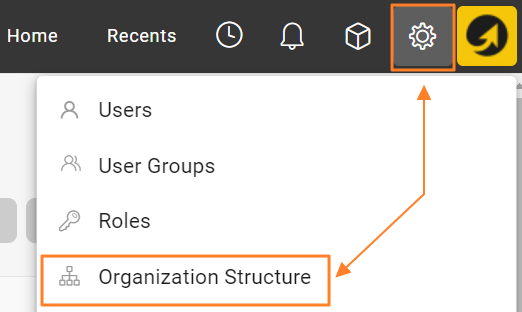
Open the organization structure. Go to your organization structure in TeamGuru.
-
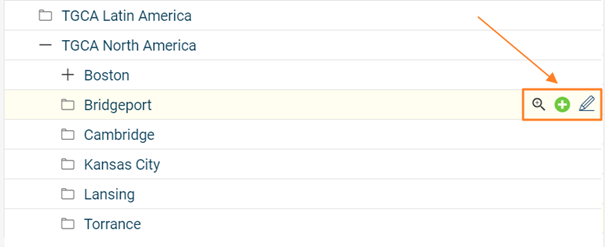
Edit the organization unit. Select the organization unit you want to investigate and open its edit screen.
-
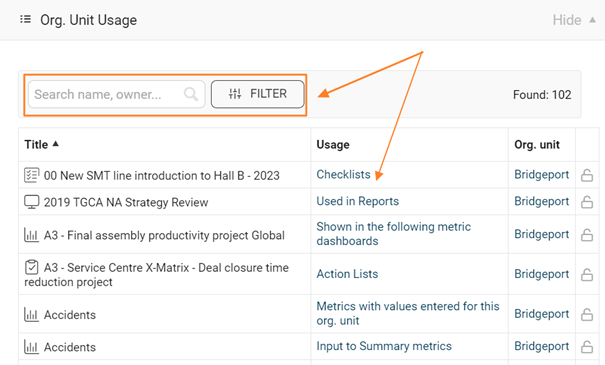
View the linked metrics and documents. On the edit screen, go to the Org. Unit Usage section. It lists all metrics and documents associated with the selected organization unit, so you can assess the impact of the changes you plan to make.
-
Be careful when deleting a unit. If you delete an organization unit, all metrics collected for that unit are permanently deleted as well. Remove units with caution and make sure all relevant data has been backed up or transferred as needed.
-
Delete or move the unit’s documents. If the organization unit contains documents, you can either delete them or move them to another folder. Consider the importance and relevance of these documents before deciding what to do.
更改组织单元时,务必了解哪些文档与之关联。本指南介绍如何查看与特定组织单元关联的文档列表,以便您在移动或删除单元时做出明智的决定。
-
打开组织结构。 在TeamGuru中进入组织结构。
-
编辑组织单元。 选择要查看的组织单元,打开其编辑页面。
-
查看关联的指标和文档。 在编辑页面中,进入组织单元使用情况部分。这里列出了与所选组织单元关联的所有指标和文档,便于您评估计划中的更改会带来哪些影响。
-
删除单元时务必谨慎。 删除组织单元后,该单元收集的所有指标也会被永久删除。请谨慎删除单元,并确保所有相关数据已根据需要备份或转移。
-
删除或移动单元中的文档。 如果组织单元中包含文档,您可以删除这些文档,也可以将其移到其他文件夹。决定如何处理之前,请先考虑这些文档的重要性和相关性。
还需要帮助吗?
请给我们留言。工作日我们通常会在一小时内回复。