Wyszukiwanie dokumentów powiązanych z jednostkami organizacyjnymi
Tłumaczenie maszynowe z angielskiego. Wyświetlany jest oryginał po angielsku.
When you make changes to your organization units, it is crucial to know which documents are associated with them. This guide shows you how to access the list of documents linked to a particular organization unit, so you can make informed decisions when moving or deleting units.
-
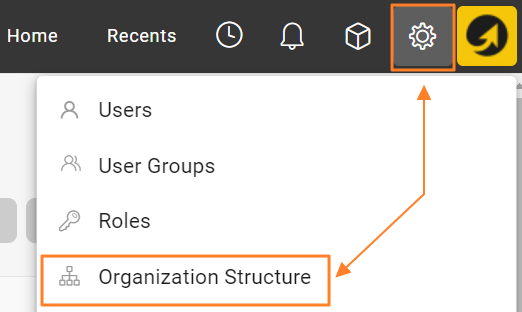
Open the organization structure. Go to your organization structure in TeamGuru.
-
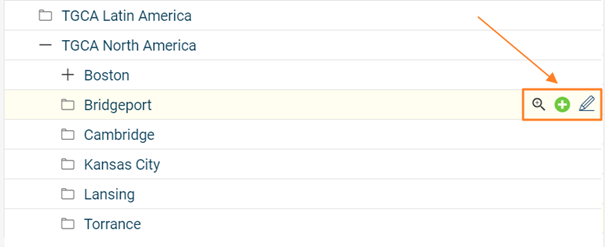
Edit the organization unit. Select the organization unit you want to investigate and open its edit screen.
-
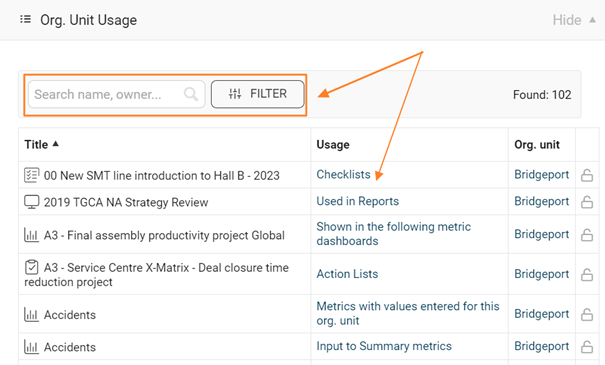
View the linked metrics and documents. On the edit screen, go to the Org. Unit Usage section. It lists all metrics and documents associated with the selected organization unit, so you can assess the impact of the changes you plan to make.
-
Be careful when deleting a unit. If you delete an organization unit, all metrics collected for that unit are permanently deleted as well. Remove units with caution and make sure all relevant data has been backed up or transferred as needed.
-
Delete or move the unit’s documents. If the organization unit contains documents, you can either delete them or move them to another folder. Consider the importance and relevance of these documents before deciding what to do.
Zanim zmienisz jednostki organizacyjne, musisz wiedzieć, które dokumenty są z nimi powiązane. Ten artykuł pokazuje, jak wyświetlić listę dokumentów powiązanych z daną jednostką organizacyjną, aby świadomie decydować o przenoszeniu lub usuwaniu jednostek.
-
Otwórz strukturę organizacyjną. Przejdź do struktury organizacyjnej w TeamGuru.
-
Edytuj jednostkę organizacyjną. Wybierz jednostkę organizacyjną, którą chcesz sprawdzić, i otwórz ekran jej edycji.
-
Wyświetl powiązane wskaźniki i dokumenty. Na ekranie edycji przejdź do sekcji Użycie jednostki organizacyjnej. Znajdziesz tam wszystkie wskaźniki i dokumenty powiązane z wybraną jednostką, dzięki czemu ocenisz skutki planowanych zmian.
-
Uważaj przy usuwaniu jednostki. Usunięcie jednostki organizacyjnej trwale usuwa też wszystkie zebrane dla niej dane wskaźników. Usuwaj jednostki ostrożnie i w razie potrzeby upewnij się, że wszystkie potrzebne dane zostały zarchiwizowane lub przeniesione.
-
Usuń lub przenieś dokumenty jednostki. Jeśli jednostka organizacyjna zawiera dokumenty, możesz je usunąć albo przenieść do innego folderu. Zanim zdecydujesz, oceń, jak ważne i aktualne są te dokumenty.
Potrzebujesz dalszej pomocy?
Napisz do nas. W dni robocze zwykle odpowiadamy w ciągu godziny.