Wie lege ich eine neue Qualifikation an?
Maschinelle Übersetzung aus dem Englischen. Englisches Original wird angezeigt.
Defining skills is the first step to creating a new skill matrix. (Video guide: learn how to create skills – 7:49)
To create a new skill, follow these steps:
-
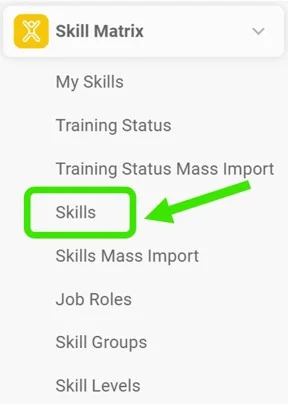
Open the skills. Go to the Skill Matrix > Skills submenu.
-
Click Create New. Click the Create New icon.

-
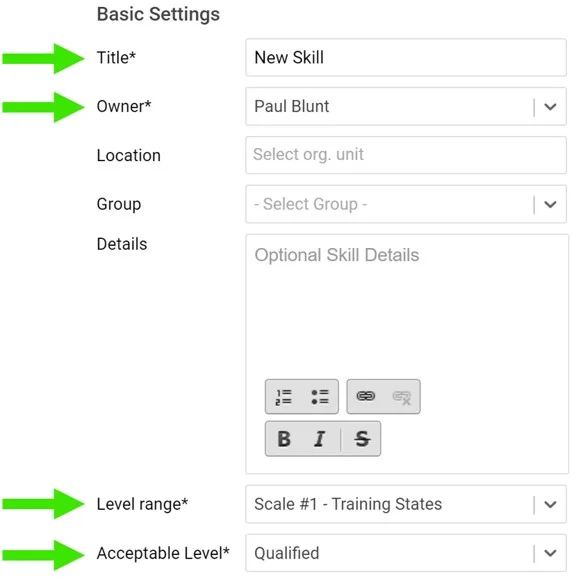
Fill in the required fields. Fill in the skill title and the required fields as shown below:
-
Add the skill requirements. Add your skill requirements:
- First choose a skill level. Two levels are predefined: qualified and trainer. You can create more levels if needed: go to the Skill Matrix menu, the Skill Levels submenu, and add a new level.
- Here you can also add details for your request and the validity of the skill requirements. If the skill requires knowledge of a document saved in the Documents module (SOP, work instructions, etc.), you can attach the document here. The document then appears in your skill matrix as required knowledge.

Das Anlegen von Qualifikationen ist der erste Schritt zu einer neuen Qualifikationsmatrix. (Video-Anleitung: Qualifikationen anlegen – 7:49)
So legen Sie eine neue Qualifikation an:
-
Öffnen Sie die Qualifikationen. Öffnen Sie das Untermenü Qualifikationsmatrix > Qualifikationen.
-
Klicken Sie auf Neu erstellen. Klicken Sie auf das Symbol Neu erstellen.
-
Füllen Sie die Pflichtfelder aus. Geben Sie den Titel der Qualifikation ein und füllen Sie die Pflichtfelder wie unten gezeigt aus:
-
Fügen Sie die Anforderungen hinzu. Fügen Sie die Anforderungen an die Qualifikation hinzu:
- Wählen Sie zuerst eine Qualifikationsstufe. Zwei Stufen sind vordefiniert: qualifiziert und Trainer. Bei Bedarf können Sie weitere Stufen anlegen: Öffnen Sie im Menü Qualifikationsmatrix das Untermenü Qualifikationsstufen und fügen Sie eine neue Stufe hinzu.
- Hier können Sie auch Details zur Anforderung und die Gültigkeit der Anforderungen angeben. Wenn die Qualifikation Kenntnisse eines Dokuments aus dem Modul Dokumente voraussetzt (SOP, Arbeitsanweisung usw.), können Sie das Dokument hier anhängen. Es erscheint dann in Ihrer Qualifikationsmatrix als erforderliches Wissen.
Brauchen Sie weitere Hilfe?
Schreiben Sie uns. An Werktagen antworten wir meist innerhalb einer Stunde.