Jak utworzyć nową kompetencję?
Tłumaczenie maszynowe z angielskiego. Wyświetlany jest oryginał po angielsku.
Defining skills is the first step to creating a new skill matrix. (Video guide: learn how to create skills – 7:49)
To create a new skill, follow these steps:
-
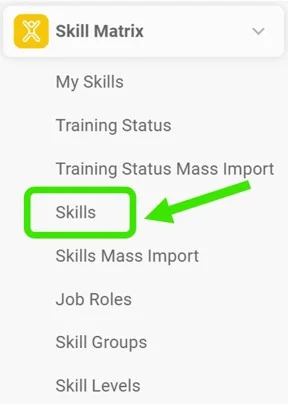
Open the skills. Go to the Skill Matrix > Skills submenu.
-
Click Create New. Click the Create New icon.

-
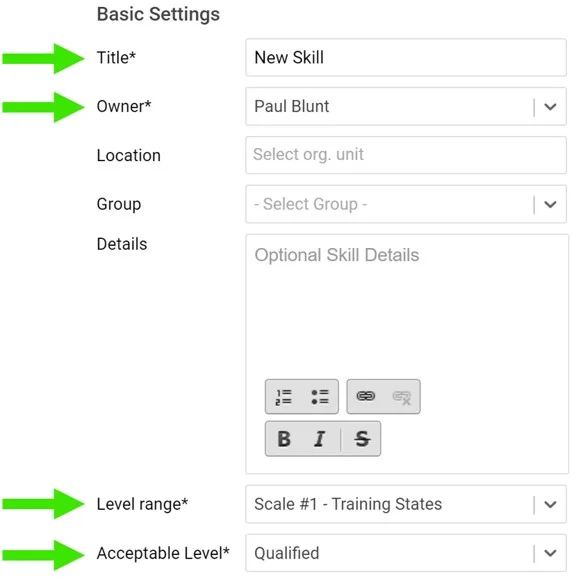
Fill in the required fields. Fill in the skill title and the required fields as shown below:
-
Add the skill requirements. Add your skill requirements:
- First choose a skill level. Two levels are predefined: qualified and trainer. You can create more levels if needed: go to the Skill Matrix menu, the Skill Levels submenu, and add a new level.
- Here you can also add details for your request and the validity of the skill requirements. If the skill requires knowledge of a document saved in the Documents module (SOP, work instructions, etc.), you can attach the document here. The document then appears in your skill matrix as required knowledge.

Zdefiniowanie kompetencji to pierwszy krok do utworzenia nowej matrycy kompetencji. (Wideo: jak tworzyć kompetencje – 7:49)
Aby utworzyć nową kompetencję:
-
Otwórz kompetencje. Przejdź do podmenu Matryca kompetencji > Kompetencje.
-
Kliknij Utwórz nowy. Kliknij ikonę Utwórz nowy.
-
Wypełnij wymagane pola. Wpisz nazwę kompetencji i uzupełnij wymagane pola, jak poniżej:
-
Dodaj wymagania. Dodaj wymagania dla kompetencji:
- Najpierw wybierz poziom kompetencji. Dwa poziomy są zdefiniowane z góry: wykwalifikowany i trener. W razie potrzeby możesz utworzyć kolejne: otwórz menu Matryca kompetencji, podmenu Poziomy kompetencji i dodaj nowy poziom.
- Tu możesz też dodać szczegóły wymagania i okres ważności. Jeśli kompetencja wymaga znajomości dokumentu zapisanego w module Dokumenty (SOP, instrukcje stanowiskowe itp.), możesz go tu dołączyć. Dokument pojawi się wtedy w matrycy kompetencji jako wymagana wiedza.
Potrzebujesz dalszej pomocy?
Napisz do nas. W dni robocze zwykle odpowiadamy w ciągu godziny.