Como os status são calculados em Objetivos estratégicos
Tradução automática do inglês. Exibindo o original em inglês.
The review dashboard shows a status for every project, KPI, priority, annual goal and 5-year goal, and an overall status of the plan. The statuses are calculated from the data you already keep in TeamGuru, so you do not have to update them by hand.
The rules
| Item | Where its status comes from |
|---|---|
| Project | The traffic light of the project. Done when the project is closed, Not started before its start date (or without one). |
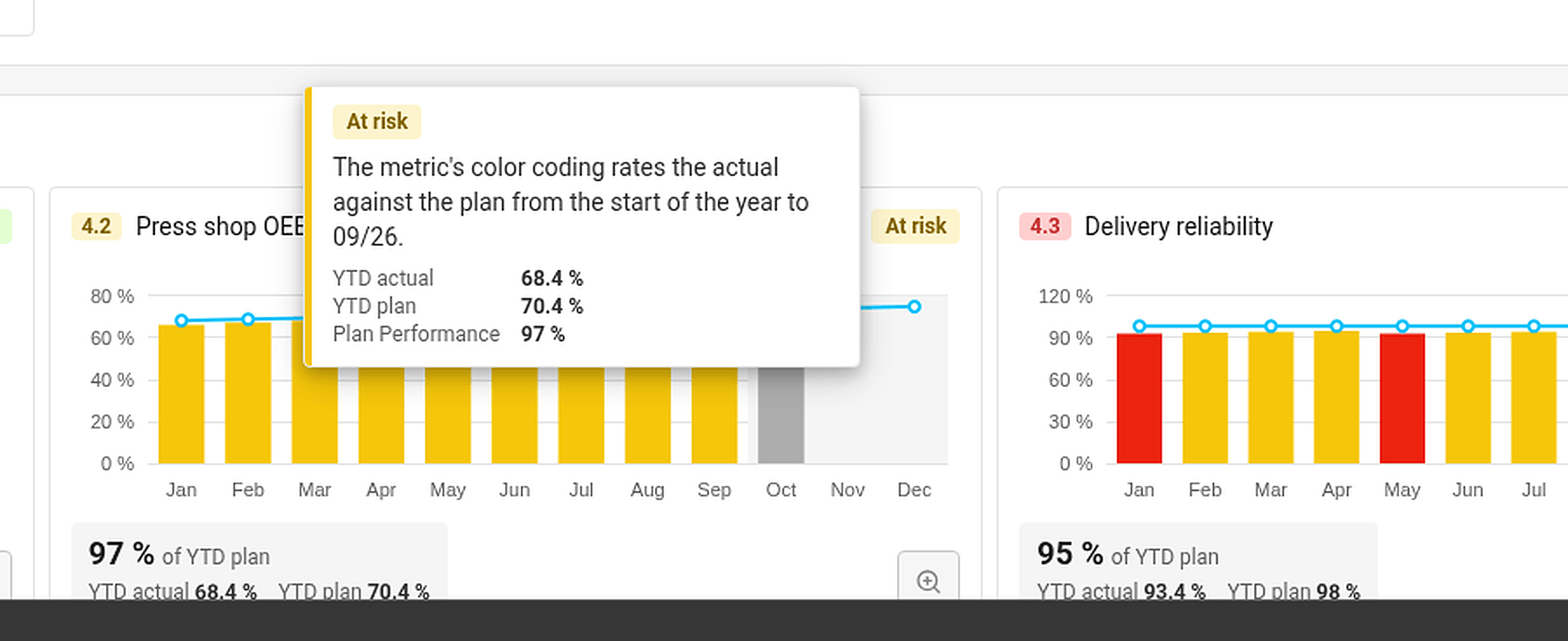
| KPI (Targets to Improve) | The color coding of its metric, comparing the year-to-date actual with the year-to-date plan up to the last closed month. No data when there is no actual or no plan. |
| Priority | The worst status of its running projects and of its child X-matrix, if it has one. No project when it has neither. |
| Annual goal | The worst status of its priorities and of the KPIs that measure them. |
| 5-year goal | The worst status of its annual goals. |
| Overall status | The worst status of the annual and 5-year goals. |
Done counts as on track. Not started, No project and No data do not count towards the status above them.
The month in progress is never rated – its value may still be incomplete.
Find out why an item has its status
Hover over a status. TeamGuru shows the reason – for example By the worst of the linked projects, or for a KPI the YTD actual, YTD plan and the percentage of the plan met.
Set a status by hand
If your judgment differs from the numbers, you can set the status of a 5-year or an annual goal yourself:
- Click Edit in the X-matrix and open the list with the pencil icon next to its name.
- In the Status column of the goal, open the menu and choose On track, At risk or Off track.
- Click Done.
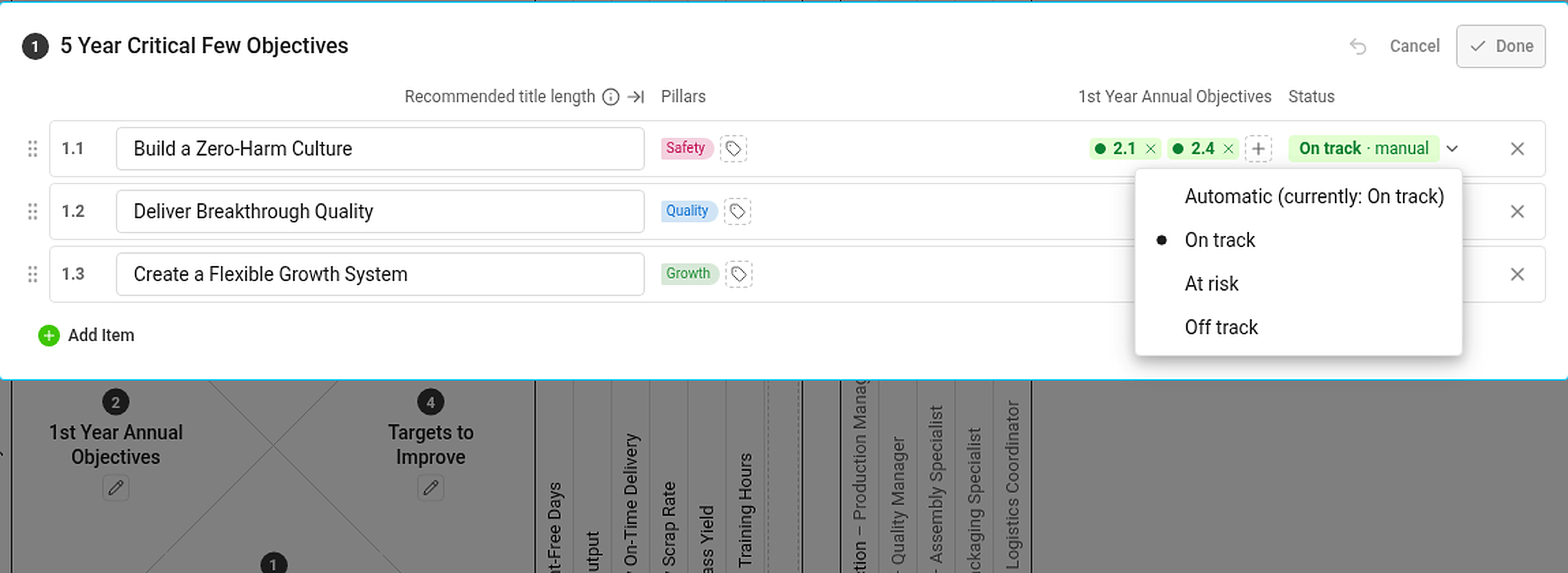
A status set by hand is marked manual and has the same effect on the statuses above it as an automatic one. If the automatic status would be different, the hover card tells you what it would be. To go back to the calculated status, choose Automatic (currently: …) in the same menu.
Statuses you cannot see the data for
If you are not allowed to see a metric or a project, you do not see its numbers or dates – but its status still counts. Everybody with access to the plan therefore sees the same statuses.
O painel de revisão mostra um status para cada projeto, KPI, prioridade, objetivo anual e objetivo de 5 anos, além de um status geral do plano. Os status são calculados a partir dos dados que você já mantém no TeamGuru, então não é preciso atualizá-los manualmente.
As regras
| Item | De onde vem o status |
|---|---|
| Projeto | O semáforo do projeto. Concluído quando o projeto está fechado, Não iniciado antes da data de início (ou se não houver data). |
| KPI (Indicadores e metas) | O código de cores da métrica, que compara o real acumulado no ano com o planejado acumulado no ano até o último mês fechado. Sem dados quando não há real ou planejado. |
| Prioridade | O pior status entre os projetos em andamento e a X-matrix subordinada, se houver. Sem projeto quando não tem nenhum dos dois. |
| Objetivo anual | O pior status entre as prioridades e os KPIs que as medem. |
| Objetivo de 5 anos | O pior status entre os objetivos anuais. |
| Status geral | O pior status entre os objetivos anuais e os de 5 anos. |
Concluído conta como dentro do plano. Não iniciado, Sem projeto e Sem dados não contam para o status do nível acima.
O mês em andamento nunca é avaliado – o valor dele ainda pode estar incompleto.
Descubra por que um item tem determinado status
Passe o mouse sobre um status. O TeamGuru mostra o motivo – por exemplo, Pelo pior dos projetos vinculados ou, no caso de um KPI, o real acumulado no ano, o planejado acumulado no ano e o percentual do plano atingido.
Defina um status manualmente
Se a sua avaliação for diferente dos números, você mesmo pode definir o status de um objetivo de 5 anos ou de um objetivo anual:
- Clique em Editar na X-matrix e abra a lista pelo ícone de lápis ao lado do nome dela.
- Na coluna Status do objetivo, abra o menu e escolha Dentro do plano, Em risco ou Fora do plano.
- Clique em Concluído.
Um status definido manualmente fica marcado como manual e afeta os status acima dele da mesma forma que um automático. Se o status automático fosse diferente, o cartão que aparece ao passar o mouse informa qual seria. Para voltar ao status calculado, escolha Automático (atual: …) no mesmo menu.
Status cujos dados você não pode ver
Se você não tem permissão para ver uma métrica ou um projeto, não vê os números nem as datas – mas o status continua contando. Por isso, todos com acesso ao plano veem os mesmos status.
Precisa de mais ajuda?
Escreva para nós. Em dias úteis, costumamos responder em até uma hora.