Jak obliczane są statusy w module Cele strategiczne
Tłumaczenie maszynowe z angielskiego. Wyświetlany jest oryginał po angielsku.
The review dashboard shows a status for every project, KPI, priority, annual goal and 5-year goal, and an overall status of the plan. The statuses are calculated from the data you already keep in TeamGuru, so you do not have to update them by hand.
The rules
| Item | Where its status comes from |
|---|---|
| Project | The traffic light of the project. Done when the project is closed, Not started before its start date (or without one). |
| KPI (Targets to Improve) | The color coding of its metric, comparing the year-to-date actual with the year-to-date plan up to the last closed month. No data when there is no actual or no plan. |
| Priority | The worst status of its running projects and of its child X-matrix, if it has one. No project when it has neither. |
| Annual goal | The worst status of its priorities and of the KPIs that measure them. |
| 5-year goal | The worst status of its annual goals. |
| Overall status | The worst status of the annual and 5-year goals. |
Done counts as on track. Not started, No project and No data do not count towards the status above them.
The month in progress is never rated – its value may still be incomplete.
Find out why an item has its status
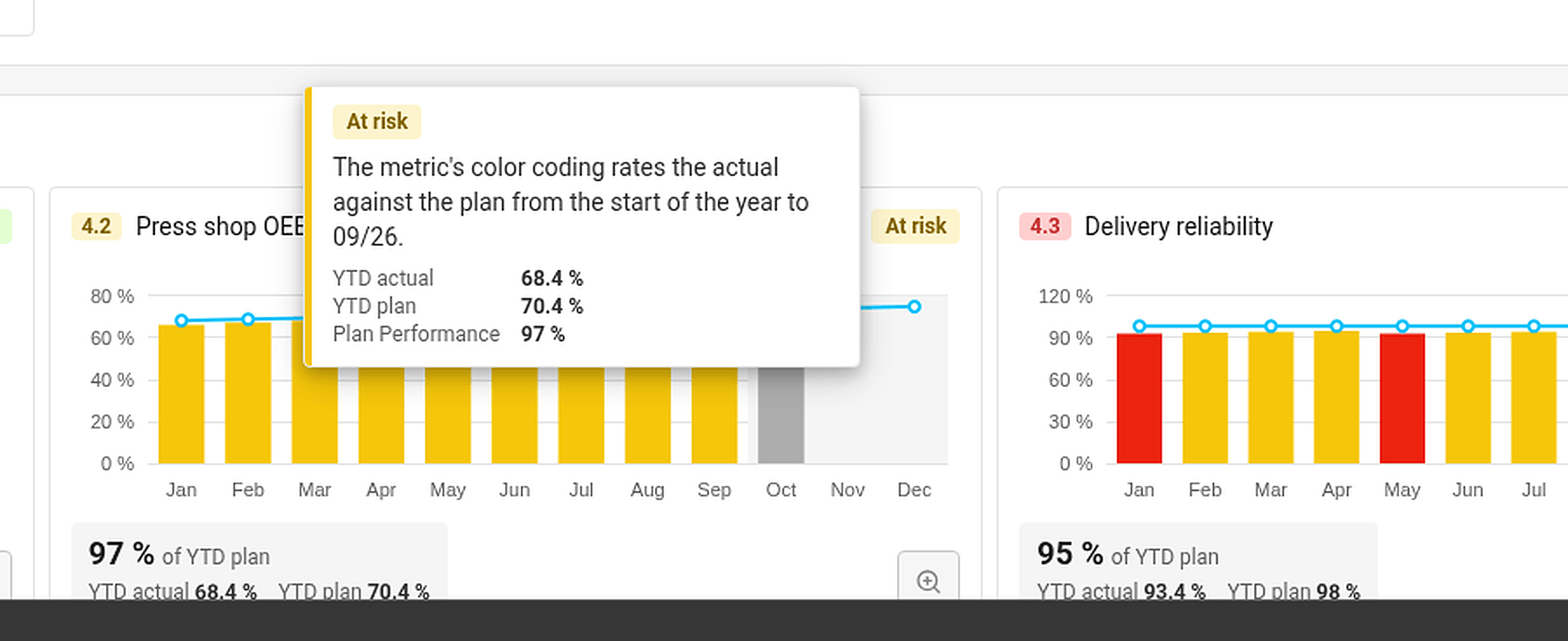
Hover over a status. TeamGuru shows the reason – for example By the worst of the linked projects, or for a KPI the YTD actual, YTD plan and the percentage of the plan met.
Set a status by hand
If your judgment differs from the numbers, you can set the status of a 5-year or an annual goal yourself:
- Click Edit in the X-matrix and open the list with the pencil icon next to its name.
- In the Status column of the goal, open the menu and choose On track, At risk or Off track.
- Click Done.
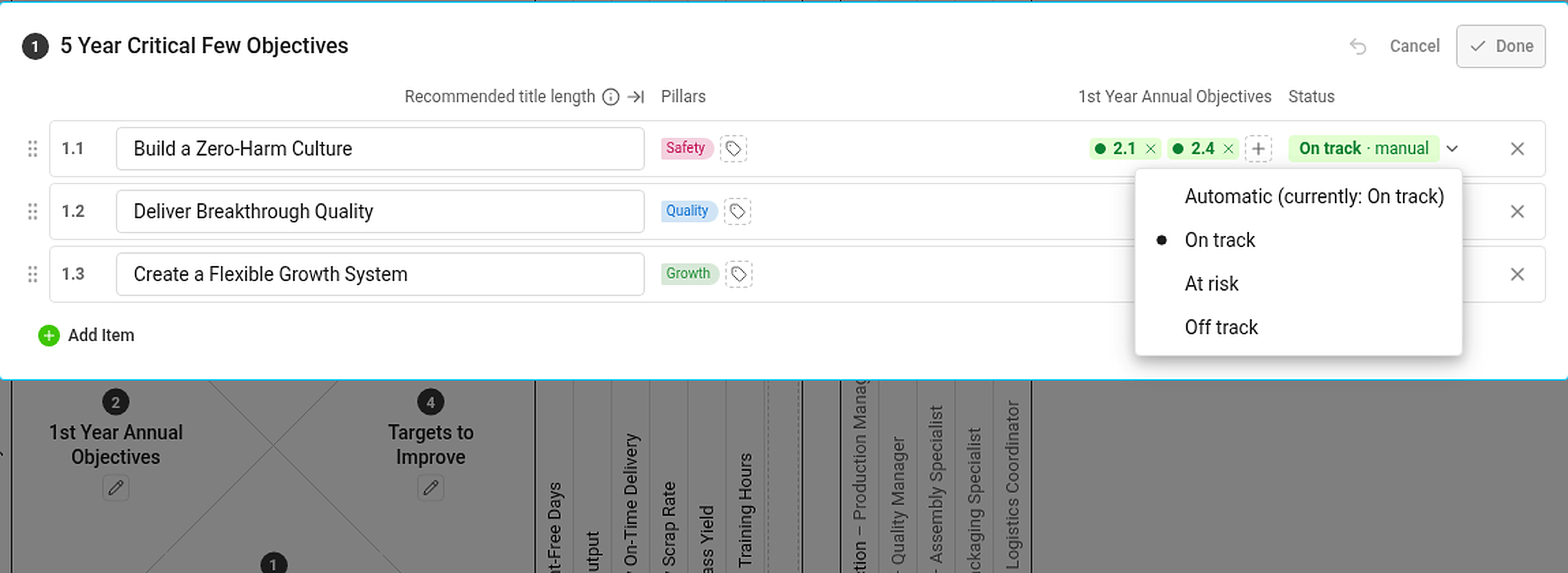
A status set by hand is marked manual and has the same effect on the statuses above it as an automatic one. If the automatic status would be different, the hover card tells you what it would be. To go back to the calculated status, choose Automatic (currently: …) in the same menu.
Statuses you cannot see the data for
If you are not allowed to see a metric or a project, you do not see its numbers or dates – but its status still counts. Everybody with access to the plan therefore sees the same statuses.
Dashboard przeglądu pokazuje status każdego projektu, KPI, priorytetu, celu rocznego i celu 5-letniego oraz status ogólny planu. Statusy są obliczane z danych, które już prowadzisz w TeamGuru, więc nie musisz ich aktualizować ręcznie.
Zasady
| Element | Skąd bierze się jego status |
|---|---|
| Projekt | Sygnalizacja świetlna projektu. Zakończony, gdy projekt jest zamknięty, Nierozpoczęty przed datą rozpoczęcia (lub gdy jej brak). |
| KPI (wartości docelowe) | Kolorowe oznaczenie wskaźnika: porównanie wykonania narastająco od początku roku z planem narastająco do ostatniego zamkniętego miesiąca. Brak danych, gdy brakuje wykonania lub planu. |
| Priorytet | Najgorszy status spośród trwających projektów priorytetu i jego podrzędnej X-Matrix, jeśli ją ma. Brak projektu, gdy nie ma ani jednego, ani drugiego. |
| Cel roczny | Najgorszy status spośród jego priorytetów i mierzących je KPI. |
| Cel 5-letni | Najgorszy status spośród jego celów rocznych. |
| Status ogólny | Najgorszy status spośród celów rocznych i 5-letnich. |
Zakończony liczy się jako zgodny z planem. Nierozpoczęty, Brak projektu i Brak danych nie wpływają na status elementu wyżej.
Bieżący miesiąc nigdy nie jest oceniany, bo jego wartość może być jeszcze niepełna.
Sprawdź, skąd wziął się status elementu
Najedź kursorem na status. TeamGuru pokaże przyczynę, np. Według najgorszego z powiązanych projektów, a dla KPI wykonanie narastająco, plan narastająco i procent realizacji planu.
Ustaw status ręcznie
Jeśli twoja ocena różni się od liczb, możesz samodzielnie ustawić status celu 5-letniego lub rocznego:
- Kliknij Edytuj w X-Matrix i otwórz listę ikoną ołówka obok jej nazwy.
- W kolumnie Status przy celu otwórz menu i wybierz Zgodnie z planem, Zagrożony lub Poza planem.
- Kliknij Gotowe.
Status ustawiony ręcznie jest oznaczony jako ręczny i wpływa na statusy wyżej tak samo jak status automatyczny. Jeśli status automatyczny byłby inny, karta wyświetlana po najechaniu kursorem pokaże, jaki. Aby wrócić do statusu obliczanego, wybierz w tym samym menu Automatycznie (obecnie: …).
Statusy, których danych nie widzisz
Jeśli nie masz dostępu do wskaźnika lub projektu, nie widzisz jego liczb ani dat, ale jego status nadal się liczy. Dlatego wszyscy z dostępem do planu widzą te same statusy.
Potrzebujesz dalszej pomocy?
Napisz do nas. W dni robocze zwykle odpowiadamy w ciągu godziny.