So werden Status im Modul Strategische Ziele berechnet
Maschinelle Übersetzung aus dem Englischen. Englisches Original wird angezeigt.
The review dashboard shows a status for every project, KPI, priority, annual goal and 5-year goal, and an overall status of the plan. The statuses are calculated from the data you already keep in TeamGuru, so you do not have to update them by hand.
The rules
| Item | Where its status comes from |
|---|---|
| Project | The traffic light of the project. Done when the project is closed, Not started before its start date (or without one). |
| KPI (Targets to Improve) | The color coding of its metric, comparing the year-to-date actual with the year-to-date plan up to the last closed month. No data when there is no actual or no plan. |
| Priority | The worst status of its running projects and of its child X-matrix, if it has one. No project when it has neither. |
| Annual goal | The worst status of its priorities and of the KPIs that measure them. |
| 5-year goal | The worst status of its annual goals. |
| Overall status | The worst status of the annual and 5-year goals. |
Done counts as on track. Not started, No project and No data do not count towards the status above them.
The month in progress is never rated – its value may still be incomplete.
Find out why an item has its status
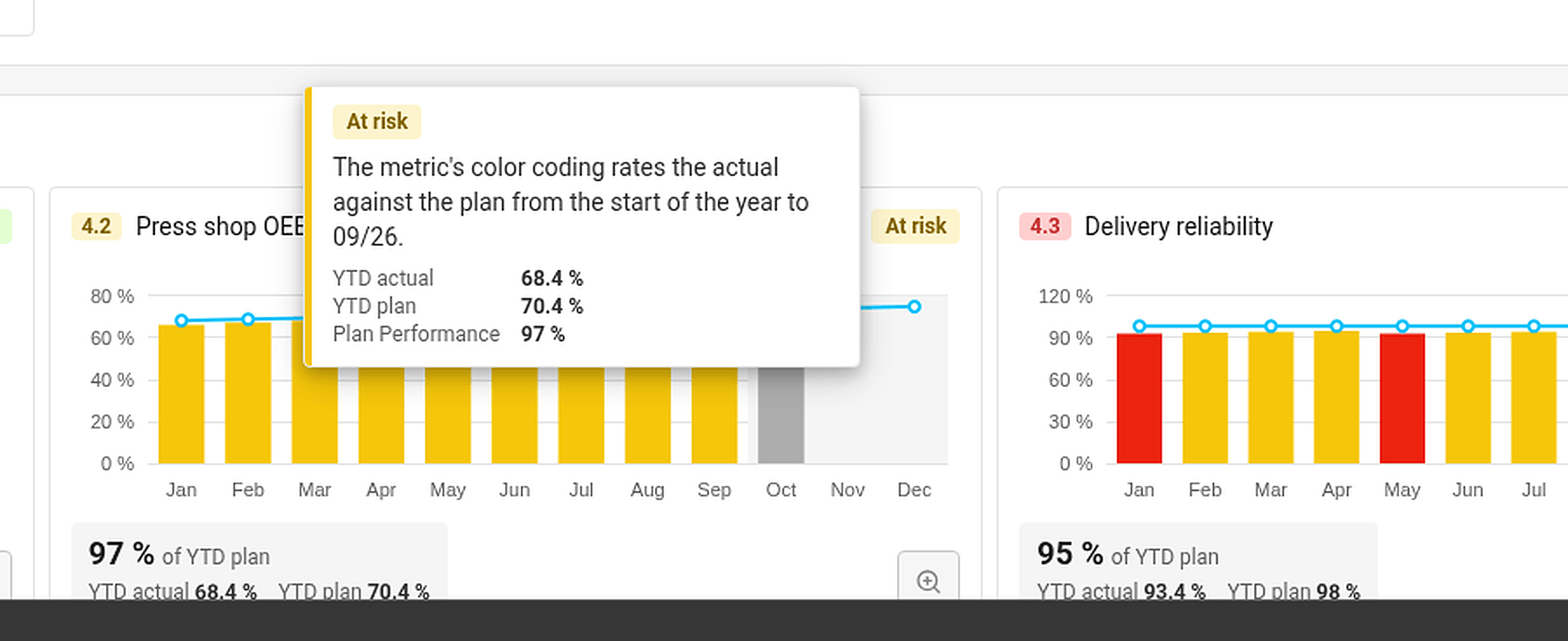
Hover over a status. TeamGuru shows the reason – for example By the worst of the linked projects, or for a KPI the YTD actual, YTD plan and the percentage of the plan met.
Set a status by hand
If your judgment differs from the numbers, you can set the status of a 5-year or an annual goal yourself:
- Click Edit in the X-matrix and open the list with the pencil icon next to its name.
- In the Status column of the goal, open the menu and choose On track, At risk or Off track.
- Click Done.
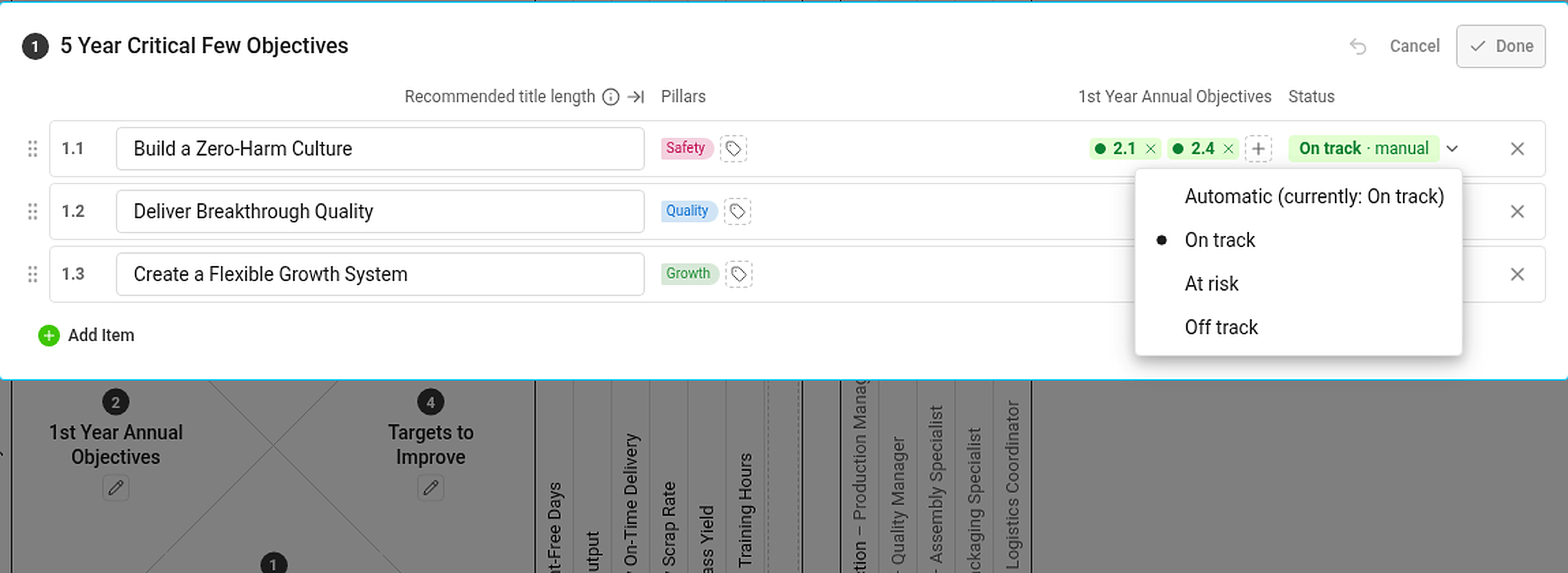
A status set by hand is marked manual and has the same effect on the statuses above it as an automatic one. If the automatic status would be different, the hover card tells you what it would be. To go back to the calculated status, choose Automatic (currently: …) in the same menu.
Statuses you cannot see the data for
If you are not allowed to see a metric or a project, you do not see its numbers or dates – but its status still counts. Everybody with access to the plan therefore sees the same statuses.
Das Review-Dashboard zeigt einen Status für jedes Projekt, jeden KPI, jede Priorität, jedes Jahres- und 5-Jahres-Ziel sowie einen Gesamtstatus des Plans. Die Status werden aus den Daten berechnet, die Sie ohnehin in TeamGuru pflegen. Sie müssen sie also nicht von Hand aktualisieren.
Die Regeln
| Element | Woher der Status kommt |
|---|---|
| Projekt | Die Ampel des Projekts. Erledigt, wenn das Projekt abgeschlossen ist, Nicht begonnen vor dem Startdatum (oder ohne Startdatum). |
| KPI (Zielwerte) | Die Farbcodierung der Kennzahl: Sie vergleicht den Ist-Wert seit Jahresbeginn mit dem Plan seit Jahresbeginn bis zum letzten abgeschlossenen Monat. Keine Daten, wenn Ist oder Plan fehlt. |
| Priorität | Der schlechteste Status ihrer laufenden Projekte und ihrer untergeordneten X-Matrix, falls vorhanden. Kein Projekt, wenn sie beides nicht hat. |
| Jahresziel | Der schlechteste Status seiner Prioritäten und der KPIs, die sie messen. |
| 5-Jahres-Ziel | Der schlechteste Status seiner Jahresziele. |
| Gesamtstatus | Der schlechteste Status der Jahres- und 5-Jahres-Ziele. |
Erledigt zählt als im Plan. Nicht begonnen, Kein Projekt und Keine Daten fließen nicht in den Status der übergeordneten Ebene ein.
Der laufende Monat wird nie bewertet – sein Wert kann noch unvollständig sein.
Herausfinden, warum ein Element seinen Status hat
Bewegen Sie den Mauszeiger über einen Status. TeamGuru zeigt den Grund an – zum Beispiel Nach dem schlechtesten verknüpften Projekt oder bei einem KPI den Ist-Wert YTD, den Plan YTD und den Prozentsatz der Planerfüllung.
Status manuell festlegen
Wenn Ihre Einschätzung von den Zahlen abweicht, können Sie den Status eines 5-Jahres- oder Jahresziels selbst festlegen:
- Klicken Sie in der X-Matrix auf Bearbeiten und öffnen Sie die Liste über das Stiftsymbol neben ihrem Namen.
- Öffnen Sie in der Spalte Status des Ziels das Menü und wählen Sie Im Plan, Gefährdet oder Im Rückstand.
- Klicken Sie auf Fertig.
Ein manuell gesetzter Status ist als manuell gekennzeichnet und wirkt auf die übergeordneten Status genauso wie ein automatischer. Würde der automatische Status abweichen, zeigt die Hover-Karte, welcher es wäre. Um zum berechneten Status zurückzukehren, wählen Sie im selben Menü Automatisch (aktuell: …).
Status, deren Daten Sie nicht sehen dürfen
Wenn Sie eine Kennzahl oder ein Projekt nicht sehen dürfen, sehen Sie weder Zahlen noch Termine – der Status zählt aber trotzdem. Daher sehen alle mit Zugriff auf den Plan dieselben Status.
Brauchen Sie weitere Hilfe?
Schreiben Sie uns. An Werktagen antworten wir meist innerhalb einer Stunde.