Ako sa počítajú stavy v module Strategické ciele
Strojový preklad z angličtiny. Zobrazený je anglický originál.
The review dashboard shows a status for every project, KPI, priority, annual goal and 5-year goal, and an overall status of the plan. The statuses are calculated from the data you already keep in TeamGuru, so you do not have to update them by hand.
The rules
| Item | Where its status comes from |
|---|---|
| Project | The traffic light of the project. Done when the project is closed, Not started before its start date (or without one). |
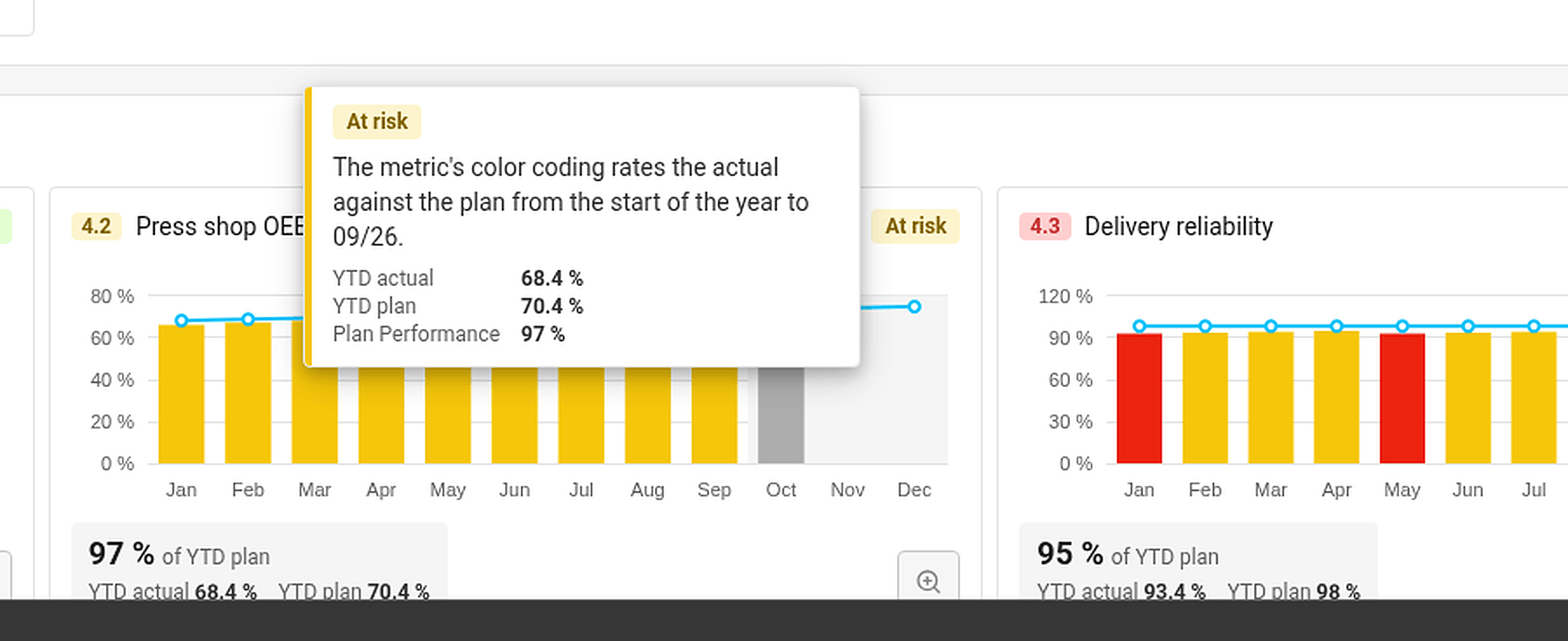
| KPI (Targets to Improve) | The color coding of its metric, comparing the year-to-date actual with the year-to-date plan up to the last closed month. No data when there is no actual or no plan. |
| Priority | The worst status of its running projects and of its child X-matrix, if it has one. No project when it has neither. |
| Annual goal | The worst status of its priorities and of the KPIs that measure them. |
| 5-year goal | The worst status of its annual goals. |
| Overall status | The worst status of the annual and 5-year goals. |
Done counts as on track. Not started, No project and No data do not count towards the status above them.
The month in progress is never rated – its value may still be incomplete.
Find out why an item has its status
Hover over a status. TeamGuru shows the reason – for example By the worst of the linked projects, or for a KPI the YTD actual, YTD plan and the percentage of the plan met.
Set a status by hand
If your judgment differs from the numbers, you can set the status of a 5-year or an annual goal yourself:
- Click Edit in the X-matrix and open the list with the pencil icon next to its name.
- In the Status column of the goal, open the menu and choose On track, At risk or Off track.
- Click Done.
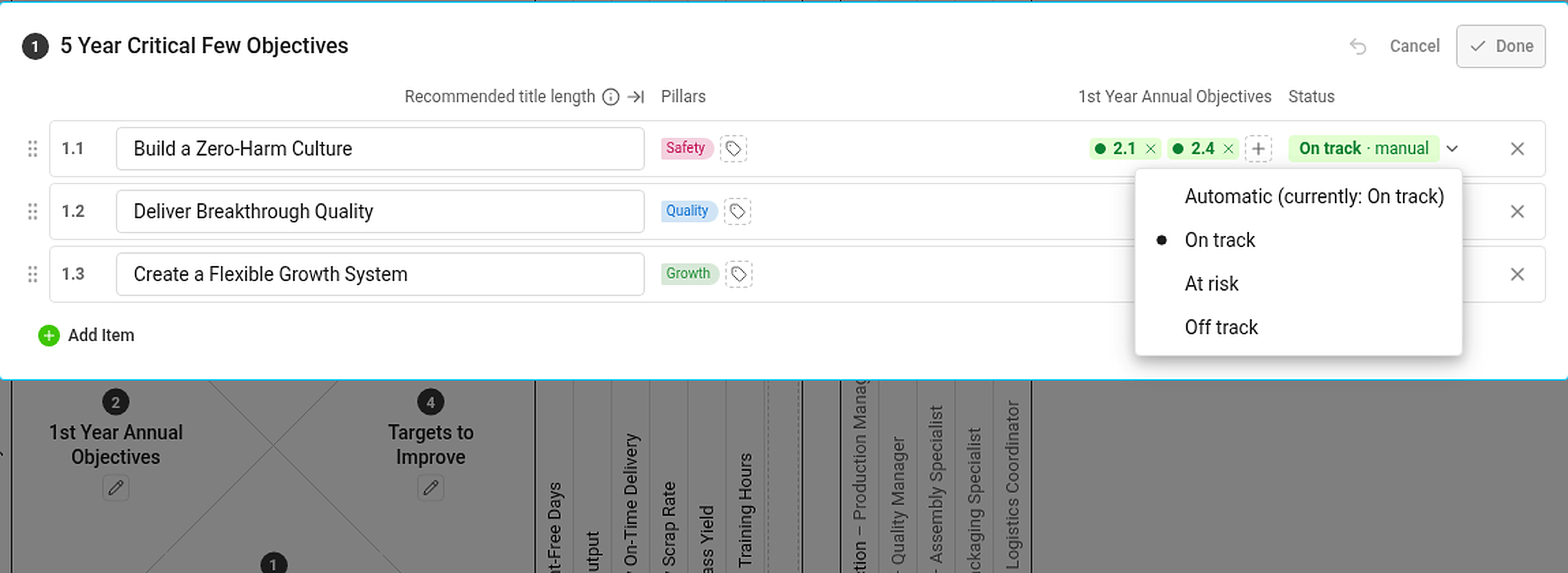
A status set by hand is marked manual and has the same effect on the statuses above it as an automatic one. If the automatic status would be different, the hover card tells you what it would be. To go back to the calculated status, choose Automatic (currently: …) in the same menu.
Statuses you cannot see the data for
If you are not allowed to see a metric or a project, you do not see its numbers or dates – but its status still counts. Everybody with access to the plan therefore sees the same statuses.
Prehľad na revíziu zobrazuje stav každého projektu, KPI, priority, ročného cieľa a 5-ročného cieľa a tiež celkový stav plánu. Stavy sa počítajú z údajov, ktoré už v TeamGuru vediete, takže ich nemusíte aktualizovať ručne.
Pravidlá
| Položka | Odkiaľ sa berie jej stav |
|---|---|
| Projekt | Semafor projektu. Hotovo, keď je projekt uzavretý, Nezačatý pred dátumom začiatku (alebo ak dátum začiatku nemá). |
| KPI (Cieľové hodnoty) | Farebné označenie jeho metriky, ktoré porovnáva skutočnosť od začiatku roka s plánom od začiatku roka až po posledný uzavretý mesiac. Bez dát, ak chýba skutočnosť alebo plán. |
| Priorita | Najhorší stav jej prebiehajúcich projektov a jej podriadenej X-matrix, ak ju má. Bez projektu, ak nemá ani jedno. |
| Ročný cieľ | Najhorší stav jeho priorít a KPI, ktoré ich merajú. |
| 5-ročný cieľ | Najhorší stav jeho ročných cieľov. |
| Celkový stav | Najhorší stav ročných a 5-ročných cieľov. |
Hotovo sa počíta ako podľa plánu. Nezačatý, Bez projektu a Bez dát sa do stavu nadradenej položky nezapočítavajú.
Prebiehajúci mesiac sa nikdy nehodnotí – jeho hodnota ešte nemusí byť úplná.
Zistite, prečo má položka daný stav
Prejdite myšou nad stav. TeamGuru zobrazí dôvod – napríklad Podľa najhoršieho z prepojených projektov, alebo pri KPI skutočnosť YTD, plán YTD a percento splnenia plánu.
Nastavte stav ručne
Ak sa váš úsudok líši od čísel, stav 5-ročného alebo ročného cieľa môžete nastaviť sami:
- V X-matrix kliknite na Upraviť a otvorte zoznam ikonou ceruzky vedľa jeho názvu.
- V stĺpci Stav pri cieli otvorte ponuku a zvoľte Podľa plánu, V ohrození alebo Mimo plánu.
- Kliknite na Hotovo.
Ručne nastavený stav je označený ako ručný a na nadradené stavy má rovnaký vplyv ako automatický. Ak by sa automatický stav líšil, karta pri prejdení myšou vám ukáže, aký by bol. K vypočítanému stavu sa vrátite výberom Automaticky (aktuálne: …) v tej istej ponuke.
Stavy, ku ktorým nevidíte údaje
Ak nemáte oprávnenie vidieť metriku alebo projekt, neuvidíte jeho čísla ani dátumy – jeho stav sa však naďalej započítava. Všetci s prístupom k plánu preto vidia rovnaké stavy.
Potrebujete ďalšiu pomoc?
Napíšte nám. V pracovné dni zvyčajne odpovedáme do hodiny.