Cómo se calculan los estados en Objetivos estratégicos
Traducción automática del inglés. Se muestra el original en inglés.
The review dashboard shows a status for every project, KPI, priority, annual goal and 5-year goal, and an overall status of the plan. The statuses are calculated from the data you already keep in TeamGuru, so you do not have to update them by hand.
The rules
| Item | Where its status comes from |
|---|---|
| Project | The traffic light of the project. Done when the project is closed, Not started before its start date (or without one). |
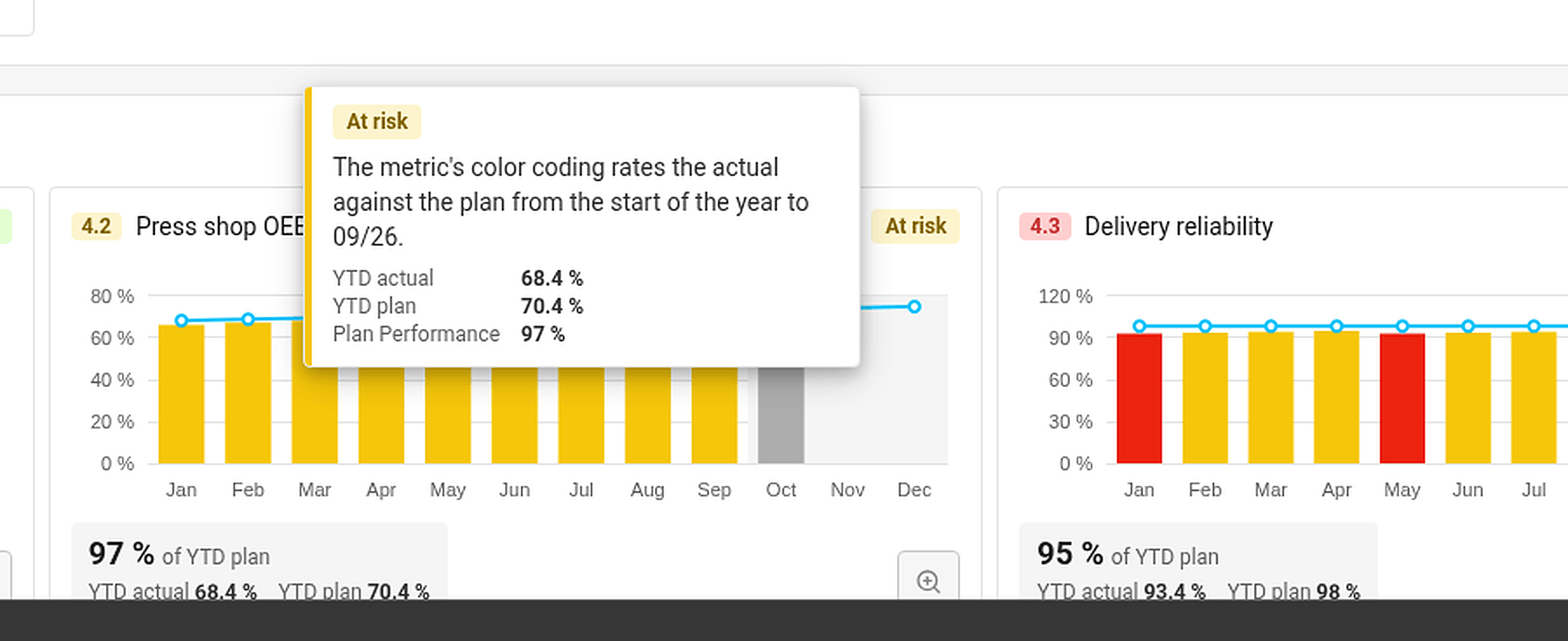
| KPI (Targets to Improve) | The color coding of its metric, comparing the year-to-date actual with the year-to-date plan up to the last closed month. No data when there is no actual or no plan. |
| Priority | The worst status of its running projects and of its child X-matrix, if it has one. No project when it has neither. |
| Annual goal | The worst status of its priorities and of the KPIs that measure them. |
| 5-year goal | The worst status of its annual goals. |
| Overall status | The worst status of the annual and 5-year goals. |
Done counts as on track. Not started, No project and No data do not count towards the status above them.
The month in progress is never rated – its value may still be incomplete.
Find out why an item has its status
Hover over a status. TeamGuru shows the reason – for example By the worst of the linked projects, or for a KPI the YTD actual, YTD plan and the percentage of the plan met.
Set a status by hand
If your judgment differs from the numbers, you can set the status of a 5-year or an annual goal yourself:
- Click Edit in the X-matrix and open the list with the pencil icon next to its name.
- In the Status column of the goal, open the menu and choose On track, At risk or Off track.
- Click Done.
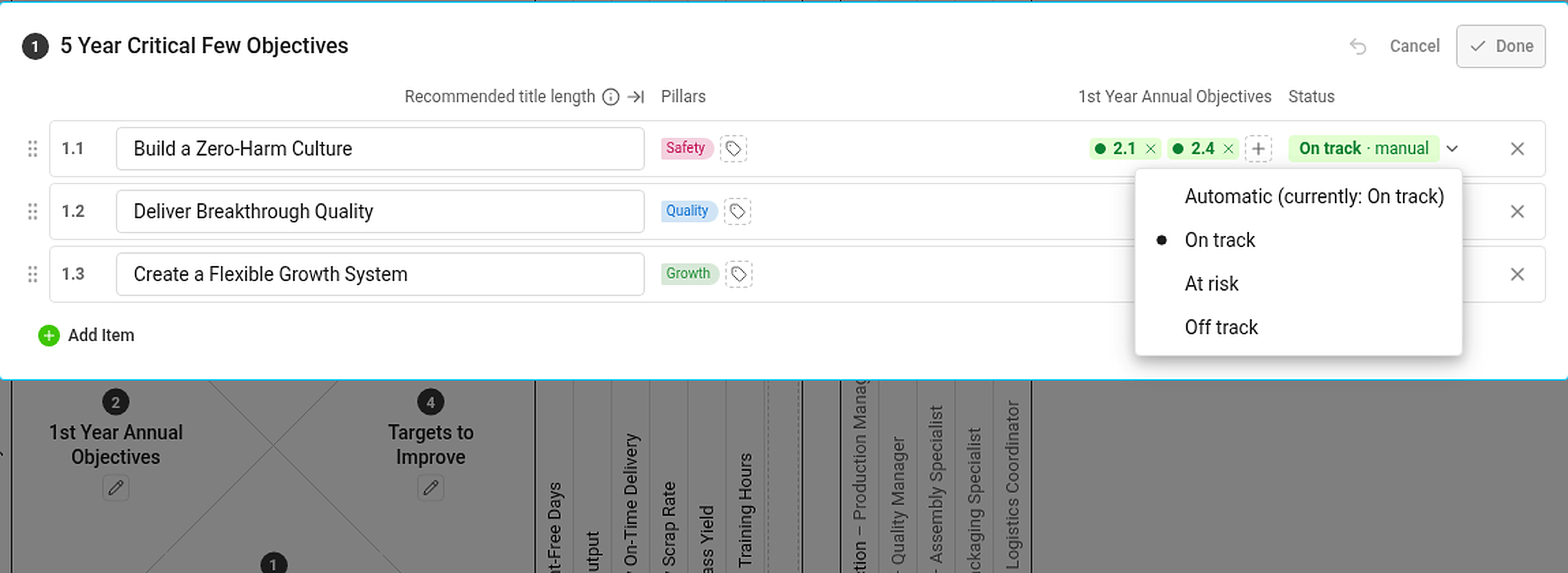
A status set by hand is marked manual and has the same effect on the statuses above it as an automatic one. If the automatic status would be different, the hover card tells you what it would be. To go back to the calculated status, choose Automatic (currently: …) in the same menu.
Statuses you cannot see the data for
If you are not allowed to see a metric or a project, you do not see its numbers or dates – but its status still counts. Everybody with access to the plan therefore sees the same statuses.
El dashboard de revisión muestra un estado para cada proyecto, KPI, prioridad, objetivo anual y objetivo a 5 años, además de un estado general del plan. Los estados se calculan a partir de los datos que ya tiene en TeamGuru, así que no tiene que actualizarlos a mano.
Las reglas
| Elemento | De dónde sale su estado |
|---|---|
| Proyecto | El semáforo del proyecto. Completado cuando el proyecto está cerrado, No iniciado antes de su fecha de inicio (o si no la tiene). |
| KPI (Metas de mejora) | El código de colores de su métrica, que compara el real acumulado del año con el plan acumulado del año hasta el último mes cerrado. Sin datos cuando no hay real o no hay plan. |
| Prioridad | El peor estado de sus proyectos en curso y de su X-matrix hija, si la tiene. Sin proyecto cuando no tiene ninguno de los dos. |
| Objetivo anual | El peor estado de sus prioridades y de los KPI que las miden. |
| Objetivo a 5 años | El peor estado de sus objetivos anuales. |
| Estado general | El peor estado de los objetivos anuales y a 5 años. |
Completado cuenta como en buen camino. No iniciado, Sin proyecto y Sin datos no cuentan para el estado del nivel superior.
El mes en curso nunca se evalúa: su valor aún puede estar incompleto.
Averiguar por qué un elemento tiene su estado
Pase el cursor sobre un estado. TeamGuru muestra el motivo: por ejemplo, Según el peor de los proyectos vinculados o, para un KPI, el real acumulado del año, el plan acumulado del año y el porcentaje del plan cumplido.
Definir un estado a mano
Si su criterio difiere de las cifras, puede definir usted mismo el estado de un objetivo a 5 años o de un objetivo anual:
- Haga clic en Editar en la X-matrix y abra la lista con el icono del lápiz junto a su nombre.
- En la columna Estado del objetivo, abra el menú y elija En buen camino, En riesgo o Desviado.
- Haga clic en Listo.
Un estado definido a mano se marca como manual y afecta a los estados superiores igual que uno automático. Si el estado automático fuera distinto, la tarjeta emergente le indica cuál sería. Para volver al estado calculado, elija Automático (actualmente: …) en el mismo menú.
Estados de datos que usted no puede ver
Si no tiene permiso para ver una métrica o un proyecto, no verá sus cifras ni sus fechas, pero su estado sigue contando. Por eso, todas las personas con acceso al plan ven los mismos estados.
¿Necesita más ayuda?
Escríbanos. En días laborables solemos responder en menos de una hora.