Jak se počítají stavy ve Strategických cílech
Strojový překlad z angličtiny. Zobrazen anglický originál.
The review dashboard shows a status for every project, KPI, priority, annual goal and 5-year goal, and an overall status of the plan. The statuses are calculated from the data you already keep in TeamGuru, so you do not have to update them by hand.
The rules
| Item | Where its status comes from |
|---|---|
| Project | The traffic light of the project. Done when the project is closed, Not started before its start date (or without one). |
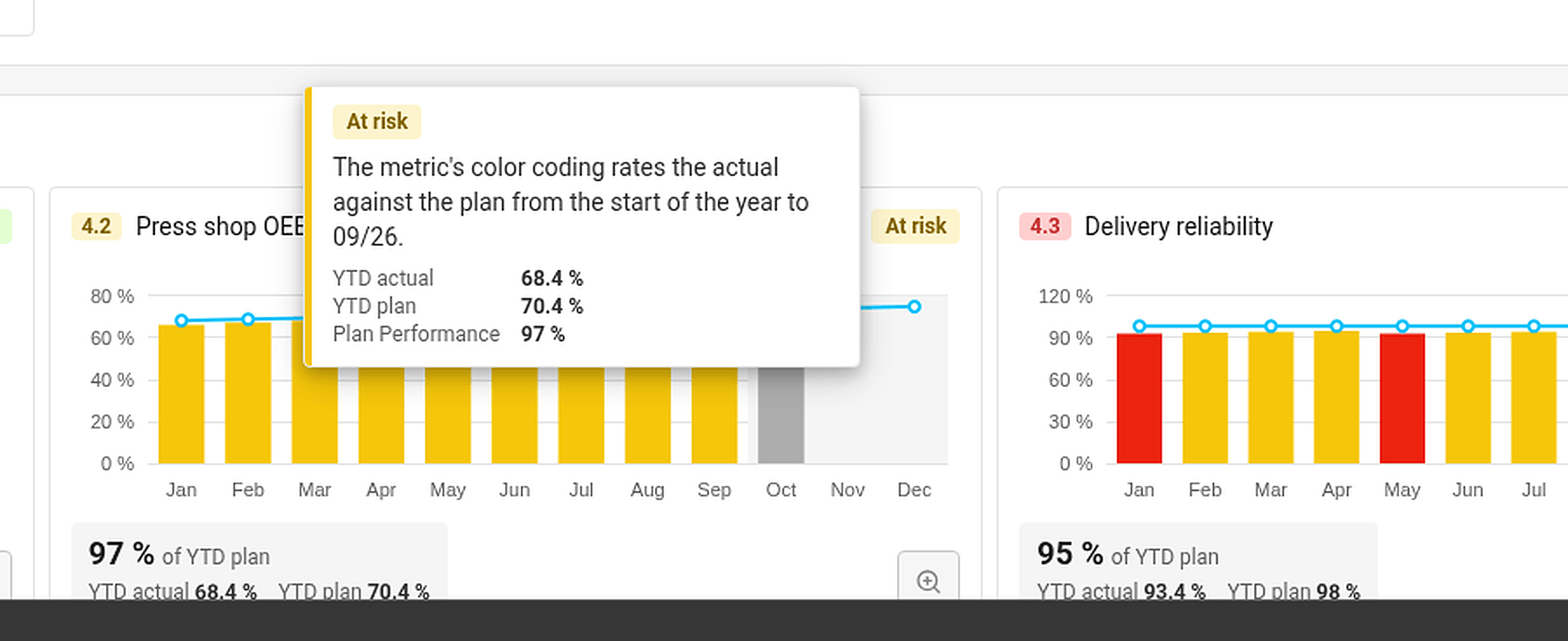
| KPI (Targets to Improve) | The color coding of its metric, comparing the year-to-date actual with the year-to-date plan up to the last closed month. No data when there is no actual or no plan. |
| Priority | The worst status of its running projects and of its child X-matrix, if it has one. No project when it has neither. |
| Annual goal | The worst status of its priorities and of the KPIs that measure them. |
| 5-year goal | The worst status of its annual goals. |
| Overall status | The worst status of the annual and 5-year goals. |
Done counts as on track. Not started, No project and No data do not count towards the status above them.
The month in progress is never rated – its value may still be incomplete.
Find out why an item has its status
Hover over a status. TeamGuru shows the reason – for example By the worst of the linked projects, or for a KPI the YTD actual, YTD plan and the percentage of the plan met.
Set a status by hand
If your judgment differs from the numbers, you can set the status of a 5-year or an annual goal yourself:
- Click Edit in the X-matrix and open the list with the pencil icon next to its name.
- In the Status column of the goal, open the menu and choose On track, At risk or Off track.
- Click Done.
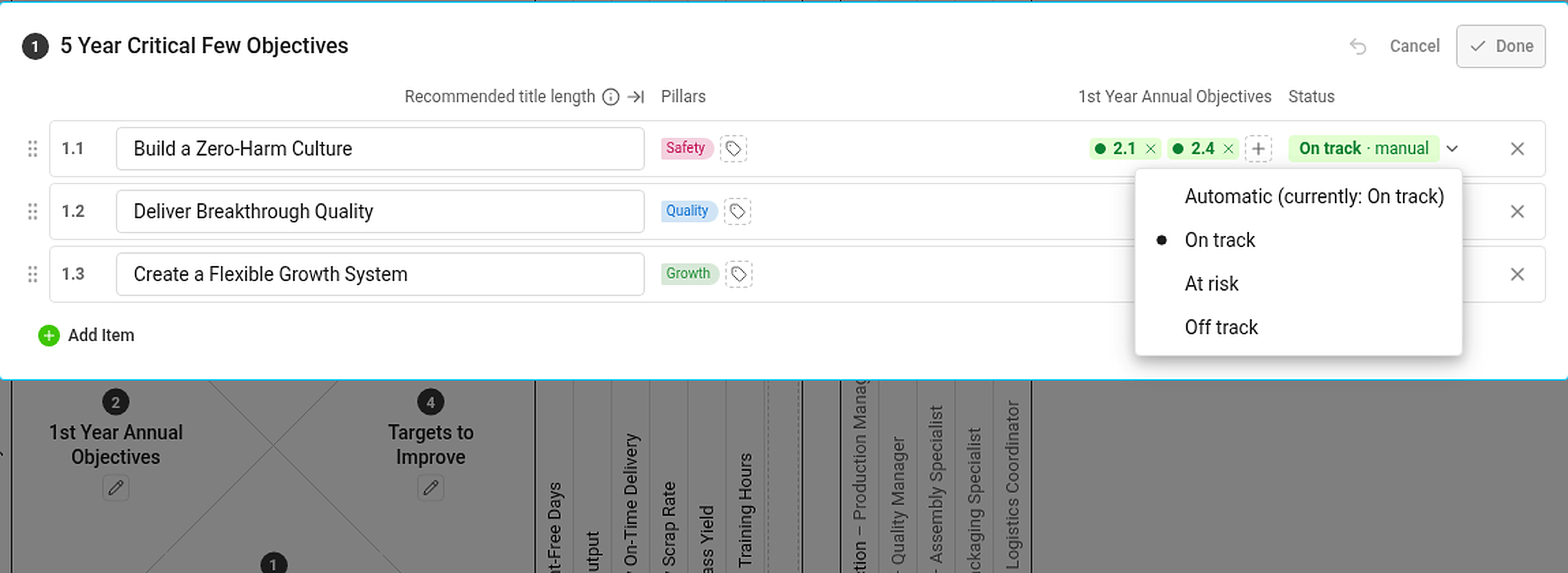
A status set by hand is marked manual and has the same effect on the statuses above it as an automatic one. If the automatic status would be different, the hover card tells you what it would be. To go back to the calculated status, choose Automatic (currently: …) in the same menu.
Statuses you cannot see the data for
If you are not allowed to see a metric or a project, you do not see its numbers or dates – but its status still counts. Everybody with access to the plan therefore sees the same statuses.
Přehledový dashboard ukazuje stav každého projektu, KPI, priority, ročního a pětiletého cíle a také celkový stav plánu. Stavy se počítají z dat, která už v TeamGuru vedete, takže je nemusíte ručně aktualizovat.
Pravidla
| Položka | Odkud se bere její stav |
|---|---|
| Projekt | Semafor projektu. Hotovo, když je projekt uzavřený, Nezahájeno před datem zahájení (nebo když datum chybí). |
| KPI (Cílové hodnoty) | Barevné hodnocení metriky, které porovnává skutečnost od začátku roku s plánem od začátku roku do posledního uzavřeného měsíce. Bez dat, když chybí skutečnost nebo plán. |
| Priorita | Nejhorší stav z jejích běžících projektů a z podřízené X-Matrix, pokud ji má. Bez projektu, když nemá ani jedno. |
| Roční cíl | Nejhorší stav z jeho priorit a z KPI, které je měří. |
| Pětiletý cíl | Nejhorší stav z jeho ročních cílů. |
| Celkový stav | Nejhorší stav z ročních a pětiletých cílů. |
Hotovo se počítá jako podle plánu. Nezahájeno, Bez projektu a Bez dat se do stavu nadřazené položky nezapočítávají.
Probíhající měsíc se nikdy nehodnotí – jeho hodnota ještě nemusí být úplná.
Proč má položka svůj stav
Najeďte myší na stav. TeamGuru ukáže důvod – například Podle nejhoršího z propojených projektů, u KPI skutečnost YTD, plán YTD a procento splnění plánu.
Ruční nastavení stavu
Pokud se váš úsudek liší od čísel, můžete stav pětiletého nebo ročního cíle nastavit sami:
- V X-Matrix klikněte na Upravit a otevřete seznam ikonou tužky vedle jeho názvu.
- Ve sloupci Stav u daného cíle otevřete menu a zvolte Podle plánu, Ohroženo nebo Mimo plán.
- Klikněte na Hotovo.
Ručně nastavený stav je označený jako ručně a na stavy nadřazených položek má stejný vliv jako automatický. Pokud by se automatický stav lišil, uvidíte ho po najetí myší. K vypočítanému stavu se vrátíte volbou Automaticky (aktuálně: …) ve stejném menu.
Stavy, k jejichž datům nemáte přístup
Pokud nesmíte vidět metriku nebo projekt, neuvidíte jejich čísla ani termíny – jejich stav se ale počítá. Všichni, kdo mají přístup k plánu, proto vidí stejné stavy.
Potřebujete další pomoc?
Napište nám. V pracovní dny obvykle odpovídáme do hodiny.