Calcul des statuts dans les Objectifs stratégiques
Traduction automatique de l'anglais. Original en anglais affiché.
The review dashboard shows a status for every project, KPI, priority, annual goal and 5-year goal, and an overall status of the plan. The statuses are calculated from the data you already keep in TeamGuru, so you do not have to update them by hand.
The rules
| Item | Where its status comes from |
|---|---|
| Project | The traffic light of the project. Done when the project is closed, Not started before its start date (or without one). |
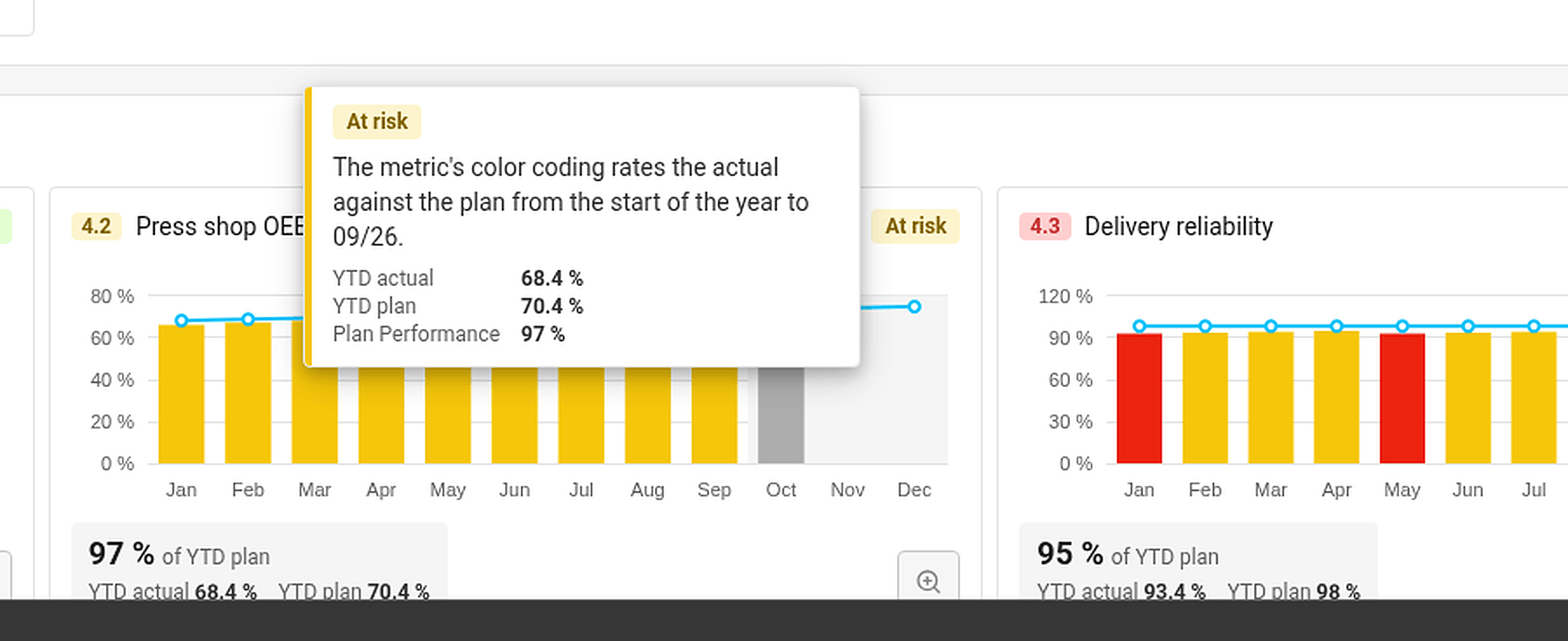
| KPI (Targets to Improve) | The color coding of its metric, comparing the year-to-date actual with the year-to-date plan up to the last closed month. No data when there is no actual or no plan. |
| Priority | The worst status of its running projects and of its child X-matrix, if it has one. No project when it has neither. |
| Annual goal | The worst status of its priorities and of the KPIs that measure them. |
| 5-year goal | The worst status of its annual goals. |
| Overall status | The worst status of the annual and 5-year goals. |
Done counts as on track. Not started, No project and No data do not count towards the status above them.
The month in progress is never rated – its value may still be incomplete.
Find out why an item has its status
Hover over a status. TeamGuru shows the reason – for example By the worst of the linked projects, or for a KPI the YTD actual, YTD plan and the percentage of the plan met.
Set a status by hand
If your judgment differs from the numbers, you can set the status of a 5-year or an annual goal yourself:
- Click Edit in the X-matrix and open the list with the pencil icon next to its name.
- In the Status column of the goal, open the menu and choose On track, At risk or Off track.
- Click Done.
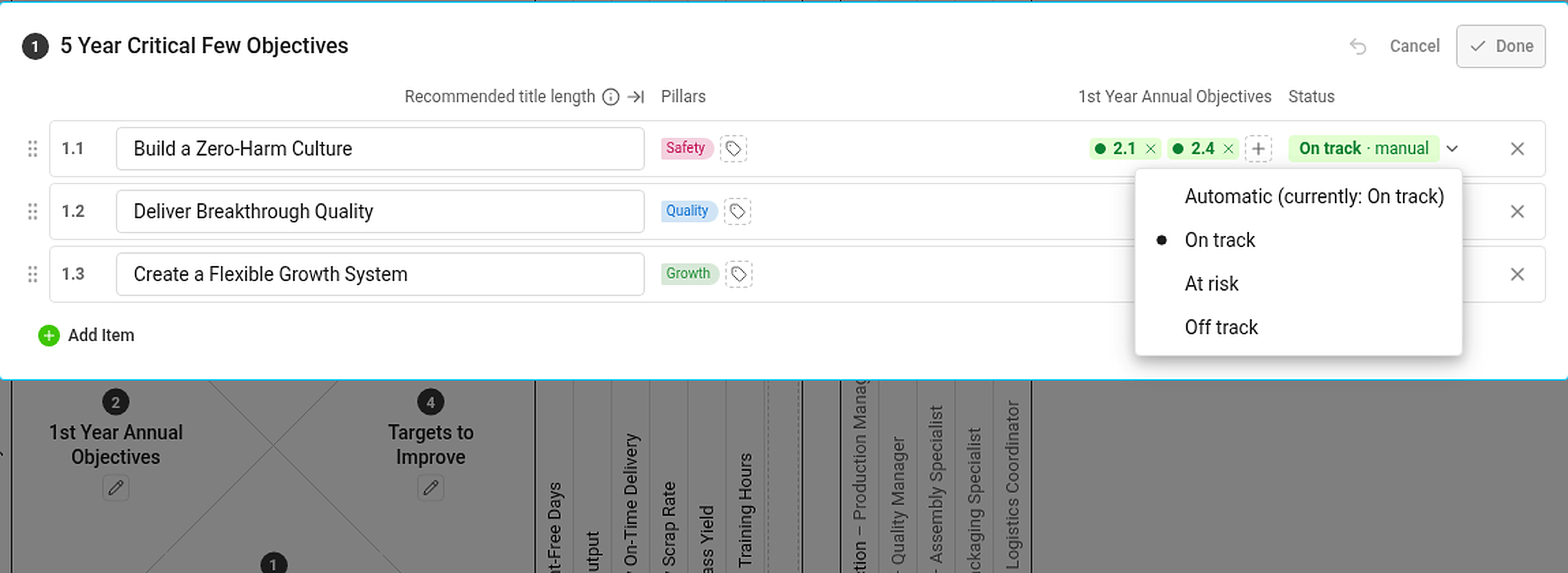
A status set by hand is marked manual and has the same effect on the statuses above it as an automatic one. If the automatic status would be different, the hover card tells you what it would be. To go back to the calculated status, choose Automatic (currently: …) in the same menu.
Statuses you cannot see the data for
If you are not allowed to see a metric or a project, you do not see its numbers or dates – but its status still counts. Everybody with access to the plan therefore sees the same statuses.
Le tableau de revue affiche un statut pour chaque projet, KPI, priorité, objectif annuel et objectif à 5 ans, ainsi qu’un statut global du plan. Les statuts sont calculés à partir des données que vous tenez déjà dans TeamGuru : inutile de les mettre à jour à la main.
Les règles
| Élément | Origine de son statut |
|---|---|
| Projet | Le feu tricolore du projet. Terminé quand le projet est clôturé, Non démarré avant sa date de début (ou s’il n’en a pas). |
| KPI (cibles à améliorer) | Le code couleur de son indicateur, qui compare le réel cumulé depuis le début de l’année au plan cumulé, jusqu’au dernier mois clôturé. Aucune donnée s’il manque le réel ou le plan. |
| Priorité | Le plus mauvais statut parmi ses projets en cours et sa X-Matrix enfant, si elle en a une. Aucun projet si elle n’a ni l’un ni l’autre. |
| Objectif annuel | Le plus mauvais statut parmi ses priorités et les KPI qui les mesurent. |
| Objectif à 5 ans | Le plus mauvais statut parmi ses objectifs annuels. |
| Statut global | Le plus mauvais statut parmi les objectifs annuels et à 5 ans. |
Terminé compte comme en bonne voie. Non démarré, Aucun projet et Aucune donnée ne comptent pas dans le statut du niveau supérieur.
Le mois en cours n’est jamais évalué : sa valeur peut encore être incomplète.
Comprendre pourquoi un élément a ce statut
Survolez un statut. TeamGuru en affiche la raison, par exemple Selon le plus mauvais des projets liés, ou, pour un KPI, le réel YTD, le plan YTD et le pourcentage du plan atteint.
Définir un statut à la main
Si votre jugement diffère des chiffres, vous pouvez définir vous-même le statut d’un objectif à 5 ans ou d’un objectif annuel :
- Cliquez sur Modifier dans la X-Matrix et ouvrez la liste avec le crayon à côté de son nom.
- Dans la colonne Statut de l’objectif, ouvrez le menu et choisissez En bonne voie, À risque ou Hors trajectoire.
- Cliquez sur Terminé.
Un statut défini à la main est marqué manuel et agit sur les statuts supérieurs exactement comme un statut automatique. Si le statut automatique est différent, la bulle de survol vous l’indique. Pour revenir au statut calculé, choisissez Automatique (actuellement : …) dans le même menu.
Statuts dont vous ne voyez pas les données
Si vous n’êtes pas autorisé à voir un indicateur ou un projet, vous ne voyez ni ses chiffres ni ses dates, mais son statut compte quand même. Toutes les personnes qui ont accès au plan voient donc les mêmes statuts.
Besoin d'aide supplémentaire ?
Écrivez-nous. Les jours ouvrés, nous répondons en général en moins d'une heure.