战略部署中的状态如何计算
本文由英文机器翻译。 当前显示英文原文。
The review dashboard shows a status for every project, KPI, priority, annual goal and 5-year goal, and an overall status of the plan. The statuses are calculated from the data you already keep in TeamGuru, so you do not have to update them by hand.
The rules
| Item | Where its status comes from |
|---|---|
| Project | The traffic light of the project. Done when the project is closed, Not started before its start date (or without one). |
| KPI (Targets to Improve) | The color coding of its metric, comparing the year-to-date actual with the year-to-date plan up to the last closed month. No data when there is no actual or no plan. |
| Priority | The worst status of its running projects and of its child X-matrix, if it has one. No project when it has neither. |
| Annual goal | The worst status of its priorities and of the KPIs that measure them. |
| 5-year goal | The worst status of its annual goals. |
| Overall status | The worst status of the annual and 5-year goals. |
Done counts as on track. Not started, No project and No data do not count towards the status above them.
The month in progress is never rated – its value may still be incomplete.
Find out why an item has its status
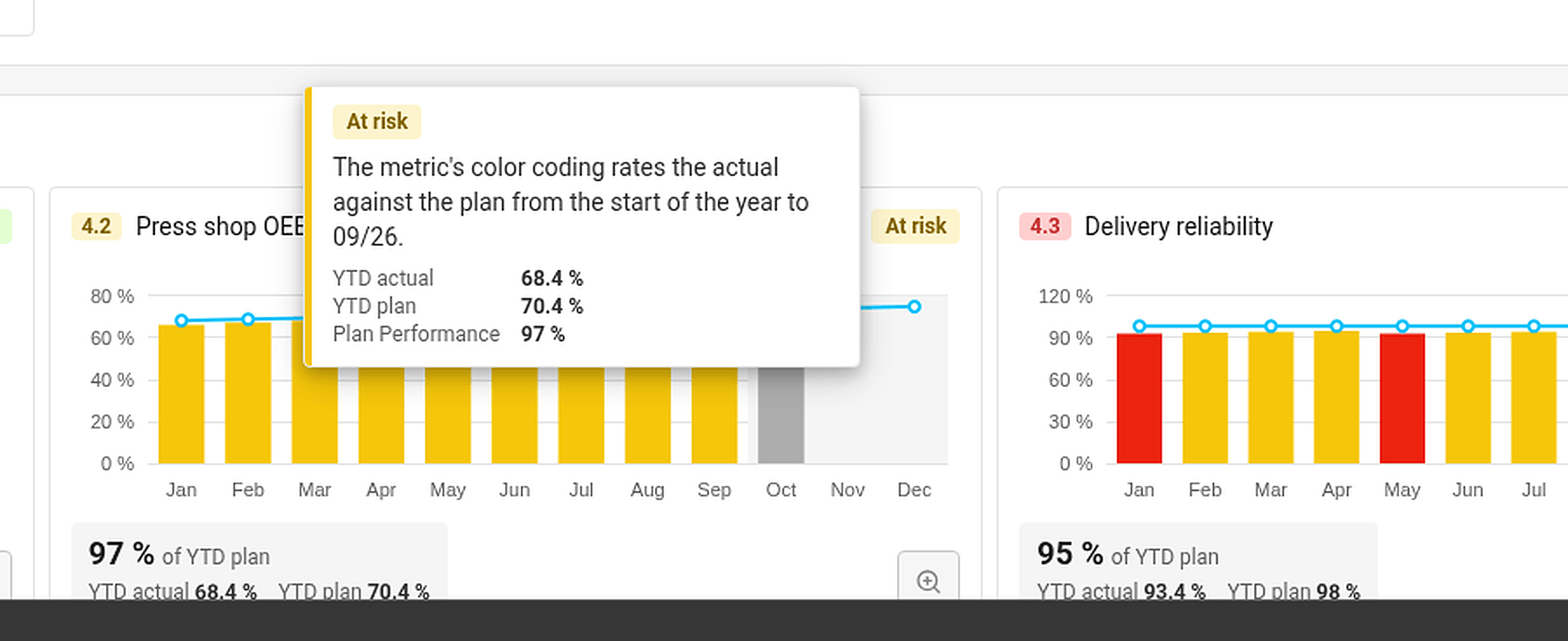
Hover over a status. TeamGuru shows the reason – for example By the worst of the linked projects, or for a KPI the YTD actual, YTD plan and the percentage of the plan met.
Set a status by hand
If your judgment differs from the numbers, you can set the status of a 5-year or an annual goal yourself:
- Click Edit in the X-matrix and open the list with the pencil icon next to its name.
- In the Status column of the goal, open the menu and choose On track, At risk or Off track.
- Click Done.
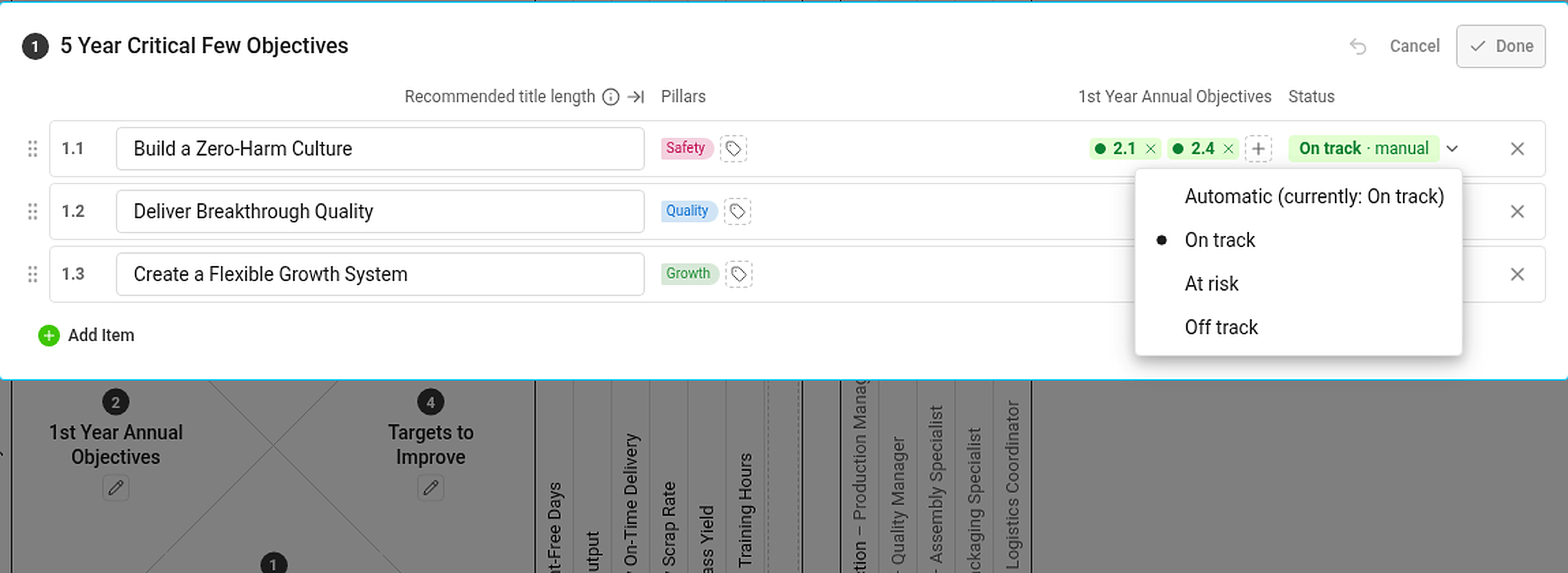
A status set by hand is marked manual and has the same effect on the statuses above it as an automatic one. If the automatic status would be different, the hover card tells you what it would be. To go back to the calculated status, choose Automatic (currently: …) in the same menu.
Statuses you cannot see the data for
If you are not allowed to see a metric or a project, you do not see its numbers or dates – but its status still counts. Everybody with access to the plan therefore sees the same statuses.
评审仪表板会显示每个项目、KPI、优先事项、年度目标和5年目标的状态,以及计划的整体状态。这些状态根据您已在TeamGuru中维护的数据自动计算,无需手动更新。
计算规则
| 条目 | 状态来源 |
|---|---|
| 项目 | 项目的红绿灯状态。项目关闭后为已完成,开始日期之前(或未设开始日期)为未开始。 |
| KPI(改进目标) | 其指标的颜色编码,截至最近一个已结束的月份,比较年初至今的实际值与年初至今的计划值。没有实际值或计划值时为无数据。 |
| 优先事项 | 取其进行中的项目以及下级X-matrix(如有)中最差的状态。两者都没有时为无项目。 |
| 年度目标 | 取其优先事项以及衡量这些优先事项的KPI中最差的状态。 |
| 5年目标 | 取其年度目标中最差的状态。 |
| 整体状态 | 取年度目标和5年目标中最差的状态。 |
已完成视为正常。未开始、无项目和无数据不计入上级状态。
当前进行中的月份从不评级,因为其数值可能尚不完整。
了解条目状态的原因
将鼠标悬停在状态上。TeamGuru会显示原因,例如按关联项目中最差的状态;对于KPI,则显示年初至今实际值、年初至今计划值以及计划完成百分比。
手动设置状态
如果您的判断与数据不同,可以自行设置5年目标或年度目标的状态:
- 在X-matrix中点击编辑,然后点击列表名称旁的铅笔图标打开该列表。
- 在目标的状态列中打开菜单,选择正常、有风险或偏离。
- 点击完成。
手动设置的状态会标记为手动,对上级状态的影响与自动状态相同。如果自动计算的状态与之不同,悬停卡片会告诉您自动状态是什么。要恢复为计算状态,请在同一菜单中选择自动(当前:…)。
无权查看数据的状态
如果您无权查看某个指标或项目,就看不到它的数值或日期,但它的状态仍会计入。因此,所有有权访问该计划的人看到的状态都相同。
还需要帮助吗?
请给我们留言。工作日我们通常会在一小时内回复。