保护报告和幻灯片设置
本文由英文机器翻译。 当前显示英文原文。
You can use one of these three layers of data protection on your report, or combine them:
- Protect the content of your report against viewing.
- Lock the settings of the report definition.
- Lock the settings on the slide level.
Protect the report
Restrict who can view the report
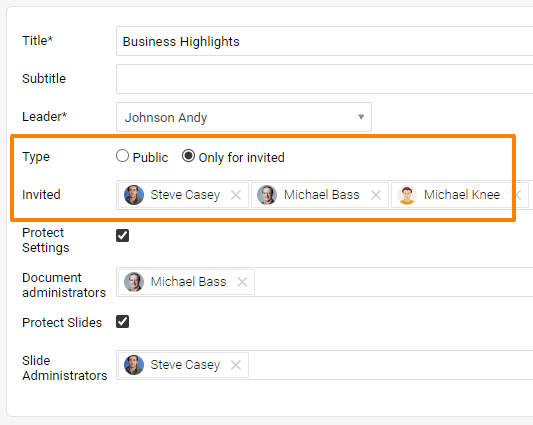
If your report contains sensitive data that only specific team members may view, lock the report by changing its Type from Public to Only for invited, and list these members below.
Lock the report definition
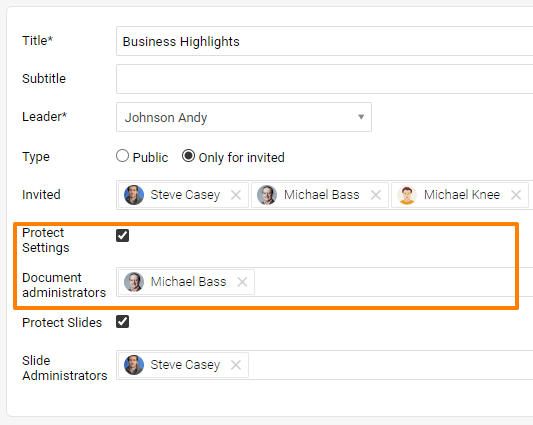
You can lock the settings of the report definition, including the slide update (= topic update). To make sure that the report definition doesn’t get changed and the report itself isn’t copied, use the Protect Settings function and list the users who are allowed to do so as Document Administrators. These administrators can change the report definition as well as the content of the slides (topic update).
Lock the slide settings
Let users edit all slides
Sometimes you need to allow some team members to edit the slides (do the topic update) in a locked report. Use the Protect Slides function and then decide whether a user can edit all the slides or just some of them.
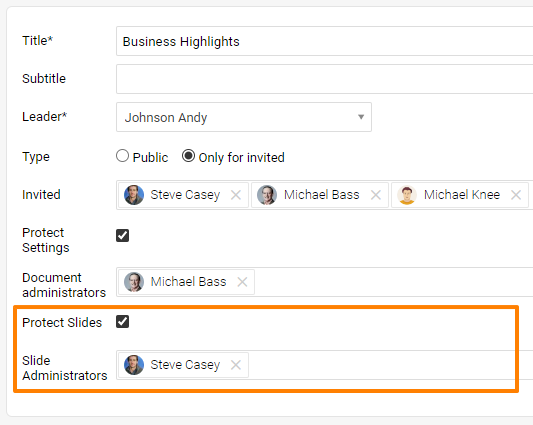
If the user can edit all the slides in the report, just set this person up as a Slide Administrator.
Let users edit selected slides
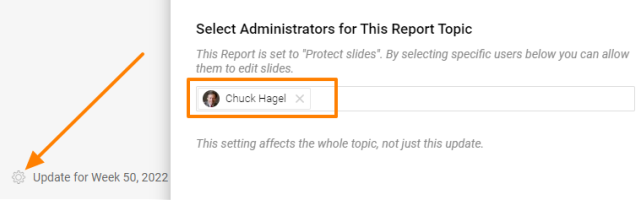
If this person should edit just some of the slides (topics), go to the particular slide and set the person up there.
您可以对报告使用以下三层数据保护中的任意一层,也可以组合使用:
- 保护报告内容,限制查看。
- 锁定报告定义的设置。
- 在幻灯片级别锁定设置。
保护报告
限制可查看报告的人员
如果报告包含仅限特定团队成员查看的敏感数据,请将报告的类型从公开改为仅限受邀人员,并在下方列出这些成员,以锁定报告。
锁定报告定义
您可以锁定报告定义的设置,包括幻灯片更新(即主题更新)。为确保报告定义不被更改、报告本身不被复制,请使用保护设置功能,并将有权进行这些操作的用户列为文档管理员。这些管理员可以更改报告定义以及幻灯片内容(主题更新)。
锁定幻灯片设置
允许用户编辑所有幻灯片
有时需要允许部分团队成员在已锁定的报告中编辑幻灯片(进行主题更新)。请使用保护幻灯片功能,然后决定用户可以编辑全部幻灯片还是仅部分幻灯片。
如果用户可以编辑报告中的所有幻灯片,只需将其设为幻灯片管理员。
允许用户编辑选定的幻灯片
如果此人只应编辑部分幻灯片(主题),请进入相应幻灯片,在那里为其进行设置。
还需要帮助吗?
请给我们留言。工作日我们通常会在一小时内回复。