如何将X-matrix链接为计划层级
本文由英文机器翻译。 当前显示英文原文。
Large organizations cascade strategy: a corporate plan, a plant plan, a department plan. The Plan hierarchy in the Main objective panel shows where your plan fits – the plan above it (↱) and the plans below it (↳).

How plans become connected
There are two ways, and both are shown in the hierarchy:
- Through a priority – a priority of the parent plan points to your plan as its child X-matrix (see How to link priorities to projects). This is the usual way: the child plan then also counts towards the status of that priority.
- As a whole – the whole X-matrix is linked to another X-matrix, without a link to a particular priority.
Link a plan as a whole
- In the Main objective panel click Edit.
- Next to No parent plan or No child plans click Assign.
- Choose the X-matrix. You can only pick plans you may open, never the plan itself and never a plan that would make the hierarchy circular.
- Click Done.
To remove a link made this way, remove the plan from the hierarchy in the same edit mode and click Done. A link made through a priority is changed in the row of that priority.
Read the hierarchy
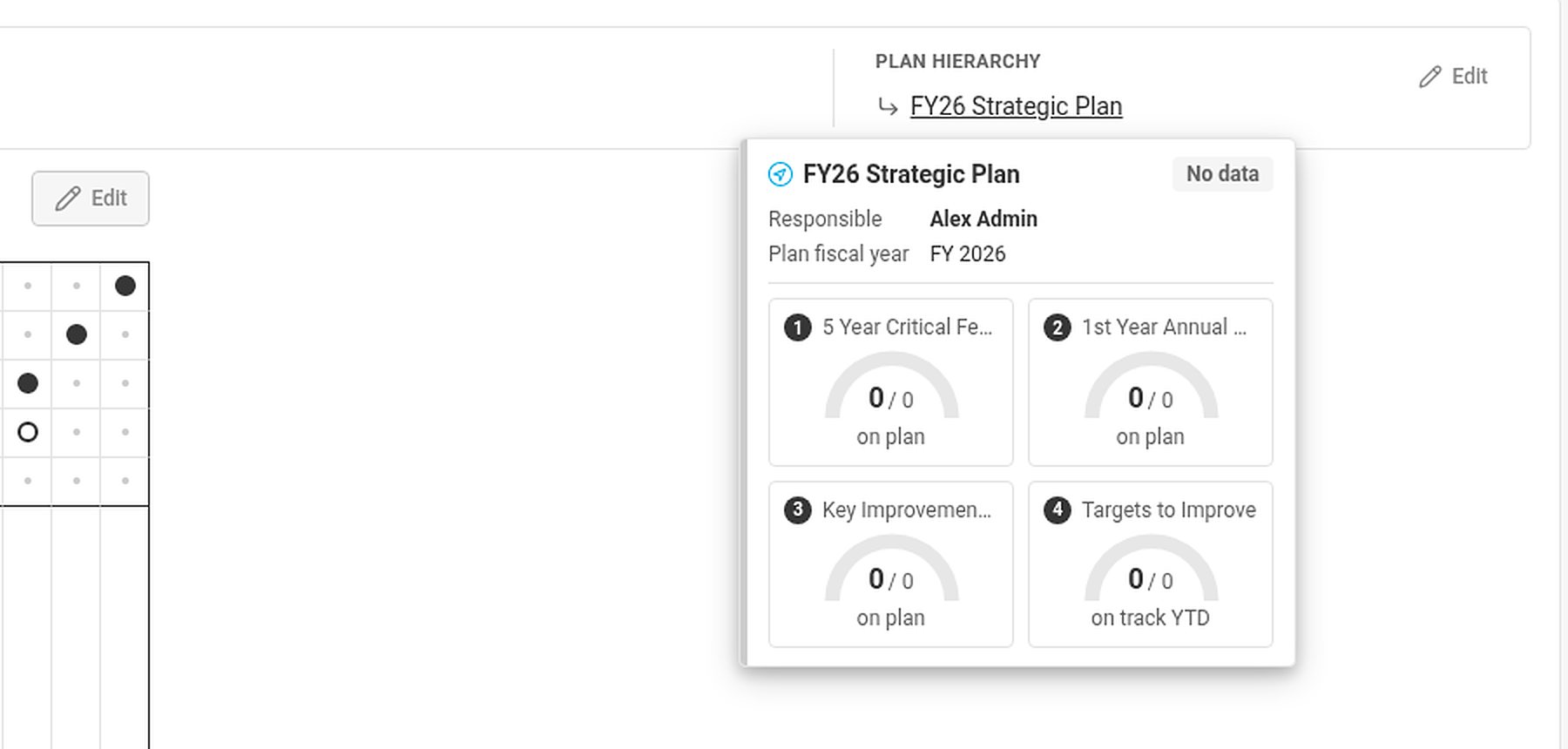
Hover over a linked plan to see a summary card: owner, plan year, overall status and the gauges of its four lists. Plans you are not allowed to open are shown as Hidden document. If there are more than three plans on a line, the rest is behind +N more.
Plan expectations
A plan that sits under a priority of a parent plan also shows What the parent plan expects – the key priorities and KPIs of the parent plan that this X-matrix can support – while your own plan is not complete.
大型组织会逐级分解战略:公司计划、工厂计划、部门计划。主要目标面板中的计划层级显示您的计划所处的位置:上级计划(↱)和下级计划(↳)。
计划如何相互关联
有两种方式,两者都会显示在层级中:
- 通过优先事项:上级计划的某个优先事项将您的计划指定为其下级X-matrix(参见如何将优先事项关联到项目)。这是常用方式:下级计划还会计入该优先事项的状态。
- 整体关联:整个X-matrix关联到另一个X-matrix,不关联到具体的优先事项。
整体关联计划
- 在主要目标面板中点击编辑。
- 在无上级计划或无下级计划旁点击分配。
- 选择X-matrix。只能选择您有权打开的计划,不能选择计划本身,也不能选择会导致层级循环的计划。
- 点击完成。
要删除以这种方式建立的关联,请在同一编辑模式下将该计划从层级中移除,然后点击完成。通过优先事项建立的关联需在该优先事项所在行中更改。
查看层级
将鼠标悬停在关联的计划上,可查看摘要卡片:负责人、计划年度、整体状态及其四个列表的仪表盘。您无权打开的计划显示为隐藏文档。如果一行中的计划超过三个,其余计划会收在还有N个中。
计划期望
位于上级计划某个优先事项之下的计划,在您自己的计划尚未完成时,还会显示上级计划的期望,即该X-matrix可以支持的上级计划的关键优先事项和KPI。
还需要帮助吗?
请给我们留言。工作日我们通常会在一小时内回复。