如何将优先事项关联到项目并查看其进展
本文由英文机器翻译。 当前显示英文原文。
Priorities (list 3 of the matrix) are the work that brings the change. Link every priority to a project in Action Lists and the review dashboard shows its progress for you.
Link a project, a metric dashboard or a child X-matrix
- Click Edit above the matrix.
- Click the pencil under Key Improvement Priorities (the list names come from the template of your plan).
- In the row of the priority, click + in the Documents column.
- Search for the document and pick it – an action list (project), a metric dashboard or another X-matrix. You can also create a new one straight from the picker.
- Click Done.
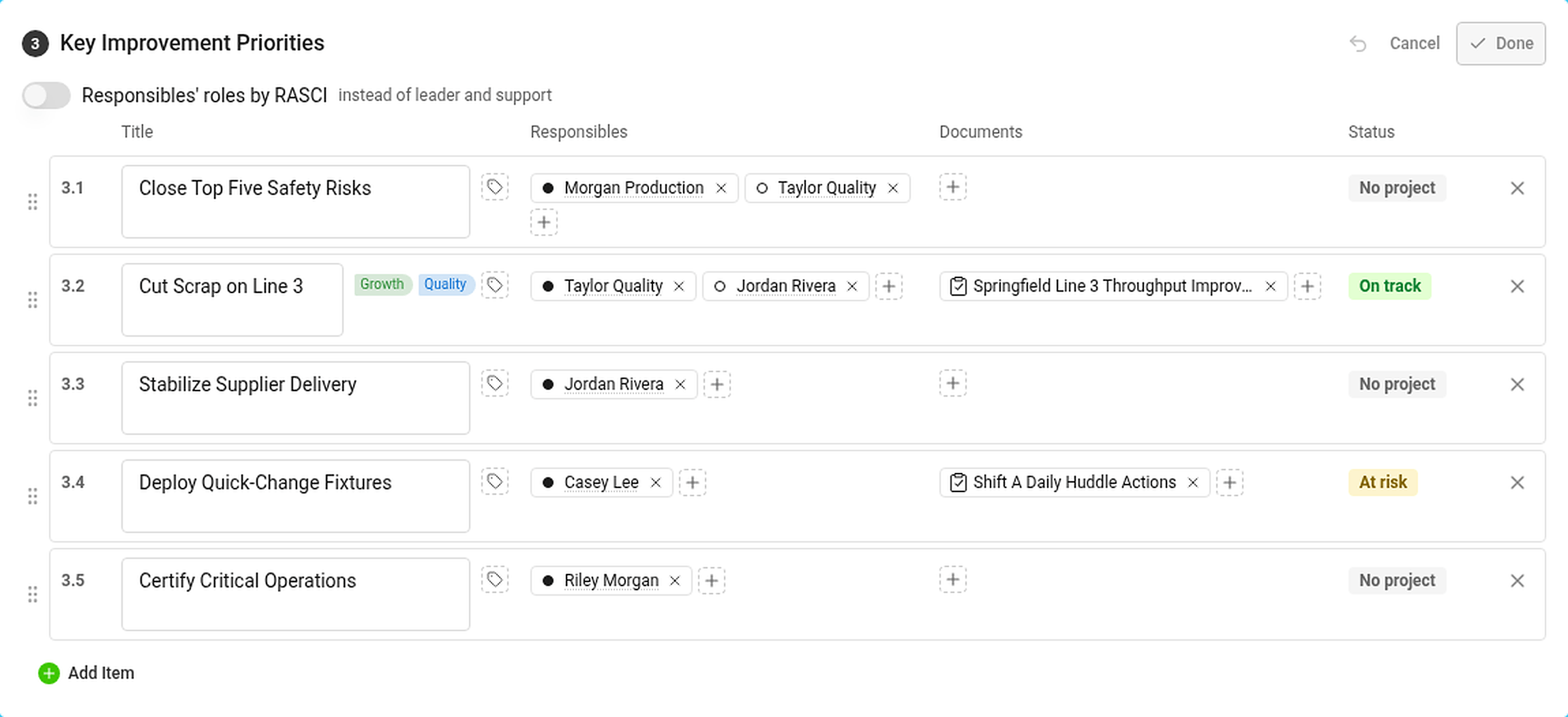
In the Responsibles column, click + to add the person who answers for the priority. The dot in front of the name is the role: filled for leader, hollow for support (or RASCI letters, if you turned RASCI on).
The Status column shows the status of the priority – see How statuses are calculated.
Where you see the progress

The Projects section lists every project linked to a priority:
- the status of the project and its progress bar – the black tick is where the project should be today according to its plan,
- the days left (or overdue) and the percentage done,
- the codes of the priorities and the pillars it belongs to.
Hover over a project for its leader, milestones and the number of tasks – total, closed and overdue. In the Strategic Plan view the projects are in the column Projects and documents.
If you are not allowed to open a project, its status still counts but its dates and progress are hidden.
A priority with its own X-matrix
Link another X-matrix to a priority and its overall status counts towards the status of the priority. Use this to connect the plan of a plant to the plan of a department. See How to link X-matrices into a plan hierarchy.
优先事项(矩阵的第3个列表)是带来变革的具体工作。将每个优先事项关联到行动清单中的一个项目,评审仪表板就会为您显示其进展。
关联项目、指标仪表板或下级X-matrix
- 点击矩阵上方的编辑。
- 点击关键改进优先事项下方的铅笔图标(列表名称来自计划的模板)。
- 在该优先事项所在行中,点击文档列中的 +。
- 搜索并选择文档:行动清单(项目)、指标仪表板或其他X-matrix。也可以直接在选择器中新建。
- 点击完成。
在负责人列中点击 +,添加负责该优先事项的人员。姓名前的圆点表示角色:实心为主导,空心为支持(如果已开启RASCI,则显示RASCI字母)。
状态列显示优先事项的状态,参见状态如何计算。
在哪里查看进展
项目部分列出与优先事项关联的所有项目:
- 项目的状态和进度条:黑色刻度表示按计划项目今天应达到的位置,
- 剩余(或逾期)天数和完成百分比,
- 所属优先事项的编号和支柱。
将鼠标悬停在项目上,可查看其负责人、里程碑以及任务数量(总数、已关闭和已逾期)。在战略计划视图中,项目位于项目和文档列。
如果您无权打开某个项目,其状态仍会计入,但日期和进度会被隐藏。
拥有自己X-matrix的优先事项
将另一个X-matrix关联到优先事项后,该X-matrix的整体状态会计入优先事项的状态。可以用这种方式将工厂的计划与部门的计划连接起来。参见如何将X-matrix链接为计划层级。
还需要帮助吗?
请给我们留言。工作日我们通常会在一小时内回复。