How to create a new 8D report
-
Add a new 8D report. To create a new 8D report, click the Add button.

-
Fill in the template name. See How to create a new 8D template file.
-
Fill in all the details.
-
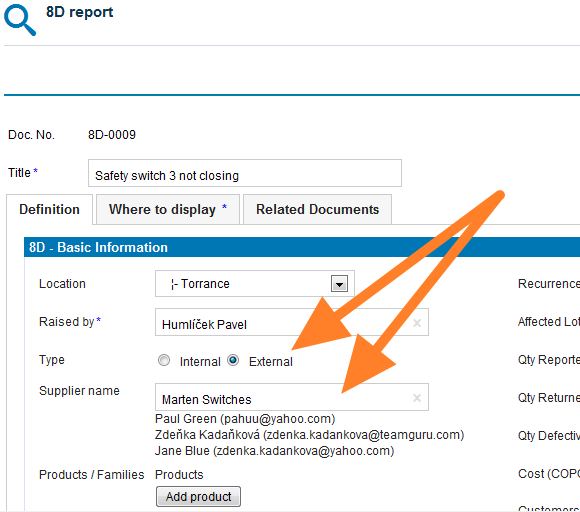
Select the 8D type. Select the External type of 8D if the issue is related to an external partner, or the Internal type if the issue is related to an intercompany partner.
-
Give an external partner access. If you select the External type and would like your partner to fill in the fields online, you first need to give him/her access to the 8D reports. See How to create a new supplier and his login details.
-
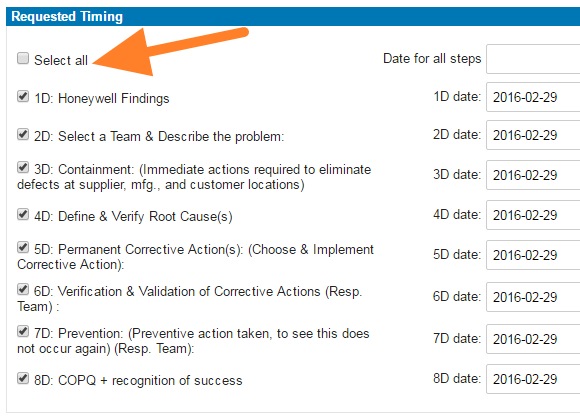
Select the steps and timing. Select the requested 8D steps and their timing.
-
Save the report. Click Save and view.
-
Inform the external partner. If your 8D request is external, follow these instructions: How to inform an internal or external supplier of a newly created 8D report.
Video guide
Still need help?
Write to us. We usually reply within an hour on business days.