Jak vytvořit nový 8D report
Strojový překlad z angličtiny. Zobrazen anglický originál.
-
Add a new 8D report. To create a new 8D report, click the Add button.

-
Fill in the template name. See How to create a new 8D template file.
-
Fill in all the details.
-
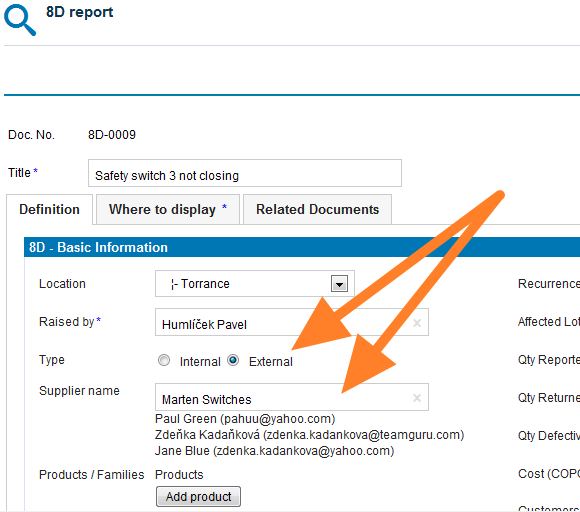
Select the 8D type. Select the External type of 8D if the issue is related to an external partner, or the Internal type if the issue is related to an intercompany partner.
-
Give an external partner access. If you select the External type and would like your partner to fill in the fields online, you first need to give him/her access to the 8D reports. See How to create a new supplier and his login details.
-
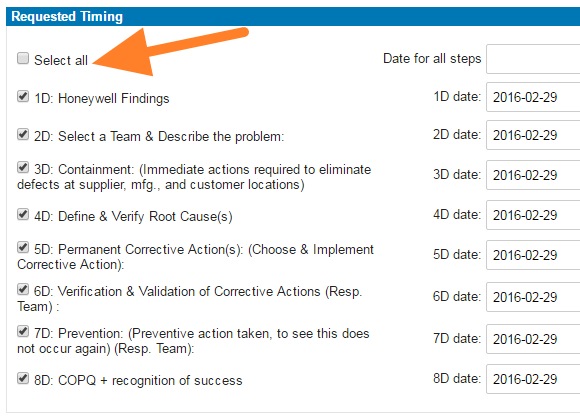
Select the steps and timing. Select the requested 8D steps and their timing.
-
Save the report. Click Save and view.
-
Inform the external partner. If your 8D request is external, follow these instructions: How to inform an internal or external supplier of a newly created 8D report.
Video guide
-
Přidejte nový 8D report. Nový 8D report vytvoříte kliknutím na tlačítko Přidat.
-
Vyplňte název šablony. Viz Jak vytvořit novou šablonu 8D.
-
Vyplňte všechny údaje.
-
Vyberte typ 8D. Typ Externí zvolte, pokud se problém týká externího partnera, typ Interní, pokud se týká partnera v rámci skupiny.
-
Dejte externímu partnerovi přístup. Pokud zvolíte typ Externí a chcete, aby partner vyplňoval pole online, musíte mu nejprve dát přístup k 8D reportům. Viz Jak vytvořit nového dodavatele a jeho přihlašovací údaje.
-
Vyberte kroky a termíny. Vyberte požadované kroky 8D a jejich termíny.
-
Uložte report. Klikněte na Uložit a zobrazit.
-
Informujte externího partnera. Pokud je váš požadavek na 8D externí, postupujte podle návodu Jak informovat interního nebo externího dodavatele o nově vytvořeném 8D reportu.
Video návod
Potřebujete další pomoc?
Napište nám. V pracovní dny obvykle odpovídáme do hodiny.