如何创建新的8D报告
本文由英文机器翻译。 当前显示英文原文。
-
Add a new 8D report. To create a new 8D report, click the Add button.

-
Fill in the template name. See How to create a new 8D template file.
-
Fill in all the details.
-
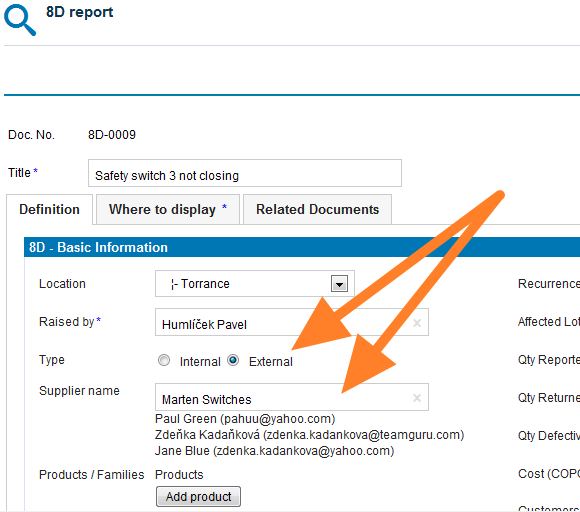
Select the 8D type. Select the External type of 8D if the issue is related to an external partner, or the Internal type if the issue is related to an intercompany partner.
-
Give an external partner access. If you select the External type and would like your partner to fill in the fields online, you first need to give him/her access to the 8D reports. See How to create a new supplier and his login details.
-
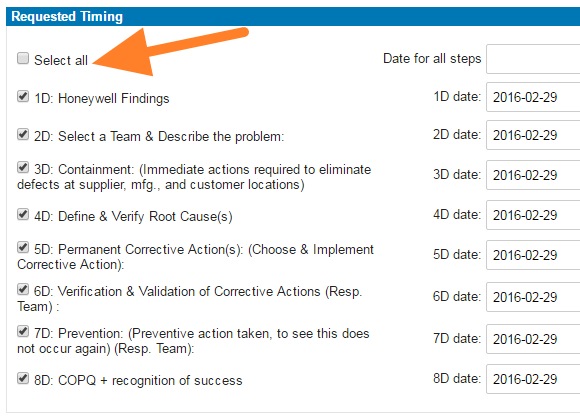
Select the steps and timing. Select the requested 8D steps and their timing.
-
Save the report. Click Save and view.
-
Inform the external partner. If your 8D request is external, follow these instructions: How to inform an internal or external supplier of a newly created 8D report.
Video guide
-
添加新的8D报告。 要创建新的8D报告,请点击 添加 按钮。
-
填写模板名称。 参见如何创建新的8D模板文件。
-
填写所有详细信息。
-
选择8D类型。 如果问题与外部合作伙伴有关,请选择 外部 类型;如果问题与集团内部的合作伙伴有关,请选择 内部 类型。
-
为外部合作伙伴开通访问权限。 如果选择 外部 类型,并希望合作伙伴在线填写各字段,您需要先为其开通8D报告的访问权限。参见如何创建新供应商及其登录信息。
-
选择步骤和时间。 选择所需的8D步骤及其时间安排。
-
保存报告。 点击 保存并查看。
-
通知外部合作伙伴。 如果您的8D请求是外部的,请按照以下说明操作:如何将新创建的8D报告通知内部或外部供应商。
视频教程
还需要帮助吗?
请给我们留言。工作日我们通常会在一小时内回复。