Jak utworzyć nowy raport 8D
Tłumaczenie maszynowe z angielskiego. Wyświetlany jest oryginał po angielsku.
-
Add a new 8D report. To create a new 8D report, click the Add button.

-
Fill in the template name. See How to create a new 8D template file.
-
Fill in all the details.
-
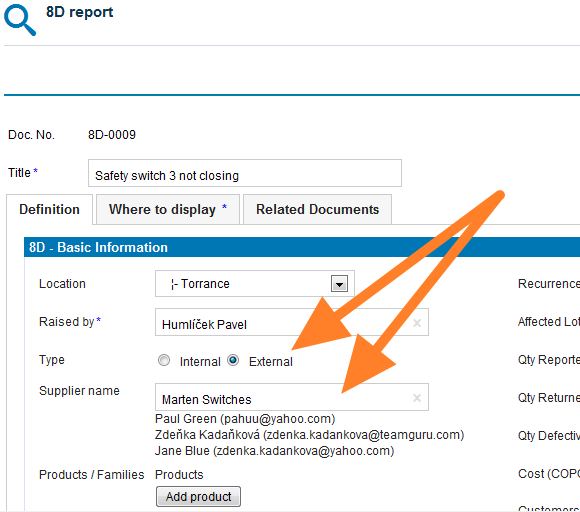
Select the 8D type. Select the External type of 8D if the issue is related to an external partner, or the Internal type if the issue is related to an intercompany partner.
-
Give an external partner access. If you select the External type and would like your partner to fill in the fields online, you first need to give him/her access to the 8D reports. See How to create a new supplier and his login details.
-
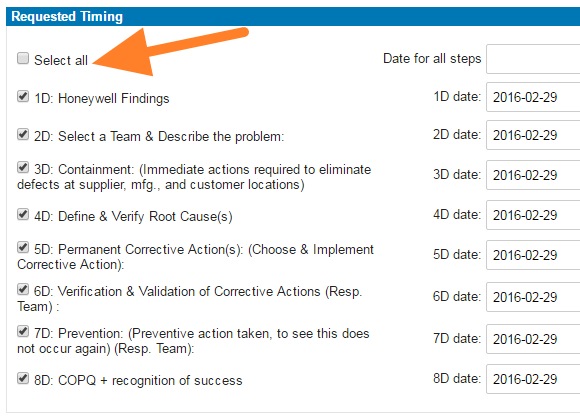
Select the steps and timing. Select the requested 8D steps and their timing.
-
Save the report. Click Save and view.
-
Inform the external partner. If your 8D request is external, follow these instructions: How to inform an internal or external supplier of a newly created 8D report.
Video guide
-
Dodaj nowy raport 8D. Aby utworzyć nowy raport 8D, kliknij przycisk Dodaj.
-
Wpisz nazwę szablonu. Zobacz Jak utworzyć nowy szablon 8D.
-
Uzupełnij wszystkie szczegóły.
-
Wybierz typ 8D. Wybierz typ Zewnętrzny, jeśli problem dotyczy partnera zewnętrznego, lub Wewnętrzny, jeśli dotyczy partnera z tej samej grupy firm.
-
Daj dostęp partnerowi zewnętrznemu. Jeśli wybierzesz typ Zewnętrzny i chcesz, aby partner wypełniał pola online, najpierw daj mu dostęp do raportów 8D. Zobacz Jak utworzyć nowego dostawcę i jego dane logowania.
-
Wybierz kroki i terminy. Wybierz wymagane kroki 8D i ich terminy.
-
Zapisz raport. Kliknij Zapisz i wyświetl.
-
Poinformuj partnera zewnętrznego. Jeśli zgłoszenie 8D jest zewnętrzne, postępuj według instrukcji: Jak poinformować dostawcę wewnętrznego lub zewnętrznego o nowym raporcie 8D.
Wideo
Potrzebujesz dalszej pomocy?
Napisz do nas. W dni robocze zwykle odpowiadamy w ciągu godziny.