Cómo crear un nuevo informe 8D
Traducción automática del inglés. Se muestra el original en inglés.
-
Add a new 8D report. To create a new 8D report, click the Add button.

-
Fill in the template name. See How to create a new 8D template file.
-
Fill in all the details.
-
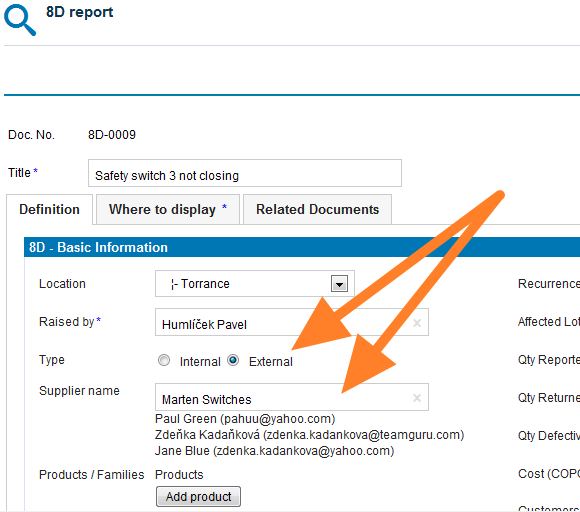
Select the 8D type. Select the External type of 8D if the issue is related to an external partner, or the Internal type if the issue is related to an intercompany partner.
-
Give an external partner access. If you select the External type and would like your partner to fill in the fields online, you first need to give him/her access to the 8D reports. See How to create a new supplier and his login details.
-
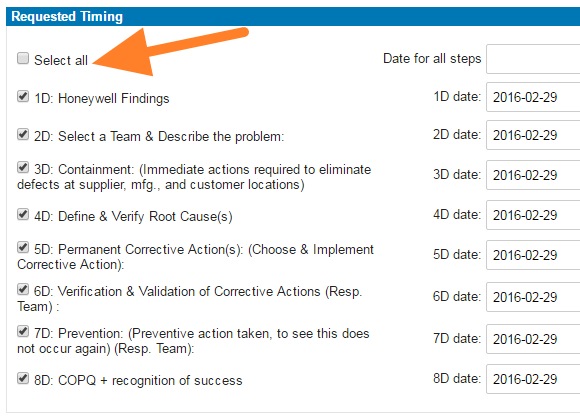
Select the steps and timing. Select the requested 8D steps and their timing.
-
Save the report. Click Save and view.
-
Inform the external partner. If your 8D request is external, follow these instructions: How to inform an internal or external supplier of a newly created 8D report.
Video guide
-
Agregue un nuevo informe 8D. Para crear un nuevo informe 8D, haga clic en el botón Agregar.
-
Elija la plantilla. Vea Cómo crear una nueva plantilla 8D.
-
Complete todos los detalles.
-
Elija el tipo de 8D. Elija el tipo Externo si el problema está relacionado con un partner externo, o el tipo Interno si está relacionado con un partner de otra empresa del grupo.
-
Dé acceso al partner externo. Si elige el tipo Externo y quiere que su partner complete los campos en línea, primero debe darle acceso a los informes 8D. Vea Cómo crear un nuevo proveedor y sus datos de acceso.
-
Elija los pasos y los plazos. Elija los pasos 8D solicitados y sus plazos.
-
Guarde el informe. Haga clic en Guardar y ver.
-
Informe al partner externo. Si su solicitud 8D es externa, siga estas instrucciones: Cómo informar a un proveedor interno o externo sobre un nuevo informe 8D.
Video
¿Necesita más ayuda?
Escríbanos. En días laborables solemos responder en menos de una hora.