Ako vytvoriť nový 8D report
Strojový preklad z angličtiny. Zobrazený je anglický originál.
-
Add a new 8D report. To create a new 8D report, click the Add button.

-
Fill in the template name. See How to create a new 8D template file.
-
Fill in all the details.
-
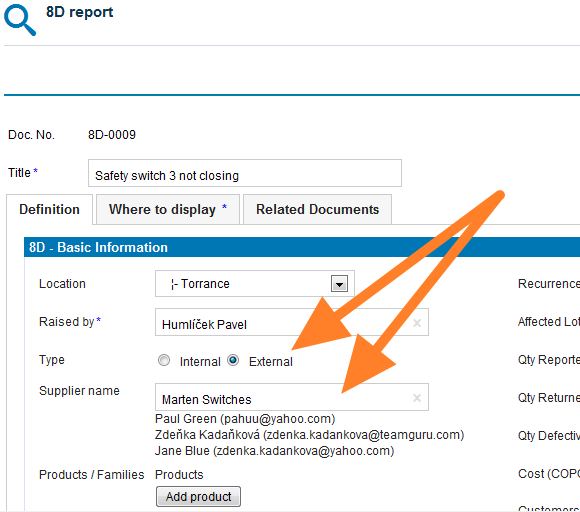
Select the 8D type. Select the External type of 8D if the issue is related to an external partner, or the Internal type if the issue is related to an intercompany partner.
-
Give an external partner access. If you select the External type and would like your partner to fill in the fields online, you first need to give him/her access to the 8D reports. See How to create a new supplier and his login details.
-
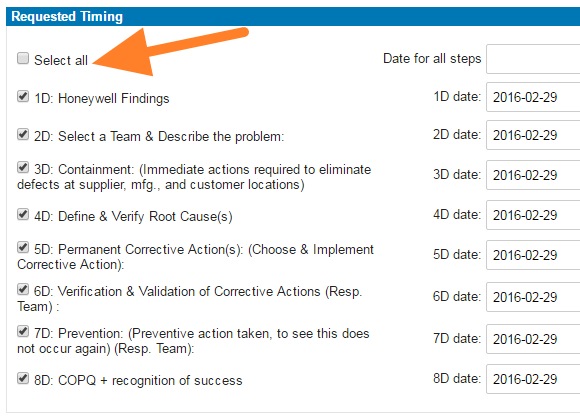
Select the steps and timing. Select the requested 8D steps and their timing.
-
Save the report. Click Save and view.
-
Inform the external partner. If your 8D request is external, follow these instructions: How to inform an internal or external supplier of a newly created 8D report.
Video guide
-
Pridajte nový 8D report. Nový 8D report vytvoríte kliknutím na tlačidlo Pridať.
-
Vyplňte názov šablóny. Pozrite Ako vytvoriť novú 8D šablónu.
-
Vyplňte všetky údaje.
-
Zvoľte typ 8D. Ak sa problém týka externého partnera, zvoľte typ 8D Externý; ak sa týka partnera v rámci skupiny, zvoľte typ Interný.
-
Dajte externému partnerovi prístup. Ak zvolíte typ Externý a chcete, aby partner vyplnil polia online, musíte mu najprv dať prístup k 8D reportom. Pozrite Ako vytvoriť nového dodávateľa a jeho prihlasovacie údaje.
-
Zvoľte kroky a termíny. Vyberte požadované kroky 8D a ich termíny.
-
Uložte report. Kliknite na Uložiť a zobraziť.
-
Informujte externého partnera. Ak je vaša požiadavka na 8D externá, postupujte podľa tohto návodu: Ako informovať interného alebo externého dodávateľa o novom 8D reporte.
Video návod
Potrebujete ďalšiu pomoc?
Napíšte nám. V pracovné dni zvyčajne odpovedáme do hodiny.