How to limit access to my action list
Action lists can be set up either as public or for invited people only. Public action lists can be accessed by all users who have user rights for the particular module and folder (see Managing user rights: who can access what (user roles)). You can also limit access to an action list to specific users or a user group only.
Limit access to invited people
-
Open the edit screen. Click the Edit icon to go to the action list edit screen.

-
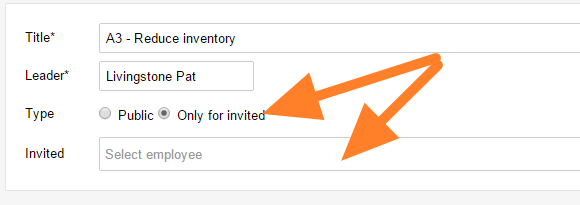
Set the type. Select Only for invited as the action list type.
-
Invite people. Enter or select the users you want to invite, or a user group.
-
Save. Save the action list.
-
Check the access. The action list can now be accessed only by the invited people. Nobody else can view or edit it.
Still need help?
Write to us. We usually reply within an hour on business days.