如何限制对我的行动清单的访问
本文由英文机器翻译。 当前显示英文原文。
Action lists can be set up either as public or for invited people only. Public action lists can be accessed by all users who have user rights for the particular module and folder (see Managing user rights: who can access what (user roles)). You can also limit access to an action list to specific users or a user group only.
Limit access to invited people
-
Open the edit screen. Click the Edit icon to go to the action list edit screen.

-
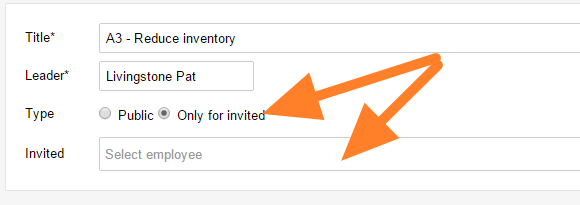
Set the type. Select Only for invited as the action list type.
-
Invite people. Enter or select the users you want to invite, or a user group.
-
Save. Save the action list.
-
Check the access. The action list can now be accessed only by the invited people. Nobody else can view or edit it.
行动清单可以设为公开,也可以设为仅限受邀人员访问。对相应模块和文件夹拥有用户权限的所有用户都可以访问公开的行动清单(参见管理用户权限:谁可以访问哪些内容(用户角色))。您也可以将行动清单的访问权限限制为特定用户或某个用户组。
仅限受邀人员访问
-
打开编辑界面。 点击 编辑 图标,进入行动清单编辑界面。
-
设置类型。 将行动清单类型设为 仅限受邀用户。
-
邀请人员。 输入或选择要邀请的用户,或选择一个用户组。
-
保存。 保存行动清单。
-
检查访问权限。 现在只有受邀人员可以访问该行动清单,其他人都无法查看或编辑。
还需要帮助吗?
请给我们留言。工作日我们通常会在一小时内回复。