I can't log in - What to do?
Most sign-in problems come from browser or computer settings. Go through these steps one by one.
-
Use the Chrome browser. Please make sure to use the Chrome web browser for the best experience.
-
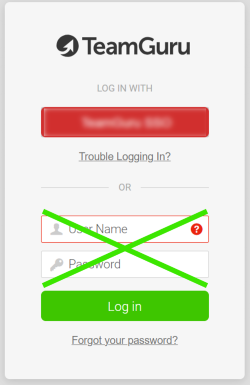
Use your company link. Go to your company’s TeamGuru link (https://yourcompany.teamguru.com). If your company uses a sign-on button, click it (do not enter anything in the white fields below the sign-on button).
-
Clear the cache and cookies. If you are still unable to log in, clear the cache and cookies in the Chrome web browser and restart your computer. This is the process in Chrome:
- On your computer, open Chrome.
- At the top right, click More.
- Click More tools > Clear browsing data.
- At the top, choose a time range. To delete everything, select All time.
- Tick the boxes next to Cookies and other site data and Cached images and files.
- Click Clear data.
For details, see Clear cache & cookies - Computer - Google Account Help.
-
Check your email address. Also check your email address: sometimes you might be using two different ones, in which case your TG account might need to be updated.
-
Contact our support team. If you are still reading, do not despair. Please contact our support team and fill in all the information, so that we can help you better and in a timely manner.
Thank you for your patience and for being a champ!
Still need help?
Write to us. We usually reply within an hour on business days.