无法登录怎么办?
本文由英文机器翻译。 当前显示英文原文。
Most sign-in problems come from browser or computer settings. Go through these steps one by one.
-
Use the Chrome browser. Please make sure to use the Chrome web browser for the best experience.
-
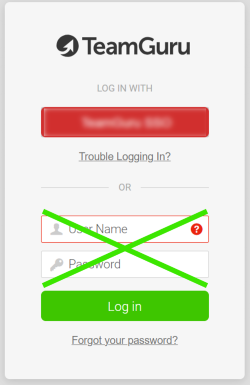
Use your company link. Go to your company’s TeamGuru link (https://yourcompany.teamguru.com). If your company uses a sign-on button, click it (do not enter anything in the white fields below the sign-on button).
-
Clear the cache and cookies. If you are still unable to log in, clear the cache and cookies in the Chrome web browser and restart your computer. This is the process in Chrome:
- On your computer, open Chrome.
- At the top right, click More.
- Click More tools > Clear browsing data.
- At the top, choose a time range. To delete everything, select All time.
- Tick the boxes next to Cookies and other site data and Cached images and files.
- Click Clear data.
For details, see Clear cache & cookies - Computer - Google Account Help.
-
Check your email address. Also check your email address: sometimes you might be using two different ones, in which case your TG account might need to be updated.
-
Contact our support team. If you are still reading, do not despair. Please contact our support team and fill in all the information, so that we can help you better and in a timely manner.
Thank you for your patience and for being a champ!
大多数登录问题都源于浏览器或计算机设置。请逐一按以下步骤排查。
-
使用Chrome浏览器。 为获得最佳体验,请务必使用 Chrome 浏览器。
-
使用贵公司的专属链接。 打开贵公司的TeamGuru链接(https://yourcompany.teamguru.com)。如果贵公司使用 单点登录按钮,请点击该按钮(不要在按钮下方的白色输入框中输入任何内容)。
-
清除缓存和Cookie。 如果仍无法登录,请清除 Chrome 浏览器的缓存和Cookie,然后重启计算机。在Chrome中的操作步骤如下:
- 在计算机上打开Chrome。
- 点击右上角的 更多。
- 点击 更多工具 > 清除浏览数据。
- 在顶部选择时间范围。要删除所有内容,请选择 时间不限。
- 勾选 Cookie及其他网站数据 和 缓存的图片和文件 旁的复选框。
- 点击 清除数据。
-
检查电子邮件地址。 另外请检查您的电子邮件地址:有时您可能在使用两个不同的地址,这种情况下可能需要更新您的TeamGuru账户。
-
联系我们的支持团队。 如果问题仍未解决,请不要灰心。请联系我们的支持团队并填写完整信息,以便我们更好、更及时地为您提供帮助。
感谢您的耐心与配合!
还需要帮助吗?
请给我们留言。工作日我们通常会在一小时内回复。