Standard pracy lidera (LSW)
Tłumaczenie maszynowe z angielskiego. Wyświetlany jest oryginał po angielsku.
A Leadership Standardized Work document helps you manage the regular activities performed by leaders at all levels.
Designing a robust system of regular checks, actions and reviews into the standard work of every leader will significantly improve the performance of your teams. You can also reduce the need for traditional process audits.
Video guide
Create an LSW document
-
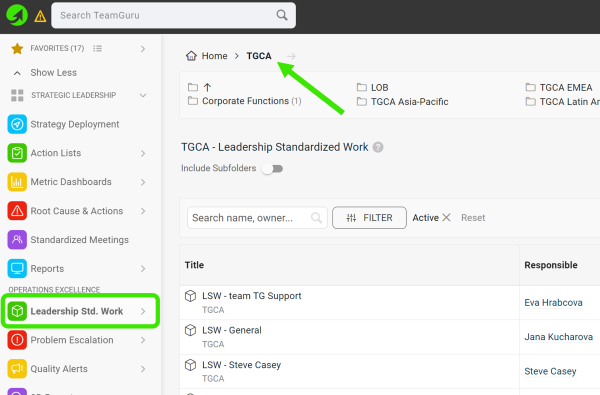
Select a folder. Go to the Leadership Std. Work module and select a folder (the location of your LSW document).
-
Create a new LSW document. Click the green Create New icon in the upper right corner.

-
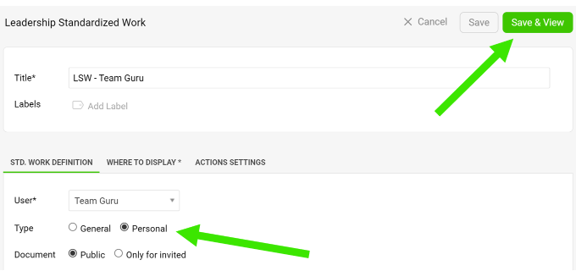
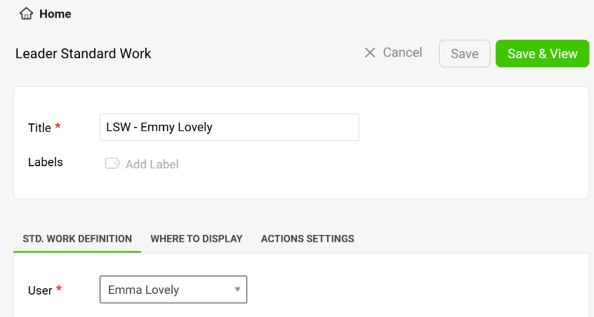
Define the settings. Define all the settings, select the type and click the Save & View button. The General type is a team LSW, the Personal type is an individual LSW.
-
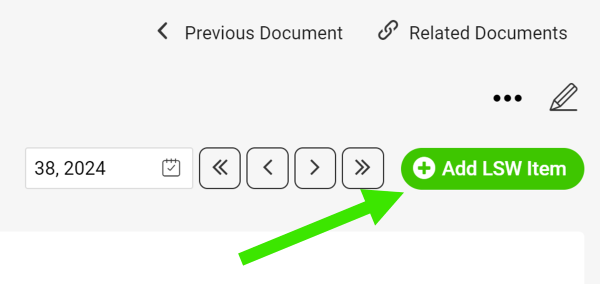
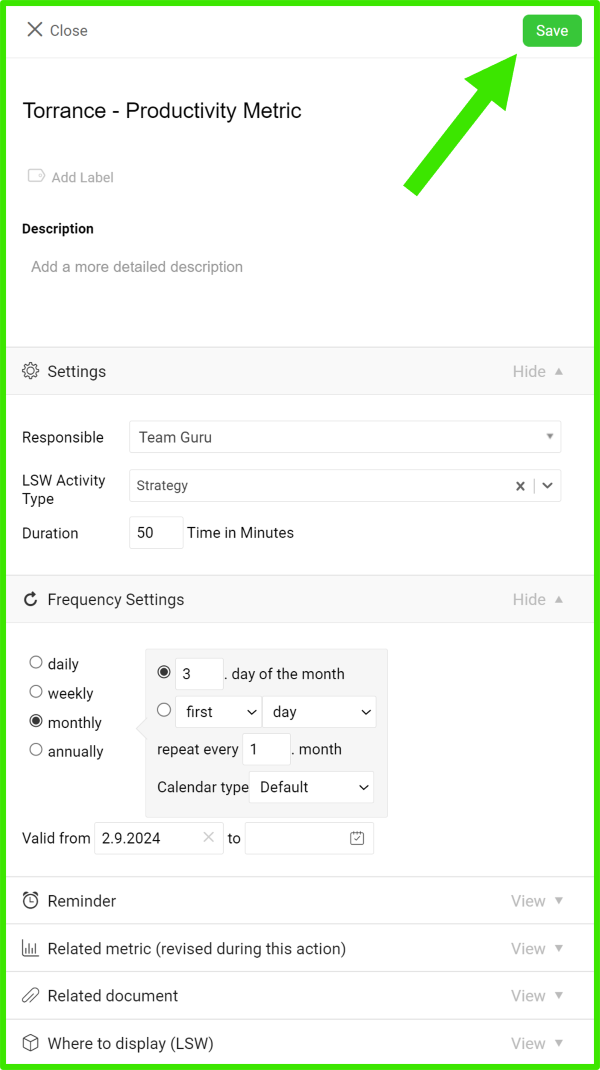
Add an LSW item. Add your LSW item, define its settings and click Save.
-
Edit an LSW item. To edit the settings of an LSW item (action), click the edit icon next to the item.

-
Manage your actions.
-
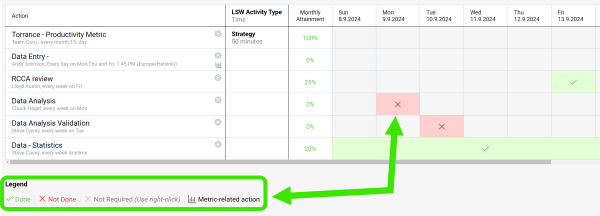
Click into each field and select a status based on the Legend.
-
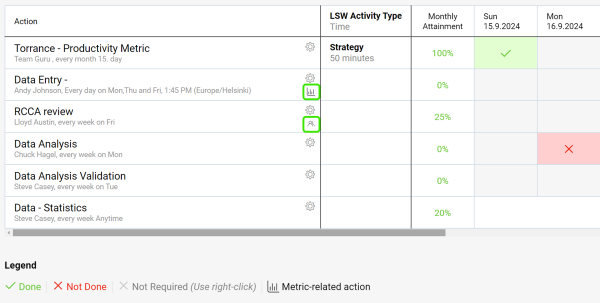
Use live links to get directly to other related documents (e.g. metric dashboards, meetings, etc.).
-
-
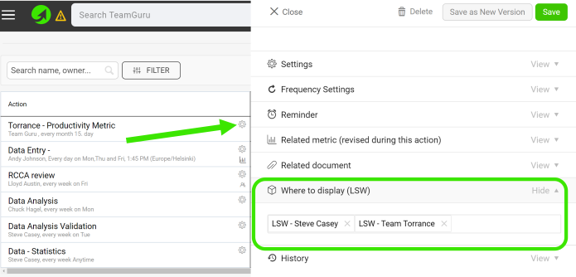
Link your LSW documents. In the action settings, scroll down to the Where to display (LSW) section and select the other LSW documents where you want your action to be displayed as well.
-
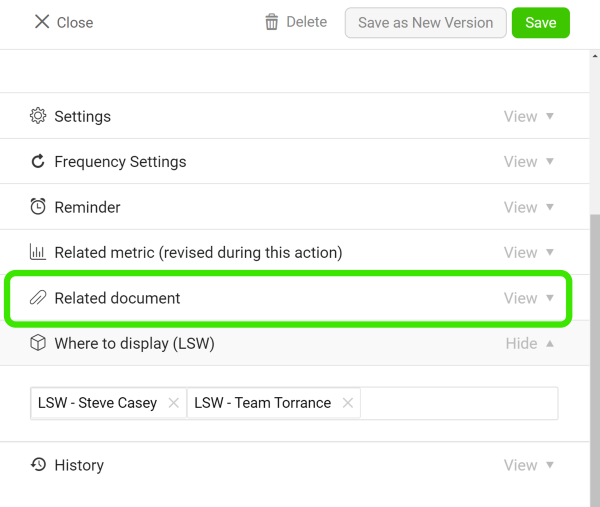
Add related documents. Add related documents to your LSW document.
Assign actions to your team
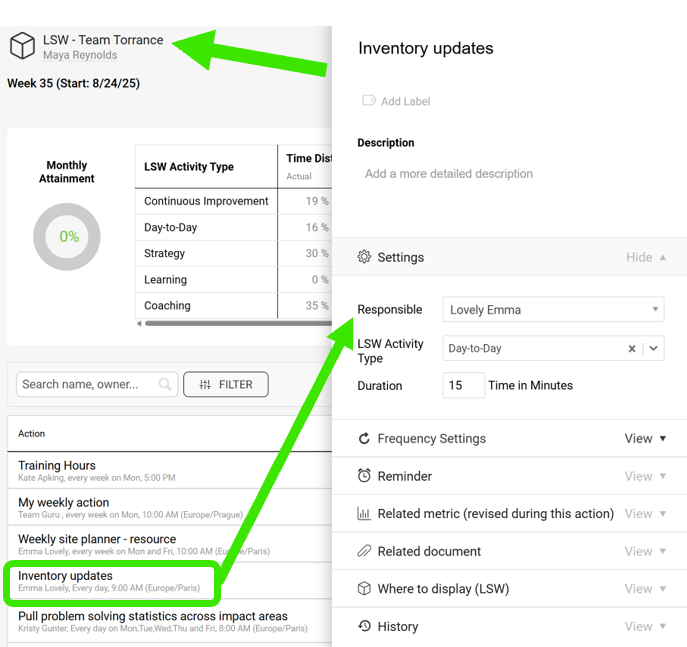
Assign actions in a team LSW
When you create a General LSW document, you can assign actions to your team members.
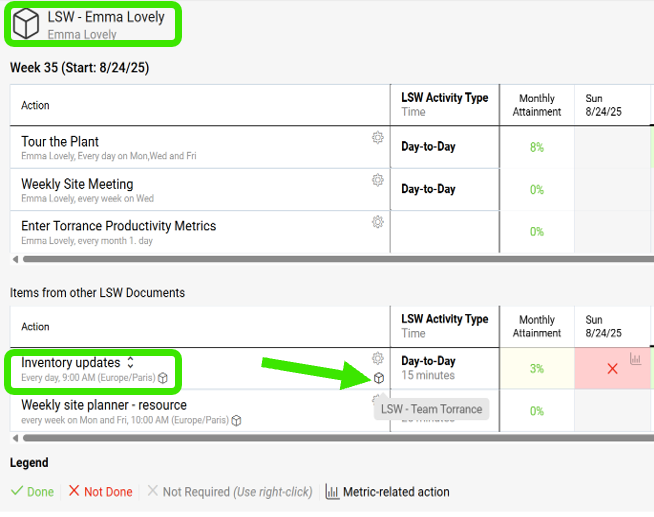
Find the action in a personal LSW
Team members who already have a personal LSW see the action there, under Items from other LSW Documents, with a live link.
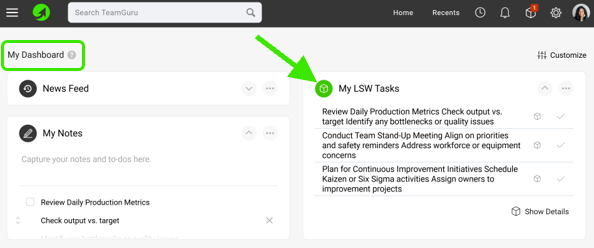
Update the action on My Dashboard
Otherwise, the action is displayed on the My Dashboard page, where they can update it.
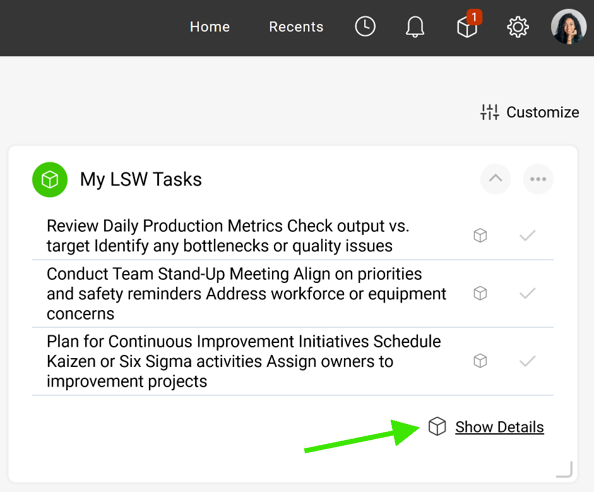
Create a personal LSW from the dashboard
If they click Show Details, they are redirected to a new LSW document, which they can save. This establishes their own LSW document.
Dokument standardu pracy lidera (LSW) pomaga zarządzać regularnymi czynnościami liderów na wszystkich szczeblach.
Wbudowanie w standard pracy każdego lidera solidnego systemu regularnych kontroli, działań i przeglądów wyraźnie poprawi wyniki Twoich zespołów. Możesz też ograniczyć potrzebę tradycyjnych audytów procesu.
Samouczek wideo
Utwórz dokument LSW
-
Wybierz folder. Przejdź do modułu Standard pracy lidera i wybierz folder (miejsce, w którym ma się znajdować dokument LSW).
-
Utwórz nowy dokument LSW. Kliknij zieloną ikonę Utwórz nowy w prawym górnym rogu.
-
Określ ustawienia. Określ wszystkie ustawienia, wybierz typ i kliknij przycisk Zapisz i wyświetl. Typ Ogólny to LSW zespołu, typ Osobisty to indywidualny LSW.
-
Dodaj pozycję LSW. Dodaj pozycję LSW, określ jej ustawienia i kliknij Zapisz.
-
Edytuj pozycję LSW. Aby zmienić ustawienia pozycji LSW (działania), kliknij ikonę edycji obok pozycji.
-
Zarządzaj działaniami.
-
Kliknij każde pole i wybierz status zgodnie z Legendą.
-
Korzystaj z aktywnych linków, aby przejść prosto do innych powiązanych dokumentów (np. dashboardów KPI, spotkań).
-
-
Połącz dokumenty LSW. W ustawieniach działania przewiń w dół do sekcji Gdzie wyświetlać (LSW) i wybierz inne dokumenty LSW, w których działanie ma się również wyświetlać.
-
Dodaj powiązane dokumenty. Dodaj powiązane dokumenty do dokumentu LSW.
Przydzielaj działania zespołowi
Przydziel działania w LSW zespołu
W dokumencie LSW typu Ogólny możesz przydzielać działania członkom zespołu.
Znajdź działanie w osobistym LSW
Członkowie zespołu, którzy mają już osobisty LSW, widzą w nim działanie w sekcji Pozycje z innych dokumentów LSW wraz z aktywnym linkiem.
Zaktualizuj działanie na stronie Mój dashboard
W przeciwnym razie działanie wyświetla się na stronie Mój dashboard, gdzie można je zaktualizować.
Utwórz osobisty LSW z dashboardu
Po kliknięciu Pokaż szczegóły członek zespołu przechodzi do nowego dokumentu LSW, który może zapisać. W ten sposób powstaje jego własny dokument LSW.
Potrzebujesz dalszej pomocy?
Napisz do nas. W dni robocze zwykle odpowiadamy w ciągu godziny.