Ako zobraziť komentáre v riadku
Strojový preklad z angličtiny. Zobrazený je anglický originál.
You can view all actions and comments right next to your dashboard. You can also view comments in a row next to your projects, org. units or partners per time period.
Watch the video guide, or follow the text instructions below.
View comments in a row
-
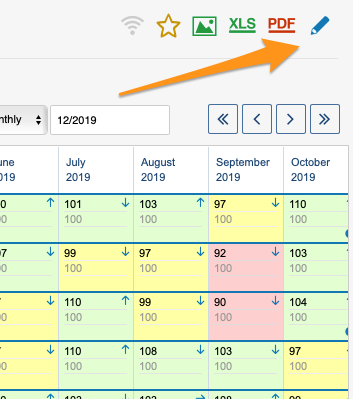
Open the dashboard settings. Go to the metric dashboard settings: click the edit pencil.
-
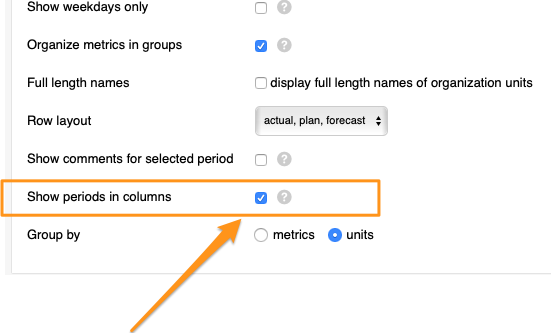
Show periods in columns. Tick the Show periods in columns box.
-
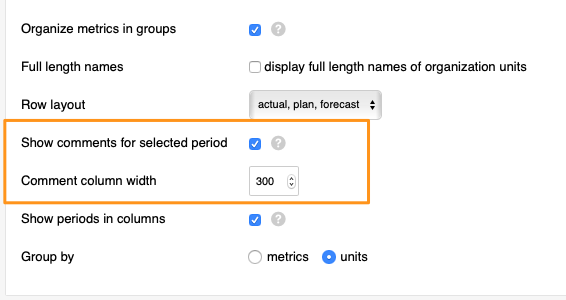
Show comments for the selected period. After you tick the box, tick another box above it, Show comments for selected period (you can also select the comment column width), and save your changes.
-
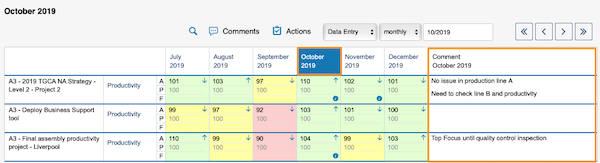
View the comments. Select a time period in your dashboard and view the comments.
Môžete zobraziť všetky akcie a komentáre priamo vedľa dashboardu. Komentáre môžete zobraziť aj v riadku vedľa projektov, org. jednotiek alebo partnerov za jednotlivé obdobia.
Pozrite si video návod alebo postupujte podľa textu nižšie.
Zobrazenie komentárov v riadku
-
Otvorte nastavenia dashboardu. Prejdite do nastavení KPI dashboardu: kliknite na ceruzku na úpravu.
-
Zobrazte obdobia v stĺpcoch. Začiarknite pole Zobraziť obdobia v stĺpcoch.
-
Zobrazte komentáre za zvolené obdobie. Potom začiarknite ďalšie pole nad ním, Zobraziť komentáre za zvolené obdobie (môžete zvoliť aj šírku stĺpca komentárov), a zmeny uložte.
-
Pozrite si komentáre. V dashboarde zvoľte obdobie a pozrite si komentáre.
Potrebujete ďalšiu pomoc?
Napíšte nám. V pracovné dni zvyčajne odpovedáme do hodiny.