Calendário pessoal do TeamGuru
Tradução automática do inglês. Exibindo o original em inglês.
Keep all important dates and events from across TeamGuru in one place, always at hand and up to date. Choose the events you are interested in and add the resulting calendar, for example to your phone, in iCal format.
Add a calendar
-
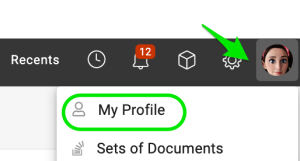
Open your profile. Click your Profile and select My Profile.
-
Add the calendar. Click Add Calendar.

-
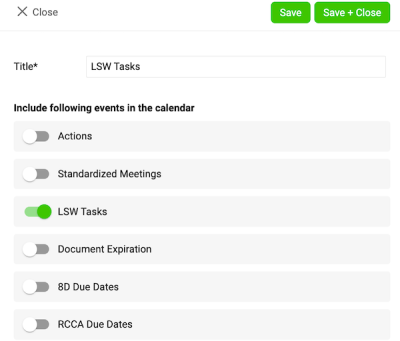
Choose the events. Choose the events you want to see in your calendar and save your settings.
-
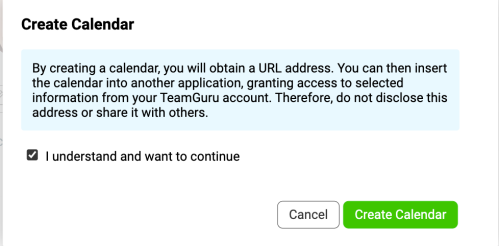
Confirm the calendar creation. After you click Save, a message appears:
- Tick the box I understand and want to continue.
- Click the Create Calendar button.
-
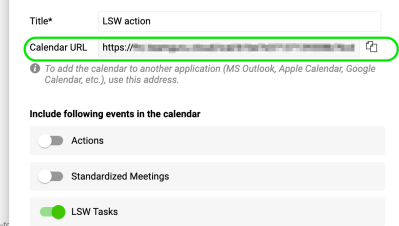
Copy the calendar link. A URL link is generated. Copy this link to add it to your Outlook calendar.
Add the URL to your Outlook calendar
-
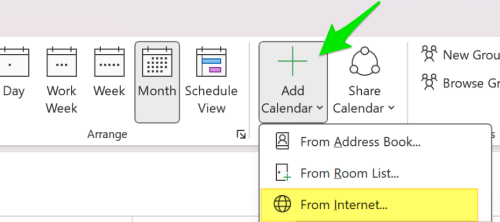
Subscribe to the calendar. In Outlook, click Add Calendar and choose From Internet (on Mac: Subscribe from Web). Paste the URL link you copied earlier.
-
Adjust the calendar settings. Adjust the calendar settings (such as name and color) as needed, then save.
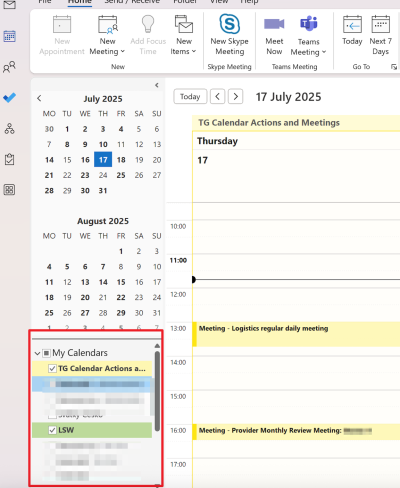
Please note: the integration works in one direction only, from TeamGuru to Outlook. Changes made in Outlook are not reflected in TG.
Reúna em um só lugar todas as datas e eventos importantes do TeamGuru, sempre à mão e atualizados. Escolha os eventos que interessam a você e adicione o calendário resultante, por exemplo, ao seu celular, no formato iCal.
Adicione um calendário
-
Abra seu perfil. Clique em Perfil e selecione Meu perfil.
-
Adicione o calendário. Clique em Adicionar calendário.
-
Escolha os eventos. Escolha os eventos que deseja ver no calendário e salve as configurações.
-
Confirme a criação do calendário. Depois que você clica em Salvar, aparece uma mensagem:
- Marque a caixa Entendo e quero continuar.
- Clique no botão Criar calendário.
-
Copie o link do calendário. Um link (URL) é gerado. Copie esse link para adicioná-lo ao calendário do Outlook.
Adicione a URL ao calendário do Outlook
-
Assine o calendário. No Outlook, clique em Adicionar calendário e escolha Da Internet (no Mac: Assinar da Web). Cole o link (URL) que você copiou.
-
Ajuste as configurações do calendário. Ajuste as configurações do calendário (como nome e cor) conforme necessário e salve.
Observação: a integração funciona em um só sentido, do TeamGuru para o Outlook. As alterações feitas no Outlook não aparecem no TeamGuru.
Precisa de mais ajuda?
Escreva para nós. Em dias úteis, costumamos responder em até uma hora.