Calendario personal de TeamGuru
Traducción automática del inglés. Se muestra el original en inglés.
Keep all important dates and events from across TeamGuru in one place, always at hand and up to date. Choose the events you are interested in and add the resulting calendar, for example to your phone, in iCal format.
Add a calendar
-
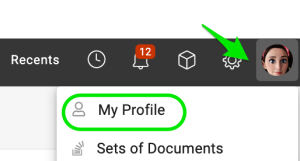
Open your profile. Click your Profile and select My Profile.
-
Add the calendar. Click Add Calendar.

-
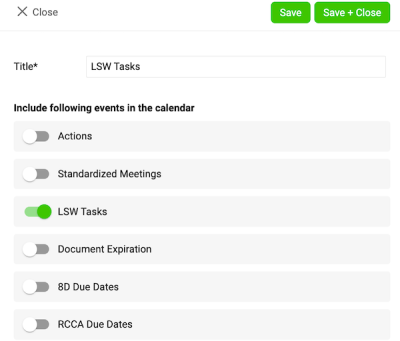
Choose the events. Choose the events you want to see in your calendar and save your settings.
-
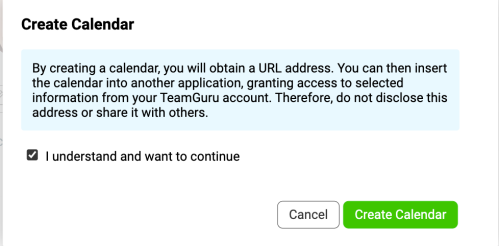
Confirm the calendar creation. After you click Save, a message appears:
- Tick the box I understand and want to continue.
- Click the Create Calendar button.
-
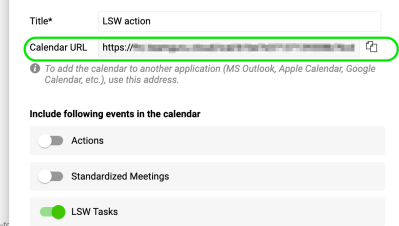
Copy the calendar link. A URL link is generated. Copy this link to add it to your Outlook calendar.
Add the URL to your Outlook calendar
-
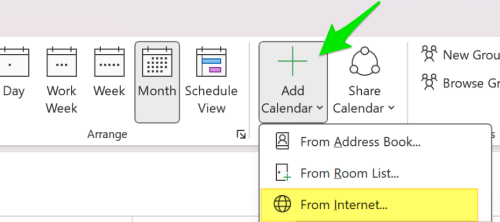
Subscribe to the calendar. In Outlook, click Add Calendar and choose From Internet (on Mac: Subscribe from Web). Paste the URL link you copied earlier.
-
Adjust the calendar settings. Adjust the calendar settings (such as name and color) as needed, then save.
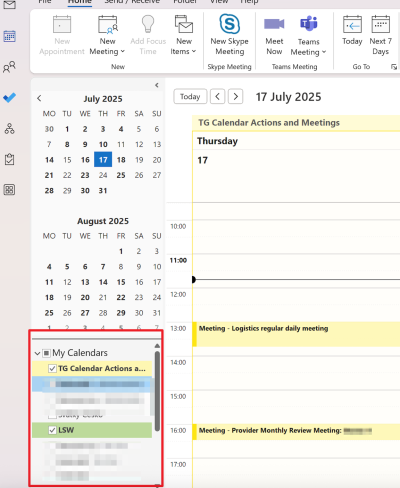
Please note: the integration works in one direction only, from TeamGuru to Outlook. Changes made in Outlook are not reflected in TG.
Tenga todas las fechas y eventos importantes de TeamGuru en un solo lugar, siempre a mano y actualizados. Elija los eventos que le interesan y agregue el calendario resultante en formato iCal, por ejemplo, a su teléfono.
Agregar un calendario
-
Abra su perfil. Haga clic en su Perfil y seleccione Mi perfil.
-
Agregue el calendario. Haga clic en Agregar calendario.
-
Elija los eventos. Elija los eventos que quiere ver en su calendario y guarde la configuración.
-
Confirme la creación del calendario. Después de hacer clic en Guardar, aparece un mensaje:
- Marque la casilla Entiendo y quiero continuar.
- Haga clic en el botón Crear calendario.
-
Copie el enlace del calendario. Se genera un enlace URL. Cópielo para agregarlo a su calendario de Outlook.
Agregar la URL a su calendario de Outlook
-
Suscríbase al calendario. En Outlook, haga clic en Agregar calendario y elija Desde Internet (en Mac: Suscribirse desde la web). Pegue el enlace URL que copió antes.
-
Ajuste la configuración del calendario. Ajuste la configuración del calendario (como el nombre y el color) según lo necesite y guarde.
Tenga en cuenta que la integración funciona en un solo sentido, de TeamGuru a Outlook. Los cambios que haga en Outlook no se reflejan en TG.
¿Necesita más ayuda?
Escríbanos. En días laborables solemos responder en menos de una hora.